
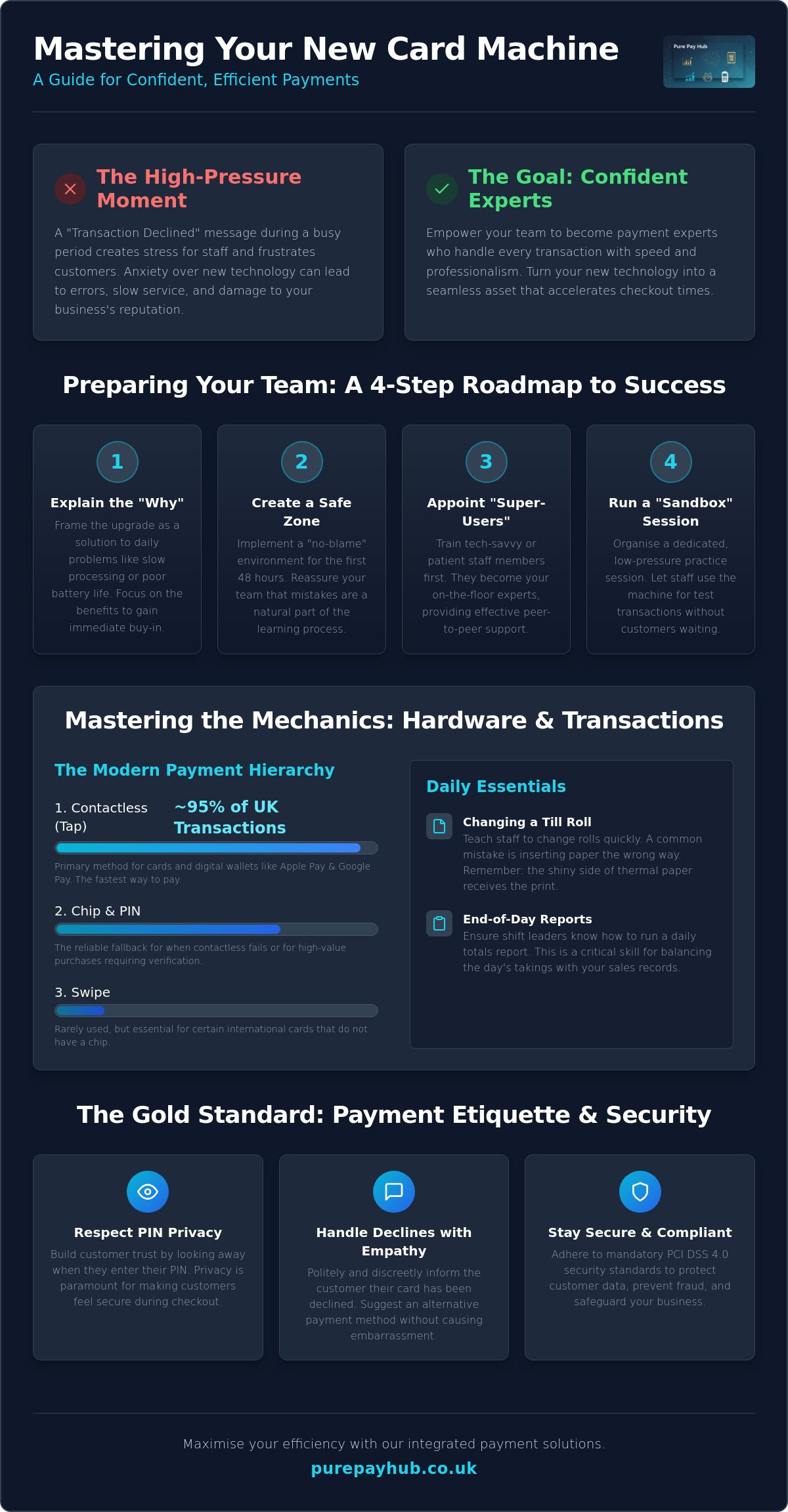
Imagine it’s a busy Saturday afternoon and your newest employee is staring blankly at a “Transaction Declined” message whilst the queue stretches out the door. It’s a high-pressure moment that often leads to accidental refunds, fumbled hardware, or frustrated customers. Training staff on a new card machine shouldn’t feel like a gamble with your business reputation. We know that introducing new technology often brings more anxiety than excitement, especially when you’re worried about signal drops or human error during peak hours.
You need a team that handles payments with professional ease, not one that freezes when a screen looks different. This guide provides a clear roadmap to ensure every member of your staff becomes a confident payment expert. We’ll show you how to accelerate checkout times and manage troubleshooting on the fly. From mastering basic functions to staying compliant with the mandatory PCI DSS 4.0 security standards, you’ll learn exactly how to make your new payment technology a seamless part of your daily operations.
Key Takeaways
- Organise a dedicated “sandbox” session to let your team practice transactions in a low-pressure environment before the technology goes live.
- Master the essential mechanics of training staff on a new card machine to ensure every tap, insert, and swipe is handled with professional speed.
- Learn the correct security protocols for complex scenarios like processing refunds, voids, and secure phone orders to protect your business from errors.
- Build customer trust by implementing high standards of payment etiquette, from respecting PIN privacy to handling declined cards with empathy.
- Discover how portable card machines and next-day funding can improve your service speed and keep your business finances healthy.
Preparing Your Team for a Seamless Transition
Introducing a new piece of hardware into a fast-paced retail or hospitality environment can feel like a disruption. However, a no-nonsense introduction to the new device prevents early frustration. Before you hand the machine to a staff member, explain why the change is happening. Focus on how it solves their daily headaches. Perhaps the old unit had poor battery life or slow processing speeds that caused queues to build up. By framing the transition as a solution rather than a chore, you reduce immediate pushback. At its core, understanding what is a payment terminal? and how it interacts with your network is the first step toward technical confidence. Setting clear expectations for the transition period ensures that everyone knows a learning curve is natural and expected.
The Psychology of New Tech: Overcoming Staff Resistance
Staff resistance often stems from a fear of looking incompetent in front of a customer. They worry about pressing the wrong button or accidentally voiding a sale. You can dismantle this anxiety by creating a “no-blame” environment for the first 48 hours. Tell your team that mistakes are expected during the learning curve. Highlight the features that make their shifts easier, such as faster contactless processing or a more intuitive touchscreen interface. This shift in mindset turns the upgrade into a shared win for the whole business. Training staff on a new card machine is as much about managing emotions as it is about technical skills.
Identify “super-users” amongst your staff early on. These are individuals who are naturally tech-savvy or have high patience levels. Train them first. They will act as your first-line support, answering quick questions whilst you focus on running the business. This peer-to-peer support is often more effective than a formal manual. It builds a culture of internal development and ensures that knowledge is shared across every shift.
Setting Up Your Training Environment
A successful training session requires deliberate preparation. Ensure the machine is fully charged and securely connected to your shop Wi-Fi or mobile network before the session begins. Organising a dedicated “sandbox” session is non-negotiable. This is a time when the machine is not live with real customers. Let your team play with the buttons and see how the screen responds to different inputs. Use dummy products or low-value test transactions, such as a £0.01 sale, to show the full cycle of a payment. Training staff on a new card machine is far more successful when they have had hands-on time without the pressure of a queue. Keep quick-start guides in a central location, like behind the counter, so the team has the tools to solve basic issues on the fly.
Mastering the Mechanics: Hardware and Basic Transactions
Once your team feels comfortable with the idea of a new system, they need to master the physical unit. Training staff on a new card machine requires a logical, step-by-step approach to the hardware interface. Start with the basics. Show them the power button, the charging port, and where the card enters the device. Most modern units feature a touchscreen, but some still rely on physical keys. Ensure every team member knows how to wake the device from sleep mode and navigate the main home screen. This hands-on familiarity prevents the “stage fright” that occurs when a customer is waiting.
The hierarchy of payment methods is the next vital lesson. In 2024, nearly 95% of eligible in-store card transactions in the UK were contactless. Your staff should lead with the “Tap” method for speed. However, they must also be ready for other scenarios:
- Contactless: The primary choice for cards and digital wallets. Note that as of March 2026, the mandatory £100 limit has been removed, though individual banks may still set their own caps.
- Chip and PIN: The fallback for when contactless fails or for high-value transactions requiring extra verification.
- Digital Wallets: Apple Pay and Google Pay use biometric authentication, which often allows them to bypass standard contactless limits safely.
- Swipe: Rarely used now, but essential for certain international cards without a chip.
Don’t overlook the practical “faff” of daily maintenance. Show your team how to change a till roll quickly. A common mistake is inserting the paper the wrong way round, which results in blank receipts and a frustrated queue. Teach them to look for the shiny side of the thermal paper. Finally, walk them through the on-screen menus to find daily totals. Running an end-of-day report is a critical skill for shift leaders to ensure the day’s takings match your records perfectly.
The Standard Transaction Flow
Accuracy starts before the card even touches the machine. Staff must enter the amount and double-check the decimal point before presenting the device to the customer. Once the payment is processed, they should wait for the “Approved” message and a clear beep. Only then is the sale confirmed. Security is paramount during this process. Following PCI DSS security standards for merchants ensures that cardholder data remains protected at every step. Always ask the customer if they prefer a printed receipt or a digital version to save on paper costs.
Hardware Maintenance 101
A dead battery in the middle of a lunch rush is an avoidable disaster. Create a charging schedule where the device is plugged in during quiet periods or at the end of every shift. Clean the screen and card slots weekly using a dry microfibre cloth; never use harsh chemicals that could damage the sensors. Security is also part of maintenance. Always store the device in a locked drawer or safe overnight to prevent tampering or theft. If you want a setup that makes this routine effortless, consider our portable card machines which are built for durability and ease of use in busy environments.
Beyond the Tap: Handling Complex Scenarios and Troubleshooting
A smooth transaction is easy to manage, but the true test of your team’s proficiency comes when things don’t go to plan. Training staff on a new card machine must include a deep dive into complex scenarios such as split bills and phone orders. In hospitality, handling partial payments is a daily requirement. Your staff should know how to divide a total across multiple cards without causing a bottleneck at the table. Similarly, for “Card Not Present” (CNP) transactions, they must follow strict verification steps. This involves manually entering the card number, expiry date, and security code, often with a manager’s oversight to ensure compliance and prevent fraud.
Connectivity and Signal Troubleshooting
Technical hitches are inevitable, but they don’t have to stop your sales. When training staff on a new card machine, teach them to monitor the signal strength indicator on the status bar. Modern devices are built to handle signal fluctuations, but staff should be ready to act if the connection stalls. Most issues can be resolved with a few simple checks:
- Network Switching: Ensure staff know that the machine will automatically search for a mobile 4G or 5G backup if the shop Wi-Fi fails.
- Device Restarts: A quick power cycle often clears communication errors without needing to reset complex network settings.
- Offline Mode: Offline Mode acts as a vital fail-safe for UK retailers, allowing you to continue taking payments even when all connectivity is lost.
Refunds, Voids, and Financial Security
Security protocols are non-negotiable when dealing with the movement of money back to a customer. Your team must understand the difference between a void and a refund. A void cancels a transaction on the same day before the funds have been settled, whilst a refund is processed for a sale from a previous day. For security, the original payment card must always be present for any refund attempt. This prevents “refund fraud,” where funds are moved to a different account. These rigorous processes are a standard part of your business security. Understanding how merchant account management fees cover these secure processes helps staff appreciate why they must follow every step correctly.
Finally, equip your team with a list of common error codes. Most issues, such as a “Declined” message or a “Communication Error,” have simple, logical fixes. Knowing when to troubleshoot and when to call technical support saves time and keeps your checkout lines moving during peak hours. A confident staff member who can explain a technical delay to a customer with calm authority protects your brand’s reputation for professionalism.
The Gold Standard of Payment Etiquette and Security
Technical mastery of the hardware is only half the battle. When training staff on a new card machine, you must instil a sense of professional etiquette that protects both the customer and your brand. Privacy is the primary concern here. Staff should instinctively perform the “look away” whilst a customer enters their PIN. This small gesture builds immediate trust and ensures the customer feels secure in your establishment. It’s also vital to remind the team to check card signatures if the machine prompts them. Whilst rare in the age of contactless, these manual checks are a final line of defence against unauthorised use.
Compliance isn’t just a back-office task; it lives on the shop floor. Since version 4.0 of the PCI DSS standards became mandatory on 31 March 2025, the focus has shifted toward outcome-based security. Your staff are the front line of this effort. They must ensure that cardholder data is never written down or stored in any physical or digital format. Failing to maintain these standards can lead to significant fines. These penalties range from £4,000 to £80,000 per month depending on the severity of the breach. Training staff on a new card machine means making these security habits second nature.
Managing the “Declined” Conversation
A declined transaction is an awkward moment for everyone involved. Your team should handle this with maximum discretion. Avoid using blunt phrases like “Your card has been declined.” Instead, use neutral language such as “The bank has not authorised this transaction at this time.” This shifts the focus away from the customer and onto the financial institution. Suggest alternative payment methods, like a different card or a mobile wallet, without being pushy. If a transaction feels “off” or the customer’s behaviour is suspicious, empower your staff to politely decline the sale and seek manager assistance.
Fraud Prevention and Physical Security
Physical tampering is a real threat to regional businesses. Staff should inspect the device daily to verify that it hasn’t been replaced or fitted with a skimming device. Check the security seal on the casing. If it is broken or looks tampered with, the machine must be taken out of service immediately. We recommend a “privacy first” approach to all hardware management. If you want to ensure your business stays ahead of these risks, you can view our secure payment solutions designed to meet the highest UK security standards.
Maximising Efficiency with PurePay Hub Integrated Solutions
Training staff on a new card machine is the first step toward a more efficient business. Once your team is confident with the basics, you can unlock the full potential of integrated technology. PurePay Hub portable card machines are designed to move with your business. In a busy restaurant or cafe, taking the payment directly to the customer reduces table-turn times significantly. It prevents the bottleneck at the counter and lets your staff focus on service rather than logistics. This efficiency is backed by the promise of next-day funding. We know that cash flow is a primary concern for regional business owners. Receiving your takings the following day ensures your finances remain stable and predictable.
Eliminating Manual Entry Errors
Manual entry is where most transaction mistakes happen. By using integrated EPOS systems, you remove the risk of the “fat-finger” mistake where a staff member accidentally types the wrong amount into the terminal. The EPOS sends the exact total directly to the card machine. This integration ensures that your sales records always match your bank deposits perfectly. Integrated EPOS systems sync stock and sales instantly. This automation saves your management team hours of manual reconciliation in the back office at the end of each week, allowing you to focus on growth instead of admin.
Leveraging Real-Time Data
Training staff on a new card machine also involves teaching them to use the digital tools that support their daily work. Show your staff how to access the PurePay Hub merchant dashboard to check transaction history in real-time. This visibility allows shift leaders to verify payments instantly without needing to call the office or check bank statements. You can use this live sales data to optimise your staff rotas and inventory levels based on your actual peak trading times. Having a clear, honest view of your business performance helps you make informed decisions with confidence.
Even with the best training, technical questions will arise. Our UK-based support team acts as the ultimate safety net for your business. We provide straight-talking, professional advice whenever your team needs a helping hand. This ensures that a minor query never turns into a major disruption for your customers. Ready to upgrade? Explore our range of countertop and mobile card machines today.
Empower Your Team for Future Growth
Mastering the art of training staff on a new card machine turns a technical hurdle into a significant competitive advantage. By prioritising hands-on practice and clear communication, you replace staff anxiety with professional confidence. You ensure that every transaction is more than just a payment; it is a secure, polished interaction that reflects your brand’s integrity. Your team is now equipped to manage complex troubleshooting and maintain high security standards even during your busiest hours.
A reliable payment system is the backbone of a thriving business. You deserve a partner that offers the same transparency and support that you give your own customers. With debit card rates from 0.3% and next-day access to your funds, we provide the financial stability you need to grow. Our UK-based technical support is available 24/7 to ensure your team always has an answer when they need it most.
Switch to a fairer, more transparent card machine partner with PurePay Hub
Your business is ready for the next level of efficiency. Take the lead today and watch your team deliver a faster, more secure checkout experience for every customer.
Frequently Asked Questions
How long does it typically take to train a new employee on a card machine?
Basic training staff on a new card machine typically takes between 15 and 30 minutes for the core functions. However, it usually takes a full shift of supervised use before an employee feels completely confident handling busy queues independently. We recommend a dedicated sandbox session before their first live transaction to ensure they understand the interface without the pressure of a waiting customer.
What is the most common mistake staff make with new payment terminals?
The most frequent error is entering the wrong transaction amount, specifically misplacing the decimal point during manual entry. This mistake can lead to significant overcharges or undercharges that complicate your end-of-day reconciliation. You can eliminate this risk entirely by using an integrated EPOS system that automatically sends the correct total from your till directly to the card machine for the customer to pay.
Is it safe to let staff process refunds without manager supervision?
It is generally not recommended to allow staff to process refunds without manager approval or a supervisor’s PIN. Unrestricted refund access increases the risk of internal fraud where funds are moved to personal accounts. Setting a clear protocol that requires a second pair of eyes protects your business finances and ensures that every refund is legitimate, documented, and processed back to the original card.
How can I ensure my staff are maintaining PCI compliance during payments?
You can maintain compliance by ensuring staff never write down card details and always respect customer privacy during PIN entry. Training staff on a new card machine must include a briefing on the latest PCI DSS 4.0 standards. Regularly check your hardware for physical tampering and ensure your team knows to report any broken security seals or suspicious modifications to the device immediately.
What should my team do if the card machine screen goes blank during a sale?
If the screen goes blank, first check the battery level or power connection to ensure the device hasn’t simply run out of charge. Once power is restored, staff must verify the status of the last transaction before attempting to take payment again. They can do this by checking the “Last Transaction” report in the menu to avoid accidentally charging the customer twice for the same sale.
Can I train my staff to take payments over the phone using a card machine?
Yes, most modern card machines allow you to process “Card Not Present” transactions for phone orders. Staff must manually enter the cardholder’s long number, expiry date, and security code into the terminal. However, for higher volumes, using a dedicated Virtual Terminal or sending a secure Payment Link is often a more efficient way to handle remote sales whilst keeping your business fully compliant.
Should staff ask customers for their favourite receipt format (email vs print)?
Staff should always offer the customer a choice between a printed or digital receipt. Many customers now prefer email receipts because they are easier to store and harder to lose than physical paper. Offering this choice also helps your business reduce paper waste and till roll costs whilst providing a more modern and professional checkout experience for your clientele during every transaction.
What happens if a customer claims they were double-charged?
If a customer claims they were double-charged, staff should immediately check the transaction history on the device or your merchant dashboard. In many cases, the second charge is actually a pending authorisation that will disappear from their bank statement within a few days. If a genuine duplicate exists, you can process a refund for the extra amount as long as you have the original receipt for verification.
Leave a Reply