Tag: Card Machine

  • Emergency Card Machine Replacement: How to Restore Your Business Payments

    Emergency Card Machine Replacement: How to Restore Your Business Payments

    Imagine it’s a busy Saturday afternoon and your shop is full, but suddenly your terminal displays a “System Tamper” error. Within minutes, a queue forms and you’re forced to tape a “Cash Only” sign to your front door. It’s a nightmare scenario that costs you revenue and reputation. If your current provider is dragging their feet, you need an emergency card machine replacement to get your business back online before the next customer walks away.

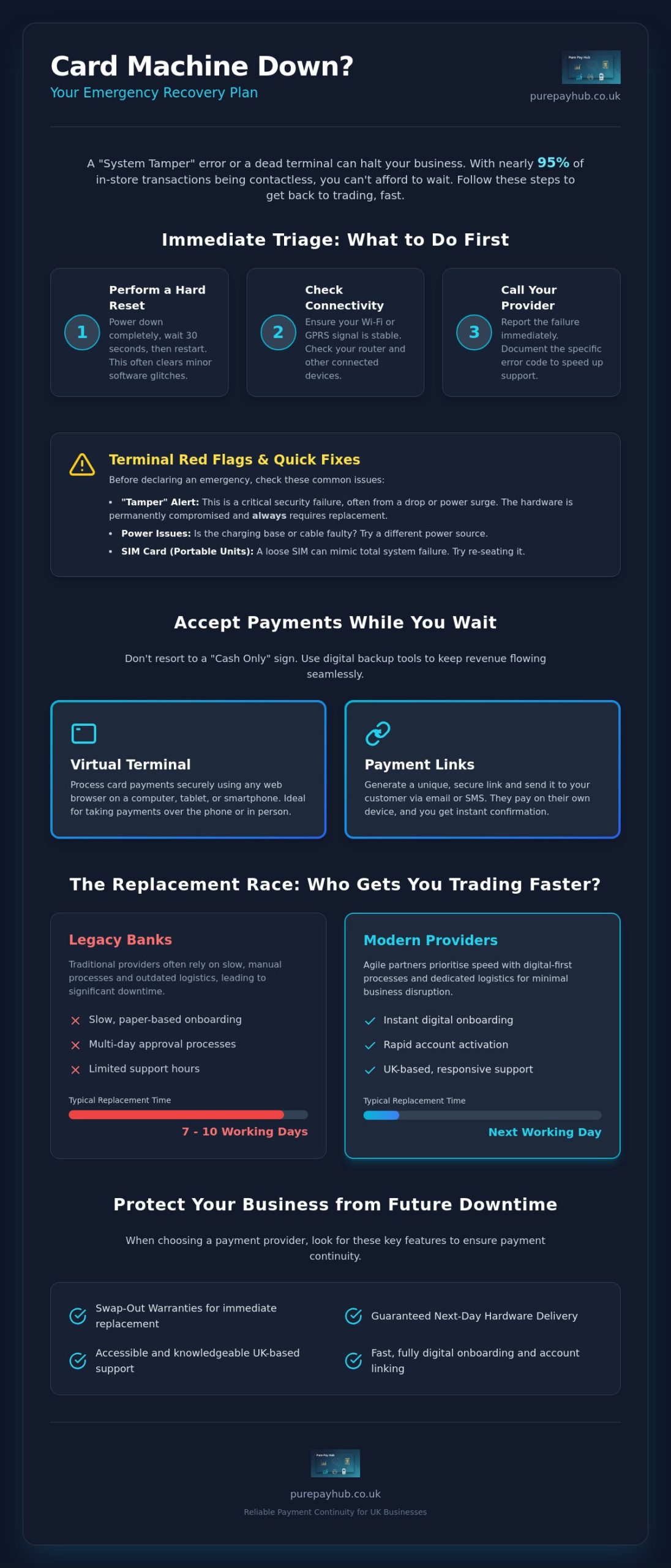
    We understand how frustrating it is to feel abandoned by legacy providers when your livelihood is on the line. With nearly 95% of in-store transactions now being contactless, being unable to take card payments is no longer a minor hiccup; it’s a total shutdown. You shouldn’t have to wait days for a resolution or navigate complex onboarding during a crisis. Business owners deserve a partner that acts with the same urgency they do.

    This article will help you secure a rapid replacement terminal and keep your business trading whilst your main system is down. We’ll look at the quickest ways to restore your payments, the importance of modern hardware compatibility, and how a supportive partner can turn a technical disaster into a seamless transition.

    Key Takeaways

    • Learn the immediate troubleshooting steps to take when a terminal fails, from performing hard resets to verifying network-wide outages with your provider.
    • Discover how to keep revenue flowing using a Virtual Terminal or Payment Links whilst your physical hardware is out of action.
    • Understand the timeline for an emergency card machine replacement and why digital onboarding speed is the real bottleneck for most businesses.
    • Identify the key contract features, such as swap-out warranties and UK-based support, that protect your business from future payment disruptions.
    • Compare the slow response times of legacy banks against modern providers that prioritise rapid account activation and next-day hardware delivery.

    Immediate Steps to Take When Your Card Machine Fails

    When your card machine stops working, the clock starts ticking on your daily revenue. Don’t panic. Start with a hard reset. Power the unit down completely, wait thirty seconds, and restart. This simple step often clears temporary software glitches that stall transactions. If the screen remains blank or frozen, check your connectivity. Most modern hardware relies on stable Wi-Fi or a GPRS signal to communicate with the bank. A Payment terminal is a sophisticated piece of kit, but it’s only as good as the network it sits on. Ensure your router is functioning and that other devices can connect to the same network.

    If the reset fails, call your provider immediately. You need to know if you’re facing a widespread network outage or a localised hardware failure. Ask the support agent for a specific error code. Documenting this code is vital. It speeds up the technical support process and proves you’ve done your due diligence. If they confirm the hardware is dead and cannot be fixed over the phone, you’re officially in the market for an emergency card machine replacement. Do not wait for a “call back” that might never come; insist on a clear timeline for a new unit.

    Whilst you wait for a resolution, switch to a backup method. Don’t turn customers away with a “Cash Only” sign. If you have access to a Virtual Terminal or can generate Payment Links, use them. These tools allow you to process payments via a tablet or smartphone. They keep the queue moving while your main terminal is out of action. It’s about maintaining momentum and showing your customers that you’re prepared for technical hitches.

    Troubleshooting Common Terminal Errors

    “Tamper” alerts are the red flag of the payment world. They usually mean the internal security sensors have been tripped, often due to a drop or a power surge. This hardware is permanently compromised for security reasons and cannot be reset. Also, check the basics. Is the charging base faulty? Try a different cable to rule out power issues. For portable units, reseat the SIM card. A loose connection here can mimic a total system failure and is a quick fix that avoids an unnecessary emergency card machine replacement.

    When to Declare a Hardware Emergency

    Identify the point of no return early. If there’s visible physical damage or the software is stuck in a reboot loop, it’s time to act. Calculate your downtime. If your current provider quotes a seven-day lead time but you’re losing hundreds of pounds an hour, that’s a genuine hardware emergency. You need a partner who offers next-day dispatch to minimise the damage to your bottom line. Remember that just buying a generic reader from a local shop won’t work instantly. You need a provider who can handle the digital onboarding and account linking just as fast as the physical delivery.

    Speed of Replacement: How Quickly Can You Get Back to Trading?

    Speed is a relative term in the payments industry. For a legacy bank, “fast” might mean a replacement unit arriving in a week. For a local merchant losing sales, “fast” means tomorrow morning. When you’re searching for an emergency card machine replacement, you must distinguish between the delivery of the hardware and the activation of the service. A shiny new device sitting on your counter is just an expensive paperweight until the software is live and linked to your account. You need both the physical and digital tracks moving at the same pace to restore your cash flow.

    Traditional high-street banks often struggle with this dual requirement. They rely on outdated logistics networks and manual approval processes that aren’t designed for a crisis. It’s common for these institutions to quote 7-10 working days for a replacement. In a modern retail environment, that delay is a disaster. You shouldn’t be penalised for hardware failure, yet slow support from a legacy provider does exactly that. Choosing a provider that treats your downtime with urgency is the only way to protect your bottom line.

    Hardware Delivery Timelines in the UK

    In the UK, the logistics of merchant services are well-established. Reliable providers use dedicated courier networks to ensure next-day delivery for countertop and portable machines. This is the baseline you should demand. If a provider cannot guarantee a 24-hour window, they aren’t equipped for emergency scenarios. Always verify that the replacement package is comprehensive. This includes the terminal, the correct power adapter, and the specific charging cradle for your model. Retail and hospitality businesses don’t have time to hunt for spare cables whilst customers are waiting to pay. A complete “plug-and-play” kit is essential for a smooth emergency card machine replacement.

    The Onboarding Bottleneck

    The digital onboarding process is the most common cause of extended downtime. Even with hardware in hand, you might be stuck waiting for background checks. To bypass this, choose a partner that uses automated verification systems for “Instant Activation”. You can play your part by keeping your business documentation organised and ready for upload. This includes your latest business bank statements and valid photo identification. Having these files ready allows a modern provider to verify your account in hours rather than days. At PurePay Hub, we’ve stripped away the unnecessary red tape. Our system is built for speed and transparency, ensuring your account is ready to process transactions the moment your hardware is unboxed. We believe that restoring your payments should be a simple, straight-talking process that gets you back to trading without the typical corporate run-around.

    Accepting Payments Without a Physical Terminal

    Waiting for your emergency card machine replacement to arrive doesn’t mean your business has to grind to a halt. You can bridge the gap between a hardware failure and the arrival of a new unit by using software-based payment tools. These interim solutions allow you to keep processing transactions without a physical terminal in your hand. They’re quick to set up and ensure that your customers aren’t met with a “Cash Only” sign. By diversifying how you accept money, you build a more resilient business that can survive technical hitches.

    Most modern merchant accounts include access to digital payment methods as standard. If you’ve been relying solely on a countertop or portable unit, now is the time to explore your dashboard. These tools aren’t just for emergencies; they’re valuable additions to your trading arsenal. They offer flexibility for phone orders, off-site events, or simply managing a sudden surge in customers when your main system is under pressure.

    Virtual Terminals as a Backup Plan

    A Virtual Terminal is a cloud-based checkout for manual entry. It allows you to turn any device with an internet connection into a secure payment point. You simply log in to your provider’s secure browser-based portal and type in the customer’s card details. This is particularly effective for taking deposits or processing orders over the phone. It’s a professional way to handle transactions whilst you wait for your emergency card machine replacement. Ideally, you should verify that this feature is activated on your account before a crisis occurs, as it provides an instant safety net for your revenue.

    Payment Links for Socially Distanced Sales

    Payment Links are another powerful tool for maintaining trade. You can create a unique URL for a specific transaction amount in seconds and send it to your customer via SMS, email, or even a QR code. The customer then pays on their own smartphone using their preferred method, such as Apple Pay or Google Pay. This keeps your queues moving and removes the need for physical contact with a terminal. You can track these link payments in real-time through your merchant dashboard, giving you total clarity on your cash flow even without a working card reader on your counter.

    For mobile merchants, Tap-to-Pay technology can turn a standard smartphone into a temporary card reader. This allows you to accept contactless payments directly onto your phone. It’s a discreet and efficient way to trade during a hardware emergency. However, no matter which interim method you choose, you must ensure your solution remains PCI compliant. As of 2026, PCI DSS v4.0.1 is the sole active standard. Your provider should handle the heavy lifting of security, but you must remain disciplined about never storing sensitive card data on your own devices. Security shouldn’t be sacrificed for speed, even in a crisis.

    Emergency Card Machine Replacement: How to Restore Your Business Payments

    Choosing a Provider That Minimises Future Downtime

    Securing an emergency card machine replacement is a vital reactive step, but the ultimate goal is to ensure you never face a total blackout again. The reliability of your payment system depends heavily on the infrastructure of your provider. Many legacy banks offer hardware as an afterthought to their main banking services, which leads to slow support and outdated technology. You need a partner that treats payment processing as a mission-critical function. This means prioritising providers that offer “Swap-Out” warranties. Under these agreements, a new unit is dispatched the moment a fault is logged, rather than waiting for a technician to attempt a repair on-site.

    Contract flexibility is another essential factor. Avoid being locked into long-term, restrictive agreements with providers that have already failed you during a crisis. If a company cannot meet its service-level agreements during an outage, you should have the freedom to move. A modern provider wins your loyalty through consistent performance and transparent fees, not through fine-print traps. Look for rolling monthly contracts or short-term commitments that keep the pressure on the provider to deliver excellent service every single day.

    The Importance of UK-Based Support

    When your machine fails on a busy Saturday night, you cannot afford to wait for a support centre in a different time zone to open. UK-based technical support is a non-negotiable requirement for regional merchants. You need to speak with someone who understands the local retail environment and the specific banking regulations that govern UK payments. Direct phone support is always superior to slow, ticket-based systems that leave you in the dark for hours. A quick conversation with an expert can often resolve a configuration issue in minutes, potentially saving you from needing a full emergency card machine replacement.

    Technical Resilience in Modern Card Machines

    Modern hardware should be built to withstand network failures. Look for multi-comms terminals that feature automatic roaming. These units can switch seamlessly between Wi-Fi and 4G signals if one connection drops out. This dual-path connectivity is essential for portable units used in busy restaurants or at outdoor events. Additionally, consider integrated EPOS systems that offer “offline caching”. These systems can securely store transaction data during a temporary internet outage and process them once the connection is restored. Auditing a provider’s historical uptime is a sensible step before you sign any lease; a dependable partner will be happy to share their reliability record.

    If your current provider is letting you down, it is time to switch to a partner that values your business continuity. You can view our range of resilient card machines to find a solution that keeps your payments stable and your queues moving.

    Switching to PurePay Hub for Reliable Payment Continuity

    When your current system fails, you need more than just a new box on the counter. You need a partner that understands the high-stakes reality of a busy retail environment. At PurePay Hub, we’ve built our service around the needs of regional merchants who can’t afford to wait. We offer an emergency card machine replacement process that focuses on both physical speed and digital readiness. Our team ensures your hardware is dispatched for next-day delivery, but we don’t stop there. We also prioritise next-day funding. This ensures the money you earn today is in your bank account tomorrow, keeping your cash flow stable whilst you transition to a more reliable system.

    Traditional banks often treat small business owners as a number in a long queue. We take a different approach. Our onboarding is designed to be punchy and efficient. You won’t be trapped in a cycle of endless paperwork or vague timelines. Instead, you’ll have direct access to account managers who understand that every hour without a terminal is an hour of lost revenue. We believe in straight-talking and fair partnership, ensuring you’re never left in the dark during a technical crisis.

    Rapid Setup for UK Businesses

    Our streamlined application process is specifically designed to get you back to work. We’ve removed the unnecessary hurdles that legacy institutions often put in your way. By using modern verification tools, we can approve your account in a fraction of the time it takes a traditional bank. PurePay Hub prioritises business continuity through fast-track approval. This means your digital account is often live and ready to process transactions before the courier even arrives with your new device. You get a direct line to experts who prioritise urgent requests, ensuring your emergency card machine replacement is handled with the gravity it deserves.

    A Fairer Approach to Merchant Services

    Transparency is the core of our identity. We’ve seen the murky fee structures and hidden markups used by legacy providers, and we’ve chosen a cleaner path. There are no opaque charges, even for urgent setups. We also include our Virtual Terminal and Payment Links as standard for every client. These tools act as your permanent safety net, allowing you to take payments over the phone or via SMS if your hardware ever fails again. If you need a capital injection to help your business grow, we also offer a business cash advance based on your card turnover. It’s a flexible way to fund development without the stress of fixed monthly repayments. Restore your payments today with PurePay Hub and experience a service built on honesty, efficiency, and reliability.

    Secure Your Trading Future with Resilient Payments

    A hardware failure is a stressful event, but it’s also an opportunity to build a more resilient business. By understanding the immediate steps to take and utilising interim tools like Payment Links, you can protect your revenue during a crisis. Ultimately, the impact of a technical fault depends on the agility of your provider. An emergency card machine replacement should be a swift, transparent process that prioritises your continuity over corporate bureaucracy.

    You shouldn’t have to settle for slow support or hidden fees when your livelihood is on the line. We provide the stability your business needs with next-day delivery, UK-based expert support, and fair rates starting from 0.3% for debit cards. It’s time to move away from legacy systems that let you down when you need them most. Our goal is to replace frustration with informed confidence.

    Get your business back on track with a reliable card machine from PurePay Hub. Take control of your payments today. Ensure you’re always ready to trade, no matter what happens to your hardware.

    Frequently Asked Questions

    How long does it take to get a replacement card machine?

    A replacement typically arrives within 24 hours when you use a provider that offers next-day delivery. Legacy banks often take much longer, sometimes up to 10 working days, which can be devastating for your cash flow. You should always check if your contract includes a swap-out warranty to ensure the fastest possible dispatch. Modern providers prioritise hardware logistics to minimise your downtime.

    Can I use my phone as a card machine while I wait for a replacement?

    You can use your smartphone to accept payments by utilising Tap-to-Pay technology or generating Payment Links. These digital tools turn your mobile device into a temporary terminal, allowing you to process contactless transactions without physical hardware. It is an excellent way to maintain trading momentum whilst waiting for your emergency card machine replacement. Most modern accounts include these features as standard.

    Do I have to pay for a replacement card terminal?

    Whether you pay for a replacement depends on your specific merchant agreement and the cause of the failure. Most rental or lease plans include hardware support and free replacements for technical faults. However, if you purchased the machine outright or the damage is accidental, you may need to pay for a new unit. Always review your service-level agreement to see what coverage you have.

    Will a replacement machine work with my existing merchant account?

    A replacement machine will work with your existing account as long as it is supplied and configured by your current merchant service provider. You cannot simply buy a generic reader from a retail shop and link it to your old account instantly. The hardware must be mapped to your unique merchant ID by your provider’s technical team to ensure secure processing.

    What is the fastest way to get a card reader for my business?

    The fastest route is to partner with a modern fintech provider that offers next-day hardware delivery and rapid digital onboarding. Whilst some retail shops sell basic card readers over the counter, these still require account approval which can take several days. Choosing a partner that handles both the logistics and the verification in-house is the most efficient solution for a business in a hurry.

    Is it possible to get a card machine with same-day activation?

    Same-day activation is generally only possible for digital tools like Virtual Terminals and Payment Links. While physical hardware usually requires at least 24 hours for courier delivery, a modern provider can often approve your digital account within a few hours. This allows you to start taking phone or online payments on the very same day you apply for an emergency card machine replacement.

    What should I do if my card machine is stolen?

    You must contact your merchant service provider immediately to deactivate the terminal and prevent fraudulent use. Because card machines contain sensitive security keys, a stolen unit poses a significant risk to your business data. Once the old unit is blacklisted, your provider will help you secure a replacement and ensure your account remains PCI compliant during the transition.

    Can I switch providers if my current terminal is broken?

    You can switch providers at any time, and doing so is often the quickest way to escape poor service from a legacy bank. If your current provider is quoting long lead times or charging high fees for support, moving to a specialist can get you back to trading faster. Just ensure you check your existing contract for any notice periods or exit fees before making the move.

  • What Happens If a Card Machine Breaks? A Merchant’s Recovery Guide

    What Happens If a Card Machine Breaks? A Merchant’s Recovery Guide

    Imagine it is a busy Saturday afternoon and your shop is full of customers. A shopper reaches for their card, but your terminal screen remains stubbornly blank. As the queue grows, the atmosphere shifts from lively to uncomfortable. You are suddenly faced with the reality of what happens if a card machine breaks during your peak trading hours. It is a stressful moment that can lead to lost revenue and awkward conversations with frustrated diners or shoppers.

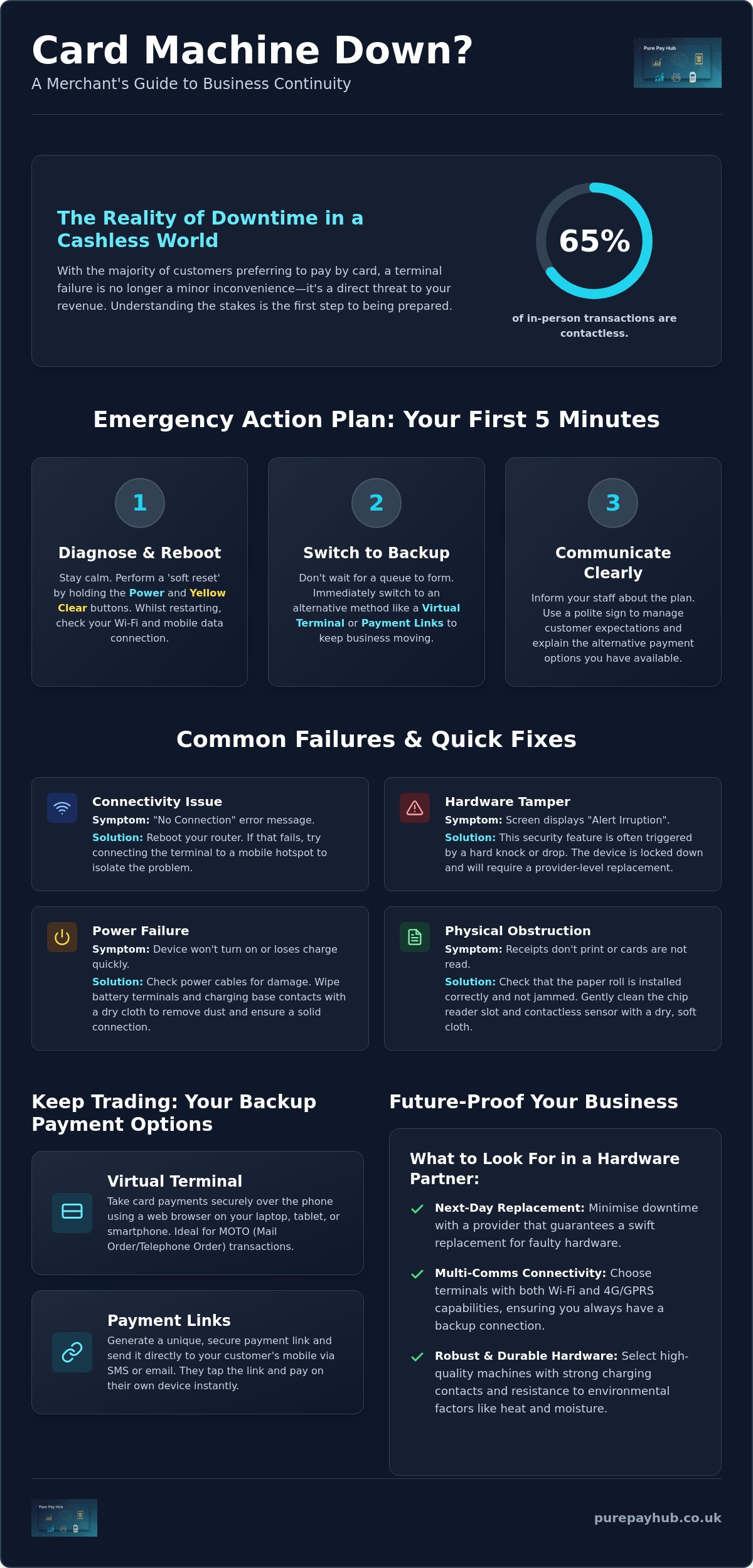
    We understand that hardware failure feels like a direct threat to your livelihood. With contactless payments now making up over 65% of in-person transactions, a faulty device is more than a minor glitch. This guide will show you how to maintain your revenue and resolve technical failures quickly. You will discover immediate alternative payment methods, such as Payment Links or Virtual Terminals, to keep your business moving. We also provide clear troubleshooting steps to get you back online and explain how to choose a more reliable hardware partner to ensure your peace of mind.

    Key Takeaways

    • Learn the specific button combination required to perform a soft reset and clear common terminal errors instantly.
    • Understand what happens if a card machine breaks and how to transition to a Virtual Terminal to process payments over the phone.
    • Establish a clear professional procedure for handling diners who do not carry cash when your system is down.
    • Recognise the hardware features, such as next-day replacement and multi-comms, that minimise the risk of long-term trade loss.

    Immediate Steps: What to Do When Your Card Machine Fails

    A hardware failure in the middle of a busy shift is a merchant’s nightmare. Your priority is to maintain trade while you investigate the cause. Don’t panic. If you appear stressed, your customers will feel anxious too. Instead, take a breath and follow a logical recovery process. Many business owners worry about what happens if a card machine breaks, fearing they’ll have to turn everyone away and lose a day’s takings. In reality, most issues are temporary and fixable within minutes.

    Start with a ‘soft reset’. On most modern devices, you can do this by holding down the ‘Power’ button and the ‘Yellow Clear’ button simultaneously. This forces the software to reboot without wiping your settings. Whilst the unit restarts, check your router or mobile data signal. A lot of “broken” machines are actually just struggling with a dropped connection. If you’re using a mobile card machine, try switching between Wi-Fi and GPRS to see if the signal improves. Understanding what happens if a card machine breaks is the first step towards building a resilient business that can handle technical hiccups without stress.

    If the reset doesn’t work, switch to a backup method immediately. Don’t let a queue form. You can use a Virtual Terminal on your tablet or send Payment Links to customers’ mobiles to keep the money flowing. Tell your staff exactly what is happening. This ensures they relay the same message to every diner or shopper, preventing confusion and maintaining a professional atmosphere. Consistent communication is the best way to keep your customers on your side during a technical fault.

    Rapid Troubleshooting for Common Terminal Errors

    Sometimes the issue is physical rather than digital. Look at the screen for an ‘Alert Irruption’ message. This usually means the internal security triggers have been tripped, often due to a drop or a hard knock. A Payment terminal is designed to be highly secure; if it thinks it’s being tampered with, it will lock down. Also, check the simple things. Ensure the paper roll isn’t jammed and that the sensor is clean. For portable units, wipe the battery terminals with a dry cloth to remove any dust that might be blocking the charge.

    Communicating with Customers to Minimise Friction

    Transparency builds trust. Place a polite sign at the centre of your counter or the entrance. This manages expectations before people reach the till. If a customer is particularly inconvenienced, offer a small discount or a free item. It’s a small price to pay to protect your reputation. Explain that you have alternative payment options available whilst you fix the issue. Most people are happy to use a payment link or wait an extra minute if you handle the situation with professional calm and clarity.

    Understanding the Failure: Why Card Terminals Stop Working

    When a terminal stops processing, it is often difficult to tell if the device is truly broken or just temporarily confused. Distinguishing between a physical hardware fault and a local network outage is the first step in your recovery. A business continuity plan should include a checklist to identify these differences quickly. If your terminal displays a “No Connection” message, the fault likely lies with your router or internet service provider rather than the unit itself. Conversely, if the screen is dead or the chip reader fails to recognise any card, you are likely facing a hardware issue.

    Environmental factors also play a significant role in device longevity. High-heat environments, such as a professional kitchen, can cause internal components to expand and eventually fail. Similarly, moisture from damp counters or spillages can corrode delicate circuitry over time. Understanding what happens if a card machine breaks due to these factors helps you better position your equipment to avoid future downtime. If your terminal is constantly exposed to steam or grease, it will eventually require a provider-level replacement.

    Hardware Faults vs. Connectivity Issues

    Testing your device on a different network is the most effective way to rule out connectivity problems. If your Wi-Fi is down, try connecting your terminal to a mobile hotspot from your phone. If it processes the transaction successfully, your hardware is fine; your shop’s internet is the culprit. You should also inspect the charging base and power cables for visible wear. Frayed wires or bent pins in the charging port often lead to intermittent power loss, which merchants frequently mistake for a total system failure. Using a high-quality Portable Card Machine with robust charging contacts can mitigate these physical risks.

    Software Glitches and Security Lockouts

    Software is just as likely to cause a stoppage as hardware. Outdated firmware can lead to failed security “handshakes” between the terminal and the bank. This results in transaction approvals being blocked. As of March 31, 2025, PCI DSS v4.0 requirements became mandatory; many older terminals may lock out if they cannot meet these new security standards. You might also encounter ‘Pedal’ or ‘System’ errors on your screen. These are internal software flags that usually indicate the device’s encryption keys have been lost or corrupted. Understanding what happens if a card machine breaks involves recognising that security is paramount; in these cases, the machine will need to be re-imaged or replaced by your provider.

    Business Continuity: Alternative Ways to Accept Payments

    A broken physical terminal is a hurdle, not a dead end for your trade. It is a common misconception that your ability to take payments is tied solely to that single piece of plastic and silicon. Understanding what happens if a card machine breaks means knowing that your merchant account remains fully operational even when the hardware isn’t. You still have the authority to process transactions; you simply need a different interface to do so. Maintaining your revenue requires a shift from physical card-present transactions to digital alternatives that bypass the faulty unit entirely.

    Your first line of defence is often your existing EPOS system. Most modern setups allow you to record ‘offline’ or cash transactions to ensure your inventory and accounting remain accurate whilst you resolve the hardware issue. For essential business-to-business sales, you might also implement a manual ‘fallback’ procedure, such as issuing a pro-forma invoice. However, for retail and hospitality, the goal is to keep the checkout process as seamless as possible for the customer. By using the digital tools already included in your merchant package, you can prevent walk-away customers and maintain a steady cash flow.

    Utilising Secure Payment Links for Instant Settlement

    Payment Links are a professional way to handle a hardware failure without sending customers to a distant ATM. You can generate a secure link via your provider’s dashboard and send it directly to the customer’s mobile via SMS or email. The shopper then completes the transaction on their own device. This method is highly effective because it supports Apple Pay and Google Pay, which are increasingly popular. By 2026, over 5.2 billion people are expected to use digital wallets. Offering this familiar interface ensures your business stays modern and resilient. You still benefit from secure settlement and next-day access to funds, exactly as you would with a physical terminal.

    The Role of the Virtual Terminal in Emergencies

    The Virtual Terminal acts as your digital backup. It is a web-based portal that you can access from any laptop, tablet, or smartphone. When a customer is standing at your counter and your machine fails, you can manually enter their card details into this secure interface. This is technically a ‘Card Not Present’ transaction, but it allows you to complete the sale immediately. It is a vital tool for what happens if a card machine breaks, as it maintains full PCI compliance whilst bypassing the broken hardware. You don’t need to install new software; you simply log in and keep trading. This ensures that a technical glitch never turns into a lost business opportunity.

    What Happens If a Card Machine Breaks? A Merchant’s Recovery Guide

    Managing the ‘No Cash’ Scenario Professionally

    Handling a customer who cannot pay cash when your digital systems fail requires a blend of legal knowledge and social tact. In a retail environment, the solution is simple: the goods remain on the shelf. However, in hospitality, the situation is more complex. Understanding what happens if a card machine breaks after a diner has already finished their meal is critical for protecting your revenue without damaging your reputation. You must manage these moments with a calm, principled approach that prioritises the customer relationship whilst ensuring the debt is settled.

    Avoid the temptation to stick a scrawled “Card machine broken” sign on your front door using a marker pen and cardboard. This looks unprofessional and suggests a permanent failure rather than a temporary technical glitch. Instead, instruct your staff to inform customers of the situation before they order. If a failure occurs mid-service, be transparent. If a deferred payment is necessary, document the customer’s details securely. Use a formal form to record their name, address, and phone number; this signals that you take your business finances seriously and expect the same from them.

    Legal Rights and Customer Obligations in the UK

    In the UK, the legal position is clear. When a customer orders food or services, a contract is formed. The technical failure of a terminal does not void their obligation to pay. However, you cannot legally ‘detain’ a customer or prevent them from leaving; doing so could lead to accusations of false imprisonment. Your best course of action is to issue an invoice for later payment. This creates a formal paper trail that you can follow up if the payment isn’t made within a specified timeframe. Most customers are honest and will settle the bill via a bank transfer or a digital payment link once they are home.

    Implementing a Backup Payment Protocol

    Resilience is built through preparation. Every business should keep a spare Portable Card Machine or Mobile Card Machine fully charged and ready for use. If your primary Countertop Card Machine relies on a fixed phone line, ensure your backup uses a 4G SIM. This provides a completely independent connectivity path. Training is also vital. Your team should know how to pivot to these backups instantly. If a hardware failure is terminal and requires an immediate, unplanned investment in new EPOS systems, you might consider a Business Cash Advance. This allows you to secure the funds for new equipment quickly, with repayments based on your future card sales rather than fixed monthly amounts.

    Future-Proofing Your Business with Reliable Payment Hardware

    Investing in high-quality hardware is a strategic decision for any regional merchant. You should always prioritise stability over the lowest possible monthly rental fee. When you calculate the true cost of a lost Saturday afternoon, the price of a premium device becomes negligible. Knowing what happens if a card machine breaks allows you to prepare for the worst before it occurs. By choosing a partner that offers 24/7 UK-based technical support, you ensure that expert help is always a phone call away. This human connection is far more valuable than a generic chatbot when your revenue is on the line.

    Modern terminals should feature ‘multi-comms’ as standard. This technology allows the device to switch between Wi-Fi, GPRS, and Bluetooth automatically. If your shop’s broadband fails, your terminal simply pivots to the strongest mobile signal available. This level of cross-channel reliability is essential for maintaining a steady flow of trade. You should also evaluate the cost of downtime against the cost of a premium rental. A slightly higher monthly fee is a small price to pay for a system that stays online when your competitors’ systems fail.

    The Importance of Next-Day Hardware Replacement

    Trade does not wait for slow repairs. PurePay Hub prioritises rapid recovery by ensuring that next-day hardware replacement is a standard part of your service. We understand that every minute of downtime is a minute of lost profit. There is a significant difference between a contract that offers to ‘repair’ a unit and one that promises to ‘replace’ it. Repairs can take days or even weeks. A replacement arrives via rapid shipping, allowing you to plug in and start trading again almost immediately. For high-volume sites, we recommend keeping a backup Countertop Card Machine on-site to eliminate the risk of trade loss entirely.

    Choosing the Right Partner for Uptime

    Your payment partner should be an ally, not a distant financial institution. Look for transparent fee structures that do not penalise you for hardware failures or technical glitches. An integrated EPOS system can also provide an extra layer of reliability by syncing your sales data across multiple channels. This ensures that even if one device has an issue, your overall business records remain accurate and accessible. Reliability is built on honest partnerships and disciplined service standards. What happens if a card machine breaks depends entirely on the support network you have behind you.

    Protect your business from downtime with PurePay Hub’s reliable card machines

    Securing Your Business Against Technical Downtime

    Hardware failures don’t have to paralyse your trade. By mastering simple troubleshooting and utilising digital backups like Payment Links, you ensure that your business remains operational regardless of physical glitches. Understanding what happens if a card machine breaks allows you to lead your team with professional calm instead of reacting with panic. You now have the strategic tools to keep queues moving and protect your hard-earned reputation during peak trading hours.

    Long-term resilience depends on a partnership built on transparency and rapid response. Don’t wait for the next failure to secure your finances. Upgrade to a reliable card machine with 24/7 support from PurePay Hub. Our partners benefit from debit card rates starting from 0.3%, next-day access to funds, and the peace of mind that comes with expert UK-based technical support. Take control of your payments today and keep your business moving forward with confidence.

    Frequently Asked Questions

    What should I do immediately if my card machine stops working during a sale?

    You should stay calm and inform the customer that you are experiencing a temporary technical glitch. Perform a soft reset by holding the power and yellow clear buttons simultaneously to see if a reboot resolves the issue. If the machine remains unresponsive, switch to an alternative method like a Payment Link or Virtual Terminal immediately to keep the queue moving and avoid customer frustration.

    Can I still take payments manually if the chip reader is broken?

    You can still process transactions manually by using a Virtual Terminal on your tablet or smartphone. Whilst some older terminals allow you to key in card numbers directly, most modern providers prefer the security of a web-based portal for manual entry. This ensures you can safely take “Card Not Present” payments even when the physical chip reader on your device is faulty.

    How long does it typically take to get a replacement card machine in the UK?

    Replacement times vary between providers, but a professional partner should offer next-day delivery as standard. In the UK, receiving a new unit within 24 hours is the industry benchmark for reliable service. If your current provider takes several days or weeks to ship a replacement, your business is at risk of significant revenue loss and customer dissatisfaction.

    Is it legal to charge a customer later if my terminal fails?

    It is perfectly legal to request payment at a later date if your terminal fails after a service has been provided. When a customer consumes a meal or receives a service, a binding contract is formed. If you cannot process their card, you should issue a formal invoice for a bank transfer or send a secure Payment Link for them to settle once they are home.

    Will I be charged for a replacement card machine if it breaks through normal wear?

    Most providers will replace a terminal at no cost if the failure is due to a technical fault or normal wear and tear. However, you will likely be charged a replacement fee if the damage was caused by a liquid spillage, a significant drop, or hardware tampering. You should check your service contract to understand the specific terms regarding accidental damage and hardware support.

    Can I use my mobile phone as a card machine if my main terminal fails?

    You can use your mobile phone as a temporary backup by accessing your merchant portal’s Virtual Terminal or generating Payment Links for customers to scan. This is a highly effective way to manage what happens if a card machine breaks during a busy shift. It allows you to bypass the broken hardware entirely without needing to invest in extra equipment during an emergency.

    What are the most common reasons for a card machine to show an ‘Alert Irruption’ error?

    An ‘Alert Irruption’ message is a security feature triggered when the terminal’s internal anti-tamper sensors are activated. This usually happens if the machine is dropped, receives a hard knock, or if someone attempts to open the casing. Once this error appears, the device is permanently locked for security reasons and will require a full replacement from your hardware provider.

    How can I prevent my card machine from breaking in the first place?

    You can prevent most hardware failures by keeping your terminal clean and away from high-heat areas like ovens or steamers. Regularly wipe the battery contacts with a dry cloth and ensure the charging cable is not frayed or tightly coiled. Using a protective silicone case can also absorb the impact of accidental drops, significantly extending the lifespan of your Portable Card Machine.

  • Training Staff on a New Card Machine: The Ultimate UK Business Guide

    Training Staff on a New Card Machine: The Ultimate UK Business Guide

    Imagine it’s a busy Saturday afternoon and your newest employee is staring blankly at a “Transaction Declined” message whilst the queue stretches out the door. It’s a high-pressure moment that often leads to accidental refunds, fumbled hardware, or frustrated customers. Training staff on a new card machine shouldn’t feel like a gamble with your business reputation. We know that introducing new technology often brings more anxiety than excitement, especially when you’re worried about signal drops or human error during peak hours.

    You need a team that handles payments with professional ease, not one that freezes when a screen looks different. This guide provides a clear roadmap to ensure every member of your staff becomes a confident payment expert. We’ll show you how to accelerate checkout times and manage troubleshooting on the fly. From mastering basic functions to staying compliant with the mandatory PCI DSS 4.0 security standards, you’ll learn exactly how to make your new payment technology a seamless part of your daily operations.

    Key Takeaways

    • Organise a dedicated “sandbox” session to let your team practice transactions in a low-pressure environment before the technology goes live.
    • Master the essential mechanics of training staff on a new card machine to ensure every tap, insert, and swipe is handled with professional speed.
    • Learn the correct security protocols for complex scenarios like processing refunds, voids, and secure phone orders to protect your business from errors.
    • Build customer trust by implementing high standards of payment etiquette, from respecting PIN privacy to handling declined cards with empathy.
    • Discover how portable card machines and next-day funding can improve your service speed and keep your business finances healthy.

    Preparing Your Team for a Seamless Transition

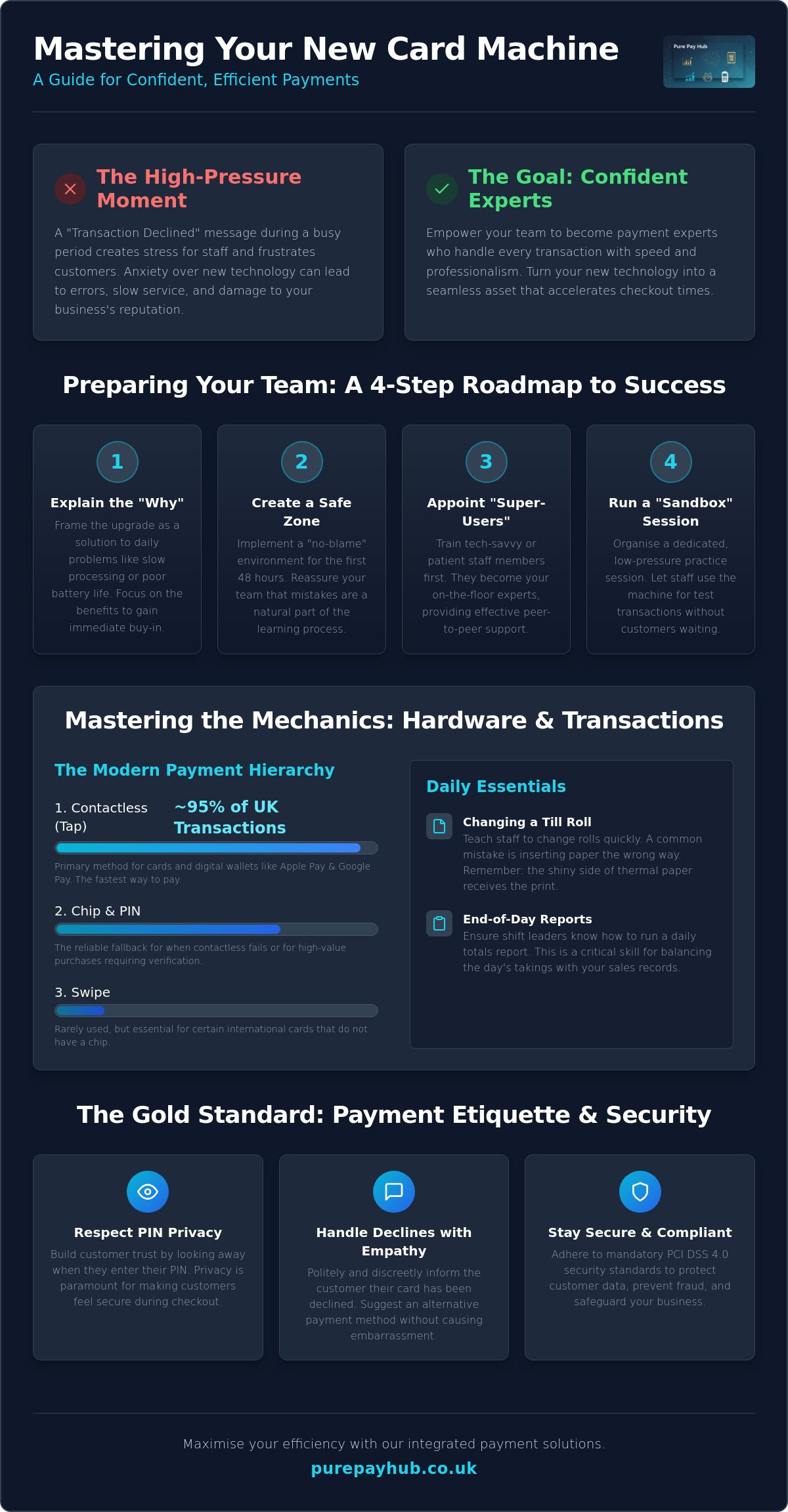
    Introducing a new piece of hardware into a fast-paced retail or hospitality environment can feel like a disruption. However, a no-nonsense introduction to the new device prevents early frustration. Before you hand the machine to a staff member, explain why the change is happening. Focus on how it solves their daily headaches. Perhaps the old unit had poor battery life or slow processing speeds that caused queues to build up. By framing the transition as a solution rather than a chore, you reduce immediate pushback. At its core, understanding what is a payment terminal? and how it interacts with your network is the first step toward technical confidence. Setting clear expectations for the transition period ensures that everyone knows a learning curve is natural and expected.

    The Psychology of New Tech: Overcoming Staff Resistance

    Staff resistance often stems from a fear of looking incompetent in front of a customer. They worry about pressing the wrong button or accidentally voiding a sale. You can dismantle this anxiety by creating a “no-blame” environment for the first 48 hours. Tell your team that mistakes are expected during the learning curve. Highlight the features that make their shifts easier, such as faster contactless processing or a more intuitive touchscreen interface. This shift in mindset turns the upgrade into a shared win for the whole business. Training staff on a new card machine is as much about managing emotions as it is about technical skills.

    Identify “super-users” amongst your staff early on. These are individuals who are naturally tech-savvy or have high patience levels. Train them first. They will act as your first-line support, answering quick questions whilst you focus on running the business. This peer-to-peer support is often more effective than a formal manual. It builds a culture of internal development and ensures that knowledge is shared across every shift.

    Setting Up Your Training Environment

    A successful training session requires deliberate preparation. Ensure the machine is fully charged and securely connected to your shop Wi-Fi or mobile network before the session begins. Organising a dedicated “sandbox” session is non-negotiable. This is a time when the machine is not live with real customers. Let your team play with the buttons and see how the screen responds to different inputs. Use dummy products or low-value test transactions, such as a £0.01 sale, to show the full cycle of a payment. Training staff on a new card machine is far more successful when they have had hands-on time without the pressure of a queue. Keep quick-start guides in a central location, like behind the counter, so the team has the tools to solve basic issues on the fly.

    Mastering the Mechanics: Hardware and Basic Transactions

    Once your team feels comfortable with the idea of a new system, they need to master the physical unit. Training staff on a new card machine requires a logical, step-by-step approach to the hardware interface. Start with the basics. Show them the power button, the charging port, and where the card enters the device. Most modern units feature a touchscreen, but some still rely on physical keys. Ensure every team member knows how to wake the device from sleep mode and navigate the main home screen. This hands-on familiarity prevents the “stage fright” that occurs when a customer is waiting.

    The hierarchy of payment methods is the next vital lesson. In 2024, nearly 95% of eligible in-store card transactions in the UK were contactless. Your staff should lead with the “Tap” method for speed. However, they must also be ready for other scenarios:

    • Contactless: The primary choice for cards and digital wallets. Note that as of March 2026, the mandatory £100 limit has been removed, though individual banks may still set their own caps.
    • Chip and PIN: The fallback for when contactless fails or for high-value transactions requiring extra verification.
    • Digital Wallets: Apple Pay and Google Pay use biometric authentication, which often allows them to bypass standard contactless limits safely.
    • Swipe: Rarely used now, but essential for certain international cards without a chip.

    Don’t overlook the practical “faff” of daily maintenance. Show your team how to change a till roll quickly. A common mistake is inserting the paper the wrong way round, which results in blank receipts and a frustrated queue. Teach them to look for the shiny side of the thermal paper. Finally, walk them through the on-screen menus to find daily totals. Running an end-of-day report is a critical skill for shift leaders to ensure the day’s takings match your records perfectly.

    The Standard Transaction Flow

    Accuracy starts before the card even touches the machine. Staff must enter the amount and double-check the decimal point before presenting the device to the customer. Once the payment is processed, they should wait for the “Approved” message and a clear beep. Only then is the sale confirmed. Security is paramount during this process. Following PCI DSS security standards for merchants ensures that cardholder data remains protected at every step. Always ask the customer if they prefer a printed receipt or a digital version to save on paper costs.

    Hardware Maintenance 101

    A dead battery in the middle of a lunch rush is an avoidable disaster. Create a charging schedule where the device is plugged in during quiet periods or at the end of every shift. Clean the screen and card slots weekly using a dry microfibre cloth; never use harsh chemicals that could damage the sensors. Security is also part of maintenance. Always store the device in a locked drawer or safe overnight to prevent tampering or theft. If you want a setup that makes this routine effortless, consider our portable card machines which are built for durability and ease of use in busy environments.

    Beyond the Tap: Handling Complex Scenarios and Troubleshooting

    A smooth transaction is easy to manage, but the true test of your team’s proficiency comes when things don’t go to plan. Training staff on a new card machine must include a deep dive into complex scenarios such as split bills and phone orders. In hospitality, handling partial payments is a daily requirement. Your staff should know how to divide a total across multiple cards without causing a bottleneck at the table. Similarly, for “Card Not Present” (CNP) transactions, they must follow strict verification steps. This involves manually entering the card number, expiry date, and security code, often with a manager’s oversight to ensure compliance and prevent fraud.

    Connectivity and Signal Troubleshooting

    Technical hitches are inevitable, but they don’t have to stop your sales. When training staff on a new card machine, teach them to monitor the signal strength indicator on the status bar. Modern devices are built to handle signal fluctuations, but staff should be ready to act if the connection stalls. Most issues can be resolved with a few simple checks:

    • Network Switching: Ensure staff know that the machine will automatically search for a mobile 4G or 5G backup if the shop Wi-Fi fails.
    • Device Restarts: A quick power cycle often clears communication errors without needing to reset complex network settings.
    • Offline Mode: Offline Mode acts as a vital fail-safe for UK retailers, allowing you to continue taking payments even when all connectivity is lost.

    Refunds, Voids, and Financial Security

    Security protocols are non-negotiable when dealing with the movement of money back to a customer. Your team must understand the difference between a void and a refund. A void cancels a transaction on the same day before the funds have been settled, whilst a refund is processed for a sale from a previous day. For security, the original payment card must always be present for any refund attempt. This prevents “refund fraud,” where funds are moved to a different account. These rigorous processes are a standard part of your business security. Understanding how merchant account management fees cover these secure processes helps staff appreciate why they must follow every step correctly.

    Finally, equip your team with a list of common error codes. Most issues, such as a “Declined” message or a “Communication Error,” have simple, logical fixes. Knowing when to troubleshoot and when to call technical support saves time and keeps your checkout lines moving during peak hours. A confident staff member who can explain a technical delay to a customer with calm authority protects your brand’s reputation for professionalism.

    Training Staff on a New Card Machine: The Ultimate UK Business Guide

    The Gold Standard of Payment Etiquette and Security

    Technical mastery of the hardware is only half the battle. When training staff on a new card machine, you must instil a sense of professional etiquette that protects both the customer and your brand. Privacy is the primary concern here. Staff should instinctively perform the “look away” whilst a customer enters their PIN. This small gesture builds immediate trust and ensures the customer feels secure in your establishment. It’s also vital to remind the team to check card signatures if the machine prompts them. Whilst rare in the age of contactless, these manual checks are a final line of defence against unauthorised use.

    Compliance isn’t just a back-office task; it lives on the shop floor. Since version 4.0 of the PCI DSS standards became mandatory on 31 March 2025, the focus has shifted toward outcome-based security. Your staff are the front line of this effort. They must ensure that cardholder data is never written down or stored in any physical or digital format. Failing to maintain these standards can lead to significant fines. These penalties range from £4,000 to £80,000 per month depending on the severity of the breach. Training staff on a new card machine means making these security habits second nature.

    Managing the “Declined” Conversation

    A declined transaction is an awkward moment for everyone involved. Your team should handle this with maximum discretion. Avoid using blunt phrases like “Your card has been declined.” Instead, use neutral language such as “The bank has not authorised this transaction at this time.” This shifts the focus away from the customer and onto the financial institution. Suggest alternative payment methods, like a different card or a mobile wallet, without being pushy. If a transaction feels “off” or the customer’s behaviour is suspicious, empower your staff to politely decline the sale and seek manager assistance.

    Fraud Prevention and Physical Security

    Physical tampering is a real threat to regional businesses. Staff should inspect the device daily to verify that it hasn’t been replaced or fitted with a skimming device. Check the security seal on the casing. If it is broken or looks tampered with, the machine must be taken out of service immediately. We recommend a “privacy first” approach to all hardware management. If you want to ensure your business stays ahead of these risks, you can view our secure payment solutions designed to meet the highest UK security standards.

    Maximising Efficiency with PurePay Hub Integrated Solutions

    Training staff on a new card machine is the first step toward a more efficient business. Once your team is confident with the basics, you can unlock the full potential of integrated technology. PurePay Hub portable card machines are designed to move with your business. In a busy restaurant or cafe, taking the payment directly to the customer reduces table-turn times significantly. It prevents the bottleneck at the counter and lets your staff focus on service rather than logistics. This efficiency is backed by the promise of next-day funding. We know that cash flow is a primary concern for regional business owners. Receiving your takings the following day ensures your finances remain stable and predictable.

    Eliminating Manual Entry Errors

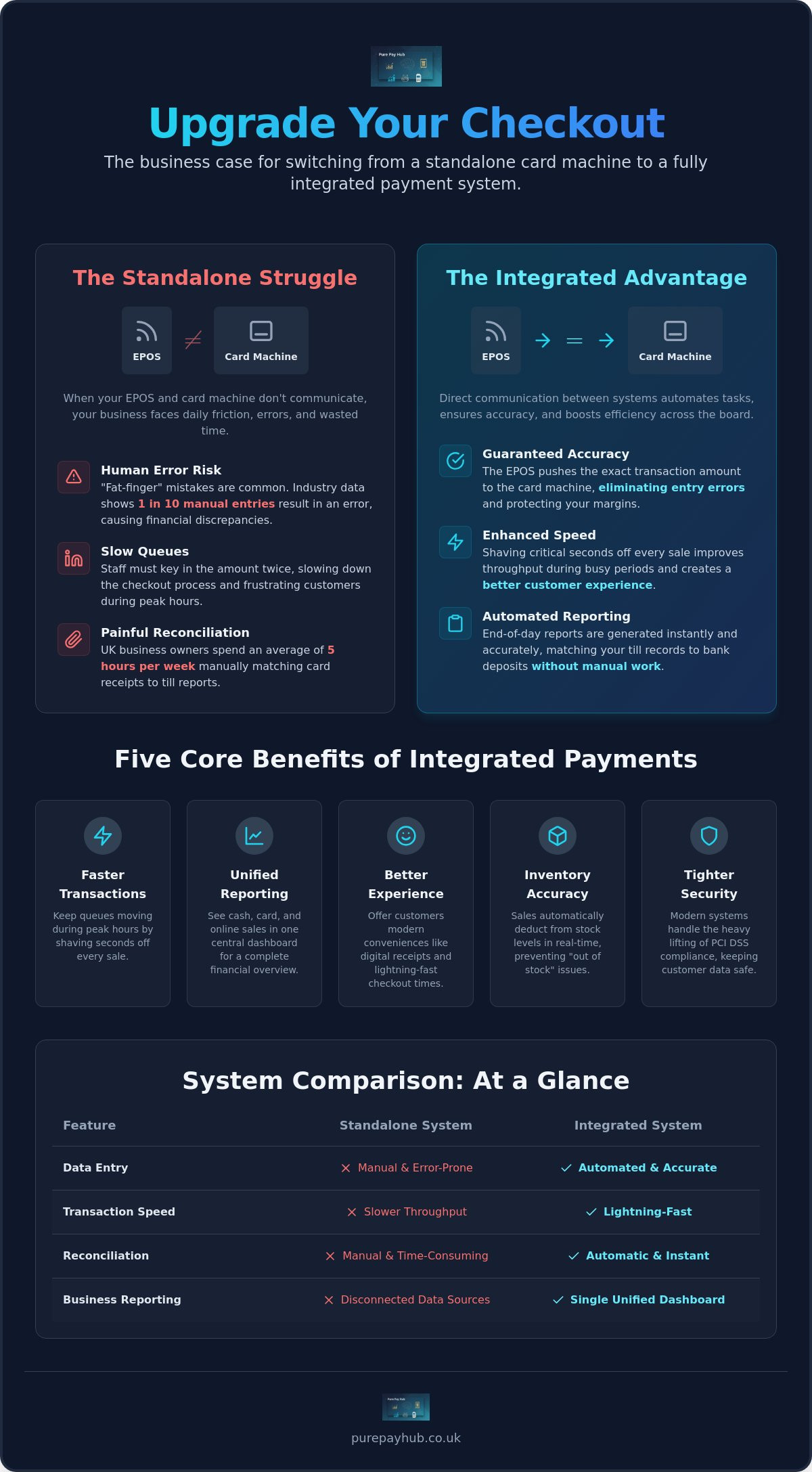
    Manual entry is where most transaction mistakes happen. By using integrated EPOS systems, you remove the risk of the “fat-finger” mistake where a staff member accidentally types the wrong amount into the terminal. The EPOS sends the exact total directly to the card machine. This integration ensures that your sales records always match your bank deposits perfectly. Integrated EPOS systems sync stock and sales instantly. This automation saves your management team hours of manual reconciliation in the back office at the end of each week, allowing you to focus on growth instead of admin.

    Leveraging Real-Time Data

    Training staff on a new card machine also involves teaching them to use the digital tools that support their daily work. Show your staff how to access the PurePay Hub merchant dashboard to check transaction history in real-time. This visibility allows shift leaders to verify payments instantly without needing to call the office or check bank statements. You can use this live sales data to optimise your staff rotas and inventory levels based on your actual peak trading times. Having a clear, honest view of your business performance helps you make informed decisions with confidence.

    Even with the best training, technical questions will arise. Our UK-based support team acts as the ultimate safety net for your business. We provide straight-talking, professional advice whenever your team needs a helping hand. This ensures that a minor query never turns into a major disruption for your customers. Ready to upgrade? Explore our range of countertop and mobile card machines today.

    Empower Your Team for Future Growth

    Mastering the art of training staff on a new card machine turns a technical hurdle into a significant competitive advantage. By prioritising hands-on practice and clear communication, you replace staff anxiety with professional confidence. You ensure that every transaction is more than just a payment; it is a secure, polished interaction that reflects your brand’s integrity. Your team is now equipped to manage complex troubleshooting and maintain high security standards even during your busiest hours.

    A reliable payment system is the backbone of a thriving business. You deserve a partner that offers the same transparency and support that you give your own customers. With debit card rates from 0.3% and next-day access to your funds, we provide the financial stability you need to grow. Our UK-based technical support is available 24/7 to ensure your team always has an answer when they need it most.

    Switch to a fairer, more transparent card machine partner with PurePay Hub

    Your business is ready for the next level of efficiency. Take the lead today and watch your team deliver a faster, more secure checkout experience for every customer.

    Frequently Asked Questions

    How long does it typically take to train a new employee on a card machine?

    Basic training staff on a new card machine typically takes between 15 and 30 minutes for the core functions. However, it usually takes a full shift of supervised use before an employee feels completely confident handling busy queues independently. We recommend a dedicated sandbox session before their first live transaction to ensure they understand the interface without the pressure of a waiting customer.

    What is the most common mistake staff make with new payment terminals?

    The most frequent error is entering the wrong transaction amount, specifically misplacing the decimal point during manual entry. This mistake can lead to significant overcharges or undercharges that complicate your end-of-day reconciliation. You can eliminate this risk entirely by using an integrated EPOS system that automatically sends the correct total from your till directly to the card machine for the customer to pay.

    Is it safe to let staff process refunds without manager supervision?

    It is generally not recommended to allow staff to process refunds without manager approval or a supervisor’s PIN. Unrestricted refund access increases the risk of internal fraud where funds are moved to personal accounts. Setting a clear protocol that requires a second pair of eyes protects your business finances and ensures that every refund is legitimate, documented, and processed back to the original card.

    How can I ensure my staff are maintaining PCI compliance during payments?

    You can maintain compliance by ensuring staff never write down card details and always respect customer privacy during PIN entry. Training staff on a new card machine must include a briefing on the latest PCI DSS 4.0 standards. Regularly check your hardware for physical tampering and ensure your team knows to report any broken security seals or suspicious modifications to the device immediately.

    What should my team do if the card machine screen goes blank during a sale?

    If the screen goes blank, first check the battery level or power connection to ensure the device hasn’t simply run out of charge. Once power is restored, staff must verify the status of the last transaction before attempting to take payment again. They can do this by checking the “Last Transaction” report in the menu to avoid accidentally charging the customer twice for the same sale.

    Can I train my staff to take payments over the phone using a card machine?

    Yes, most modern card machines allow you to process “Card Not Present” transactions for phone orders. Staff must manually enter the cardholder’s long number, expiry date, and security code into the terminal. However, for higher volumes, using a dedicated Virtual Terminal or sending a secure Payment Link is often a more efficient way to handle remote sales whilst keeping your business fully compliant.

    Should staff ask customers for their favourite receipt format (email vs print)?

    Staff should always offer the customer a choice between a printed or digital receipt. Many customers now prefer email receipts because they are easier to store and harder to lose than physical paper. Offering this choice also helps your business reduce paper waste and till roll costs whilst providing a more modern and professional checkout experience for your clientele during every transaction.

    What happens if a customer claims they were double-charged?

    If a customer claims they were double-charged, staff should immediately check the transaction history on the device or your merchant dashboard. In many cases, the second charge is actually a pending authorisation that will disappear from their bank statement within a few days. If a genuine duplicate exists, you can process a refund for the extra amount as long as you have the original receipt for verification.

  • The Ultimate Guide to Choosing a Card Machine for Your UK Business in 2026

    The Ultimate Guide to Choosing a Card Machine for Your UK Business in 2026

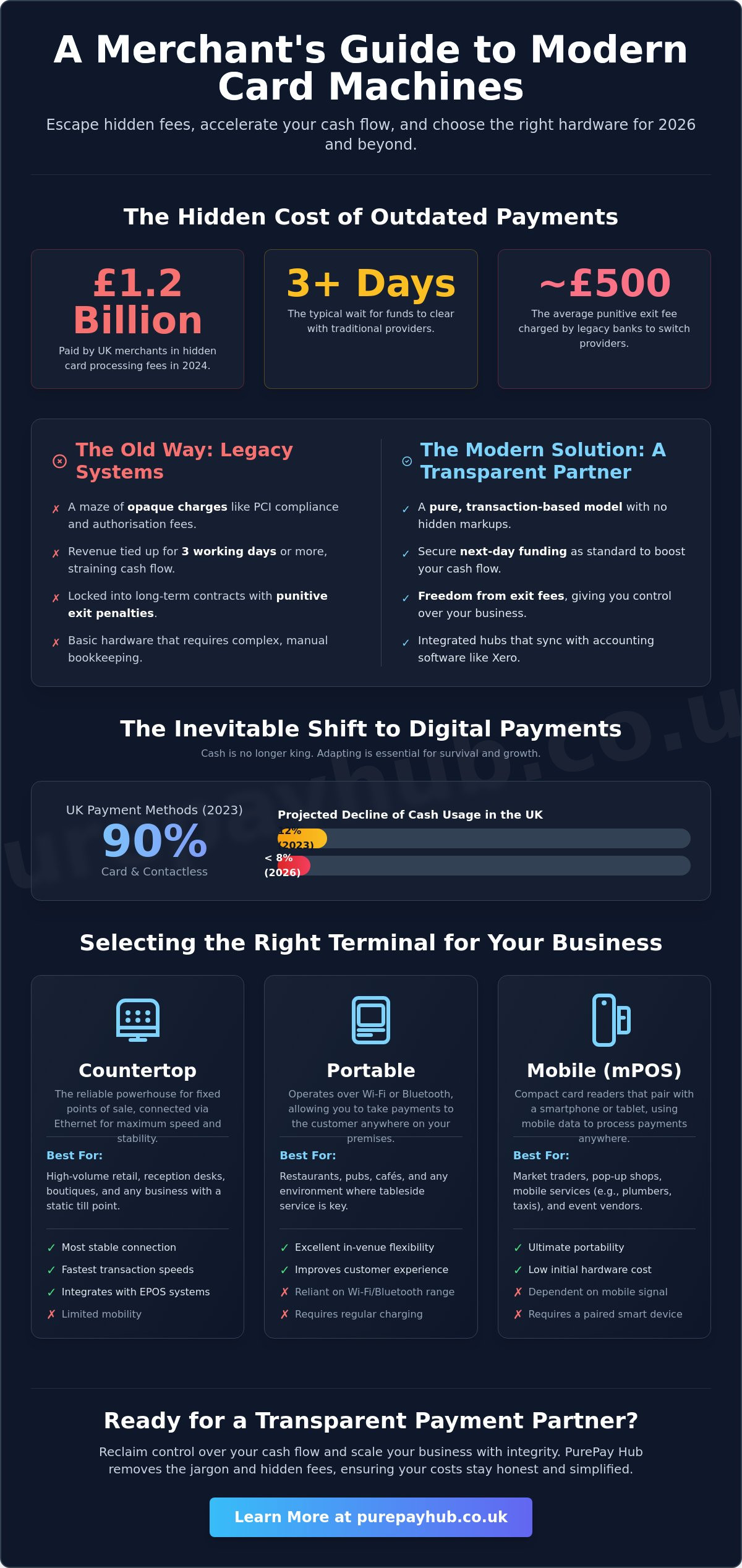
    What if the very tool you use to take payments is actually siphoning away your profit through a maze of opaque charges? In 2024, UK merchants paid an estimated £1.2 billion in hidden card processing fees, a figure that continues to rise as legacy providers cling to complex contracts. You’ve likely felt the sting of waiting three working days for funds to clear or discovered a “PCI compliance fee” that was never mentioned during the sales pitch. It’s frustrating to see your hard-earned revenue tied up in outdated systems whilst you’re trying to grow your business.

    This guide cuts through the corporate jargon to help you choose a card machine that prioritises your cash flow. You’ll discover how to secure next-day funding as standard and move to a pure, transaction-based model that eliminates hidden markups. We’ll examine the hardware reliability you need for 2026 and provide a clear roadmap to escape the £500 exit fees often charged by traditional banks.

    Key Takeaways

    • Understand how modern payment terminals have evolved into integrated financial hubs designed to streamline your daily business operations.
    • Select the perfect card machine for your specific needs by comparing the reliability of countertop units against the versatility of portable technology.
    • Learn to identify hidden costs within common pricing models and why transaction-based clarity is essential for protecting your bottom line.
    • Gain the confidence to audit your existing merchant statements and navigate provider switches whilst avoiding punitive exit fees.
    • Explore how a transparent partnership with PurePay Hub can help you reclaim control over your cash flow and scale your business with integrity.

    What is a Card Machine and How Does it Function in 2026?

    A card machine is no longer just a peripheral; it’s the heartbeat of a modern storefront. It functions as a secure terminal that encrypts card data and transmits it to authorisation centres in milliseconds. By 2026, these devices have transitioned from basic hardware into integrated financial hubs for UK SMEs. They provide a transparent link between your physical sales and your digital ledger. If you’re curious about the technical specifications, you can read about what is a payment terminal to understand its historical development and core mechanics. Accepting digital payments is now essential for consumer trust. UK Finance data from 2023 showed that 90% of all UK payments were made via card or contactless methods. By 2026, refusing to use a card machine effectively closes your doors to the majority of the British public.

    The role of NFC (Near Field Communication) technology is central to this shift. It facilitates near-instant contactless and mobile wallet payments through services like Apple Pay and Google Pay. This technology isn’t just about convenience; it’s about security. Every transaction is tokenised, meaning your customer’s actual card details are never stored on your device. This level of “pure” security protects your business from data breaches and builds long-term loyalty with your clientele.

    The Core Components of Modern Payment Processing

    Modern processing relies on three pillars to ensure funds move safely from the customer to your pocket. Your merchant account acts as the essential bridge between the terminal and your business bank. The payment gateway ensures every transaction is encrypted and secure during transmission. Finally, the acquiring bank settles the funds into your account. At PurePay Hub, we prioritise clarity in this chain. We remove the jargon and the hidden fees that traditional banks often bury in the small print, ensuring your transaction-based costs stay honest and simplified.

    Why Businesses are Moving Away from Cash

    The shift away from physical currency is driven by efficiency and safety. Cash carries high insurance premiums and theft risks that digital payments simply don’t have. According to industry reports, cash usage in the UK dropped to just 12% in 2023, and it’s projected to fall below 8% by 2026. Transitioning to a digital-first model offers several clear wins for your business:

    • Faster Checkout: Contactless transactions usually complete in under two seconds, which significantly increases your peak-time turnover.
    • Reduced Risk: Digital payments eliminate the danger of counterfeit notes and internal shrinkage.
    • Automated Bookkeeping: Modern card machine systems sync directly with accounting software like Xero, making your tax returns a breeze.

    By embracing these integrated hubs, you aren’t just taking payments. You’re organising your entire financial life through a single, dependable partner.

    Countertop, Portable, or Mobile: Selecting the Right Terminal

    Your business layout dictates your hardware choice. A card machine isn’t a one-size-fits-all tool; it’s the physical bridge between your service and your revenue. Choosing the wrong terminal leads to dropped connections at the table or cluttered wires at the till. PurePay Hub prioritises hardware that fits your specific workflow, ensuring that every transaction is as clean and efficient as possible.

    Assessing your environment is the first step toward pure performance. If you operate from a fixed point, like a boutique or a reception desk, stability is your priority. If you move amongst customers, range and battery life become the primary metrics for success. Recent data from the 2022 market review into UK payment regulations highlighted that merchants often overlook the impact of hardware contracts on their total cost of ownership. We believe in providing the right tool without the typical industry fluff.

    Countertop Terminals for Fixed Retail

    Countertop units are the reliable powerhouses of the retail world. These devices connect directly via Ethernet, providing the fastest and most stable connection available. They’re perfect for high-volume businesses where the point of sale never moves. Because they’re plugged into a power source, you never have to worry about a dead battery during a midday rush. Most modern countertop units integrate seamlessly with EPOS systems. This connection ensures your inventory levels update the moment a sale is made, removing the need for manual reconciliation at the end of the day.

    Portable vs Mobile: Understanding the Difference

    The terms “portable” and “mobile” are often used interchangeably, but they serve very different needs. Understanding the distinction helps you avoid paying for features you won’t use.

    • Portable: These devices use Wi-Fi or Bluetooth to connect to a base station. They’re designed for short-range movement, such as taking a card machine to a table in a restaurant or a chair in a salon. They offer the flexibility of movement within a roughly 50-metre radius of your router.
    • Mobile: These terminals are essential for tradespeople, delivery drivers, or market stall holders. They use an internal SIM card to connect to GPRS, 4G, or 5G networks. This provides national coverage, allowing you to take payments wherever you have a mobile signal.

    Battery life is the deciding factor for businesses on the move. A high-quality mobile terminal should last for at least 8 to 10 hours of active use, or roughly 200 transactions, before needing a charge. If you’re operating at an outdoor festival or a remote site, this longevity is non-negotiable. It’s about maintaining a professional image; a terminal that dies mid-transaction creates unnecessary friction. You can find a terminal that matches your pace by choosing hardware designed for your specific industry demands.

    The Ultimate Guide to Choosing a Card Machine for Your UK Business in 2026

    The Real Cost of Processing: Understanding Fee Structures

    Choosing a card machine involves more than just picking a device. You need to look at the numbers beneath the surface. Many providers offer “free” equipment or no monthly costs, yet they claw back that value through inflated transaction percentages. A transparent, transaction-based model ensures you only pay for the service you use. At PurePay Hub, we advocate for clarity over complexity. Our “Pure” approach offers transparent rates starting from 0.3% for debit cards, ensuring your hard-earned revenue stays in your business.

    The Trap of Flat-Rate Pricing

    Flat rates often act as a convenience tax for small businesses. A standard 1.75% rate feels manageable when you’re starting out. However, as your business grows, this fixed percentage becomes a significant drain on your profits. Interchange fees are the base costs set by card schemes like Visa and Mastercard. Most debit card transactions carry a very low interchange cost. When you pay a flat 1.75%, the provider pockets the massive difference between that base cost and what they charge you.

    Variable rates are the fairer alternative. They reflect the actual cost of the card used by your customer. By moving away from flat-rate models, you align your costs with reality. This creates a partnership where your success isn’t penalised by static, high-margin fees. For a business processing £10,000 a month, switching from a 1.75% flat rate to a transparent 0.3% debit rate can save over £100 monthly.

    Essential Fees and Value-Added Services

    Understanding your Merchant Service Charge (MSC) is the first step toward financial clarity. This is the total fee you pay to process a payment. Beyond the transaction fee, you must watch for hidden extras that traditional banks often slip into the small print. These include:

    • MMSC: Minimum Monthly Service Charges that apply if your transaction volume is low.
    • Statement Fees: Charges for receiving a breakdown of your activity.
    • PCI DSS Penalties: Fines for not meeting security standards, often costing £20 to £50 per month.

    Hardware rental provides a low entry cost and includes technical support, whilst purchasing your card machine outright offers better long-term value for established shops. We help you navigate these choices without the jargon. Staying PCI compliant is essential for security, and we provide the tools to help you avoid unnecessary fines. We focus on keeping your processing “Pure” so you can focus on your customers.

    How to Switch Providers and Optimise Your Setup

    Switching your card machine provider is a strategic move for your bottom line. It isn’t just about a lower rate; it’s about reclaiming control over your business finances. Many UK merchants stay with expensive providers because the process feels daunting. In reality, a structured approach makes the transition seamless and profitable. Your first step is a clinical audit of your current costs. Look beyond the headline rate. Divide your total monthly fees by your total turnover to find your true effective rate. This often reveals hidden markups that traditional banks fail to mention.

    To ensure a smooth migration, follow these essential steps:

    • Review your contract: Identify if you are in a rolling 30-day notice period or tied into a longer term. Check for any “early exit” fees.
    • Request a Pure comparison: Send your latest statement to a transparent provider like PurePay Hub. We provide a side-by-side breakdown of where you are losing money.
    • Organise your documents: Have your proof of ID, business bank details, and VAT registration ready. This speeds up the underwriting process significantly.
    • Synchronise the swap: Keep your old terminal active until your new hardware is tested and your first transaction is successfully processed.

    Overcoming the Fear of Switching

    The biggest myth in payment processing is that switching causes downtime. You don’t have to stop taking payments. By running two systems in parallel for 24 hours, you eliminate risk. We handle the heavy lifting of the transition, ensuring your new hardware integrates with your favourite EPOS software from day one. Modern setups are designed to be “plug and play,” meaning you can be up and running within minutes of unboxing your new device.

    The Importance of Next-Day Funding

    Slow settlement times can cripple a small business. Waiting 3 to 5 working days for your own money is a relic of old banking. If you process £2,000 on a busy Saturday, you need that capital in your account by Sunday or Monday to restock inventory. Next-day funding provides a massive competitive advantage for cash flow management. It turns yesterday’s sales into today’s buying power. Always verify that your new contract includes a guarantee for funding speed before you sign.

    Stop overpaying for your processing and start growing your business with a partner you can trust. Request your transparent side-by-side comparison today.

    PurePay Hub: A Modern Ally for UK Merchants

    Choosing a card machine shouldn’t feel like signing a contract with a hidden enemy. Many UK small businesses struggle with opaque fee structures and delayed settlements that stifle their growth. PurePay Hub operates differently. We’ve built our service on a foundation of transparency and direct support. Our transaction-based fees are designed to help your business scale without the fear of sudden cost spikes. You get a fair price that reflects your actual usage, not a generic corporate estimate.

    Efficiency is at the heart of our platform. We provide integrated EPOS solutions specifically tailored for sectors ranging from retail and hospitality to healthcare providers like Maximal Physio. These systems do more than just process payments; they unify your inventory and sales data into one streamlined workflow. To keep your operations moving, we provide next-day funding as a standard feature for our merchants. You won’t be left waiting for your hard-earned revenue to clear. This speed ensures your cash flow remains healthy, allowing you to restock or pay staff without delay.

    Beyond Payments: Business Cash Advances

    Growth often requires capital that traditional banks are slow to provide. We offer access to Business Cash Advances that prioritise your potential over your credit history. You can secure unsecured capital without the burden of fixed monthly interest rates. Repayment is structured as a simple percentage of your daily sales. When you’re busy, you pay back more. During quiet spells, your repayments automatically drop. We use your card machine data to prove your creditworthiness, making growth funding accessible and stress-free for every merchant we support.

    Why Purity in Processing Matters

    We’ve eliminated corporate jargon to provide honest, straight-talking support for every merchant. The Hub concept is central to our philosophy. It centralises your payments, detailed reporting, and funding options into one manageable space. You don’t need to jump between different providers or confusing spreadsheets to understand your finances. It’s a single, reliable point of truth for your business. Join PurePay Hub today for a fairer way to take payments and experience a partnership built on clarity.

    Future-Proof Your UK Payments Today

    Navigating the UK payment landscape in 2026 requires more than just hardware; it requires a strategy built on transparency and speed. You’ve seen how the right card machine can transform your daily operations, whether you’re serving customers at a fixed counter or on the move. The key is to look past the shiny devices and focus on the underlying fee structure. Many providers still hide costs in complex tiers, but your business deserves a model that prioritises clarity.

    PurePay Hub offers a refreshing alternative for merchants who are tired of opaque markups. We provide a pure, transaction-based approach that puts you in control of your margins. With debit card rates starting from 0.3% and next-day access to your funds, you can stop waiting for your money and start reinvesting it. It’s time to leave behind the frustration of hidden fees and partner with an ally that values your growth.

    Switch to PurePay Hub for transparent rates and next-day funding and take the first step towards a fairer financial future for your business. Success is built on the right partnerships, and we’re ready to help yours thrive.

    Frequently Asked Questions

    How much does a card machine cost for a small business in the UK?

    Costs vary based on your choice of hardware. You can buy a basic card reader for £19 plus VAT, or invest in a standalone card machine for £150 to £250. Transaction fees are the most important factor, usually ranging from 1.1% to 2.5%. We believe in pure transparency, so you’ll always know exactly what you’re paying without hidden markups or confusing fee tiers.

    Can I get a card machine with no monthly contract or rental fees?

    You can certainly find no-contract options that remove the burden of monthly rental fees. These pay-as-you-go models involve a one-off purchase of the hardware followed by a fixed percentage fee per sale. It’s a fair partnership for seasonal businesses or startups. This simplified approach ensures you only pay when you’re actually making money, keeping your overheads predictable and honest.

    What is the difference between a card reader and a card machine?

    A card reader typically requires a Bluetooth connection to a smartphone or tablet to process payments. In contrast, a standalone card machine functions independently with its own operating system and often a built-in receipt printer. Modern businesses often choose the latter for a more professional checkout experience. This choice provides the stability of a dedicated hub for all your daily financial transactions.

    How long does it take to get funds from card sales into my bank account?

    Funds typically reach your bank account within 1 to 3 business days. While some legacy banks take longer, many modern providers now offer next-day or even instant settlement. This speed is vital for maintaining healthy cash flow. We focus on providing a clear, logical path for your money to travel from the customer’s pocket to your bank account without unnecessary delays.

    What happens if my business Wi-Fi goes down whilst I am taking a payment?

    Your payment won’t fail if your device has a built-in SIM card for 4G connectivity. Most professional terminals automatically switch to mobile data if the Wi-Fi signal drops. This fail-safe ensures you never miss a sale during peak trading hours. It’s a dependable solution that keeps your business running smoothly, even when your local internet provider lets you down whilst you’re busy.

    Is it difficult to switch card machine providers if I am already in a contract?

    Switching is straightforward, though you must check your current contract for any exit fees or notice periods. Many providers now offer buyout incentives, sometimes covering up to £3,000 in cancellation costs to help you move. We act as your ally during this transition, ensuring the move is handled with integrity. It’s about finding a fairer deal that supports your long-term business growth.

    What security standards do card machines need to meet in the UK?

    Every device must comply with PCI DSS regulations. These strict rules ensure that 100% of transaction data is encrypted and handled safely. Using certified hardware protects your business from fraud and builds essential trust with your customers. It’s a non-negotiable standard that brings purity and security to every single tap, dip, or swipe at your counter.

    Can I use my card machine to accept Apple Pay and Google Pay?

    You can accept Apple Pay, Google Pay, and other digital wallets on any contactless-enabled terminal. These mobile payments use Near Field Communication technology to complete transactions in under two seconds. It’s a modern requirement for UK merchants, as 50% of all retail transactions now involve contactless methods. Supporting these options shows your customers that you’re a forward-thinking, efficient business.