Tag: point of sale

  • Training Staff on a New Card Machine: The Ultimate UK Business Guide

    Training Staff on a New Card Machine: The Ultimate UK Business Guide

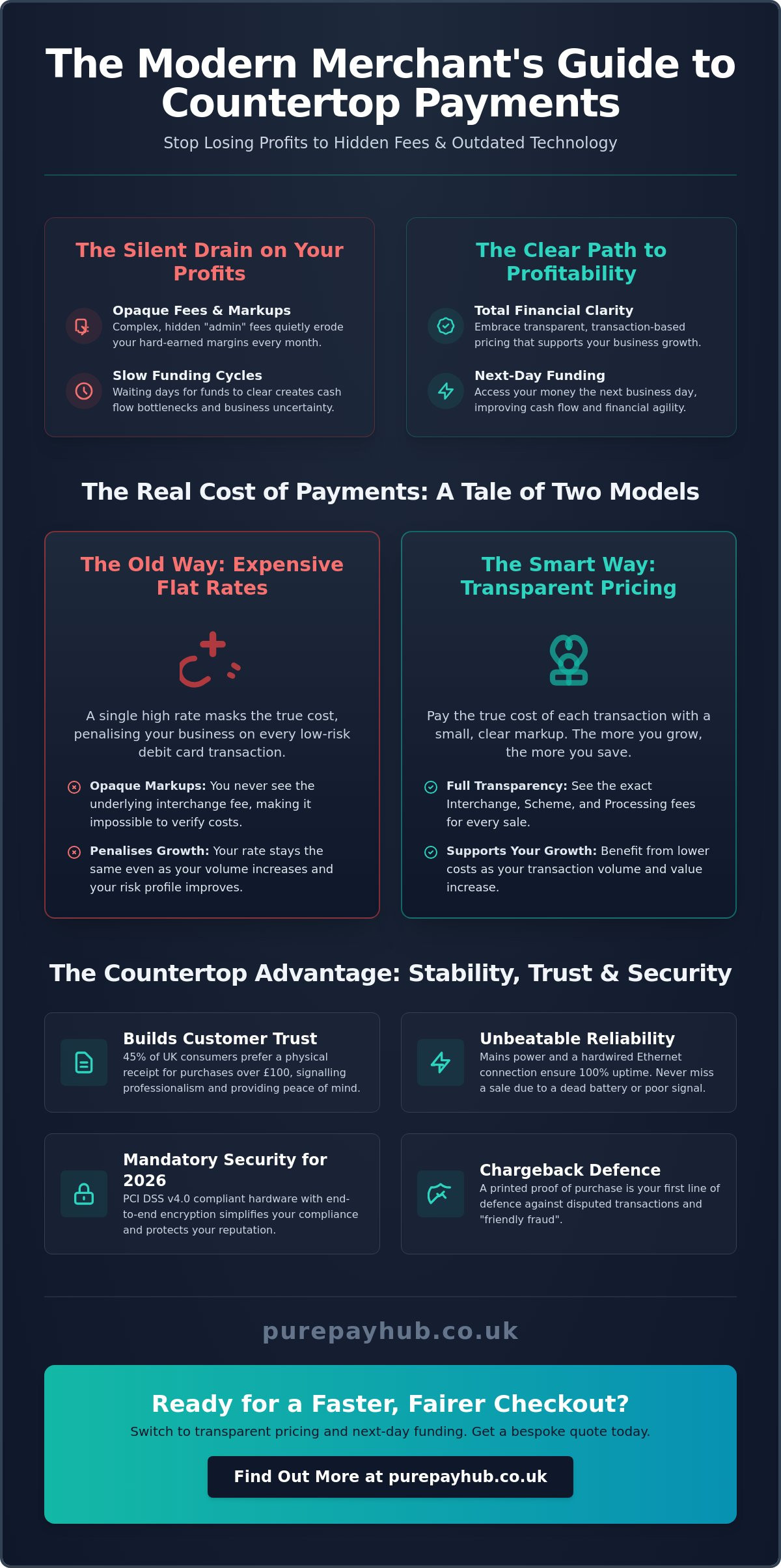
    Imagine it’s a busy Saturday afternoon and your newest employee is staring blankly at a “Transaction Declined” message whilst the queue stretches out the door. It’s a high-pressure moment that often leads to accidental refunds, fumbled hardware, or frustrated customers. Training staff on a new card machine shouldn’t feel like a gamble with your business reputation. We know that introducing new technology often brings more anxiety than excitement, especially when you’re worried about signal drops or human error during peak hours.

    You need a team that handles payments with professional ease, not one that freezes when a screen looks different. This guide provides a clear roadmap to ensure every member of your staff becomes a confident payment expert. We’ll show you how to accelerate checkout times and manage troubleshooting on the fly. From mastering basic functions to staying compliant with the mandatory PCI DSS 4.0 security standards, you’ll learn exactly how to make your new payment technology a seamless part of your daily operations.

    Key Takeaways

    • Organise a dedicated “sandbox” session to let your team practice transactions in a low-pressure environment before the technology goes live.
    • Master the essential mechanics of training staff on a new card machine to ensure every tap, insert, and swipe is handled with professional speed.
    • Learn the correct security protocols for complex scenarios like processing refunds, voids, and secure phone orders to protect your business from errors.
    • Build customer trust by implementing high standards of payment etiquette, from respecting PIN privacy to handling declined cards with empathy.
    • Discover how portable card machines and next-day funding can improve your service speed and keep your business finances healthy.

    Preparing Your Team for a Seamless Transition

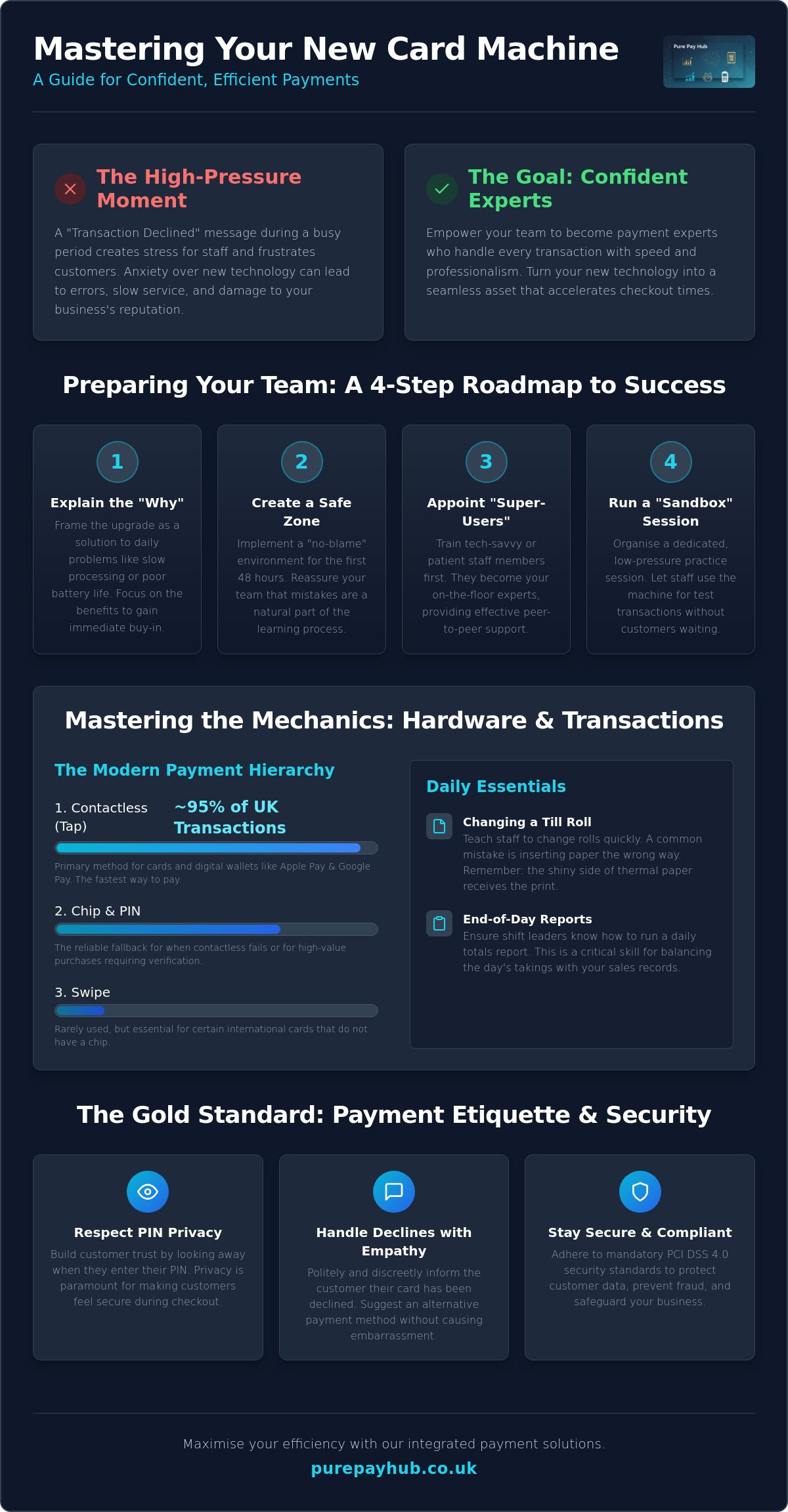
    Introducing a new piece of hardware into a fast-paced retail or hospitality environment can feel like a disruption. However, a no-nonsense introduction to the new device prevents early frustration. Before you hand the machine to a staff member, explain why the change is happening. Focus on how it solves their daily headaches. Perhaps the old unit had poor battery life or slow processing speeds that caused queues to build up. By framing the transition as a solution rather than a chore, you reduce immediate pushback. At its core, understanding what is a payment terminal? and how it interacts with your network is the first step toward technical confidence. Setting clear expectations for the transition period ensures that everyone knows a learning curve is natural and expected.

    The Psychology of New Tech: Overcoming Staff Resistance

    Staff resistance often stems from a fear of looking incompetent in front of a customer. They worry about pressing the wrong button or accidentally voiding a sale. You can dismantle this anxiety by creating a “no-blame” environment for the first 48 hours. Tell your team that mistakes are expected during the learning curve. Highlight the features that make their shifts easier, such as faster contactless processing or a more intuitive touchscreen interface. This shift in mindset turns the upgrade into a shared win for the whole business. Training staff on a new card machine is as much about managing emotions as it is about technical skills.

    Identify “super-users” amongst your staff early on. These are individuals who are naturally tech-savvy or have high patience levels. Train them first. They will act as your first-line support, answering quick questions whilst you focus on running the business. This peer-to-peer support is often more effective than a formal manual. It builds a culture of internal development and ensures that knowledge is shared across every shift.

    Setting Up Your Training Environment

    A successful training session requires deliberate preparation. Ensure the machine is fully charged and securely connected to your shop Wi-Fi or mobile network before the session begins. Organising a dedicated “sandbox” session is non-negotiable. This is a time when the machine is not live with real customers. Let your team play with the buttons and see how the screen responds to different inputs. Use dummy products or low-value test transactions, such as a £0.01 sale, to show the full cycle of a payment. Training staff on a new card machine is far more successful when they have had hands-on time without the pressure of a queue. Keep quick-start guides in a central location, like behind the counter, so the team has the tools to solve basic issues on the fly.

    Mastering the Mechanics: Hardware and Basic Transactions

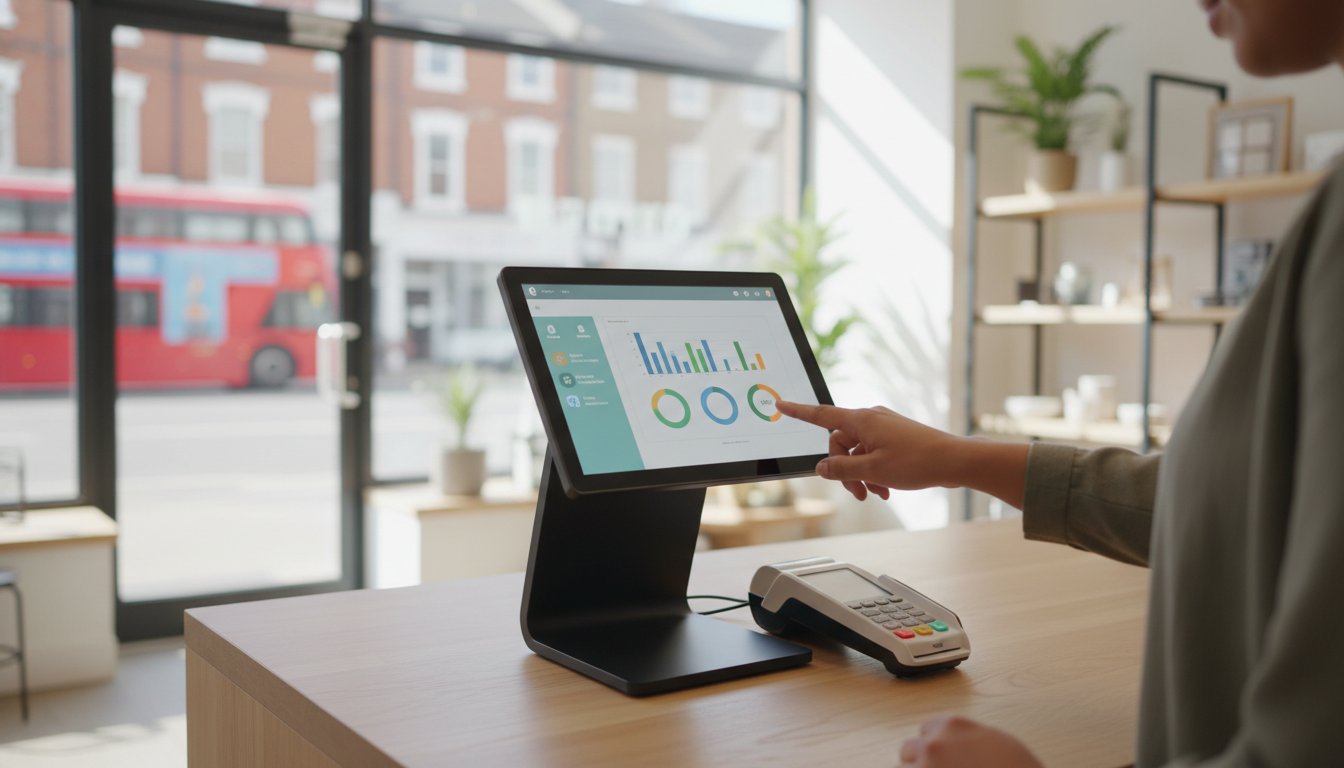
    Once your team feels comfortable with the idea of a new system, they need to master the physical unit. Training staff on a new card machine requires a logical, step-by-step approach to the hardware interface. Start with the basics. Show them the power button, the charging port, and where the card enters the device. Most modern units feature a touchscreen, but some still rely on physical keys. Ensure every team member knows how to wake the device from sleep mode and navigate the main home screen. This hands-on familiarity prevents the “stage fright” that occurs when a customer is waiting.

    The hierarchy of payment methods is the next vital lesson. In 2024, nearly 95% of eligible in-store card transactions in the UK were contactless. Your staff should lead with the “Tap” method for speed. However, they must also be ready for other scenarios:

    • Contactless: The primary choice for cards and digital wallets. Note that as of March 2026, the mandatory £100 limit has been removed, though individual banks may still set their own caps.
    • Chip and PIN: The fallback for when contactless fails or for high-value transactions requiring extra verification.
    • Digital Wallets: Apple Pay and Google Pay use biometric authentication, which often allows them to bypass standard contactless limits safely.
    • Swipe: Rarely used now, but essential for certain international cards without a chip.

    Don’t overlook the practical “faff” of daily maintenance. Show your team how to change a till roll quickly. A common mistake is inserting the paper the wrong way round, which results in blank receipts and a frustrated queue. Teach them to look for the shiny side of the thermal paper. Finally, walk them through the on-screen menus to find daily totals. Running an end-of-day report is a critical skill for shift leaders to ensure the day’s takings match your records perfectly.

    The Standard Transaction Flow

    Accuracy starts before the card even touches the machine. Staff must enter the amount and double-check the decimal point before presenting the device to the customer. Once the payment is processed, they should wait for the “Approved” message and a clear beep. Only then is the sale confirmed. Security is paramount during this process. Following PCI DSS security standards for merchants ensures that cardholder data remains protected at every step. Always ask the customer if they prefer a printed receipt or a digital version to save on paper costs.

    Hardware Maintenance 101

    A dead battery in the middle of a lunch rush is an avoidable disaster. Create a charging schedule where the device is plugged in during quiet periods or at the end of every shift. Clean the screen and card slots weekly using a dry microfibre cloth; never use harsh chemicals that could damage the sensors. Security is also part of maintenance. Always store the device in a locked drawer or safe overnight to prevent tampering or theft. If you want a setup that makes this routine effortless, consider our portable card machines which are built for durability and ease of use in busy environments.

    Beyond the Tap: Handling Complex Scenarios and Troubleshooting

    A smooth transaction is easy to manage, but the true test of your team’s proficiency comes when things don’t go to plan. Training staff on a new card machine must include a deep dive into complex scenarios such as split bills and phone orders. In hospitality, handling partial payments is a daily requirement. Your staff should know how to divide a total across multiple cards without causing a bottleneck at the table. Similarly, for “Card Not Present” (CNP) transactions, they must follow strict verification steps. This involves manually entering the card number, expiry date, and security code, often with a manager’s oversight to ensure compliance and prevent fraud.

    Connectivity and Signal Troubleshooting

    Technical hitches are inevitable, but they don’t have to stop your sales. When training staff on a new card machine, teach them to monitor the signal strength indicator on the status bar. Modern devices are built to handle signal fluctuations, but staff should be ready to act if the connection stalls. Most issues can be resolved with a few simple checks:

    • Network Switching: Ensure staff know that the machine will automatically search for a mobile 4G or 5G backup if the shop Wi-Fi fails.
    • Device Restarts: A quick power cycle often clears communication errors without needing to reset complex network settings.
    • Offline Mode: Offline Mode acts as a vital fail-safe for UK retailers, allowing you to continue taking payments even when all connectivity is lost.

    Refunds, Voids, and Financial Security

    Security protocols are non-negotiable when dealing with the movement of money back to a customer. Your team must understand the difference between a void and a refund. A void cancels a transaction on the same day before the funds have been settled, whilst a refund is processed for a sale from a previous day. For security, the original payment card must always be present for any refund attempt. This prevents “refund fraud,” where funds are moved to a different account. These rigorous processes are a standard part of your business security. Understanding how merchant account management fees cover these secure processes helps staff appreciate why they must follow every step correctly.

    Finally, equip your team with a list of common error codes. Most issues, such as a “Declined” message or a “Communication Error,” have simple, logical fixes. Knowing when to troubleshoot and when to call technical support saves time and keeps your checkout lines moving during peak hours. A confident staff member who can explain a technical delay to a customer with calm authority protects your brand’s reputation for professionalism.
    Training Staff on a New Card Machine: The Ultimate UK Business Guide

    The Gold Standard of Payment Etiquette and Security

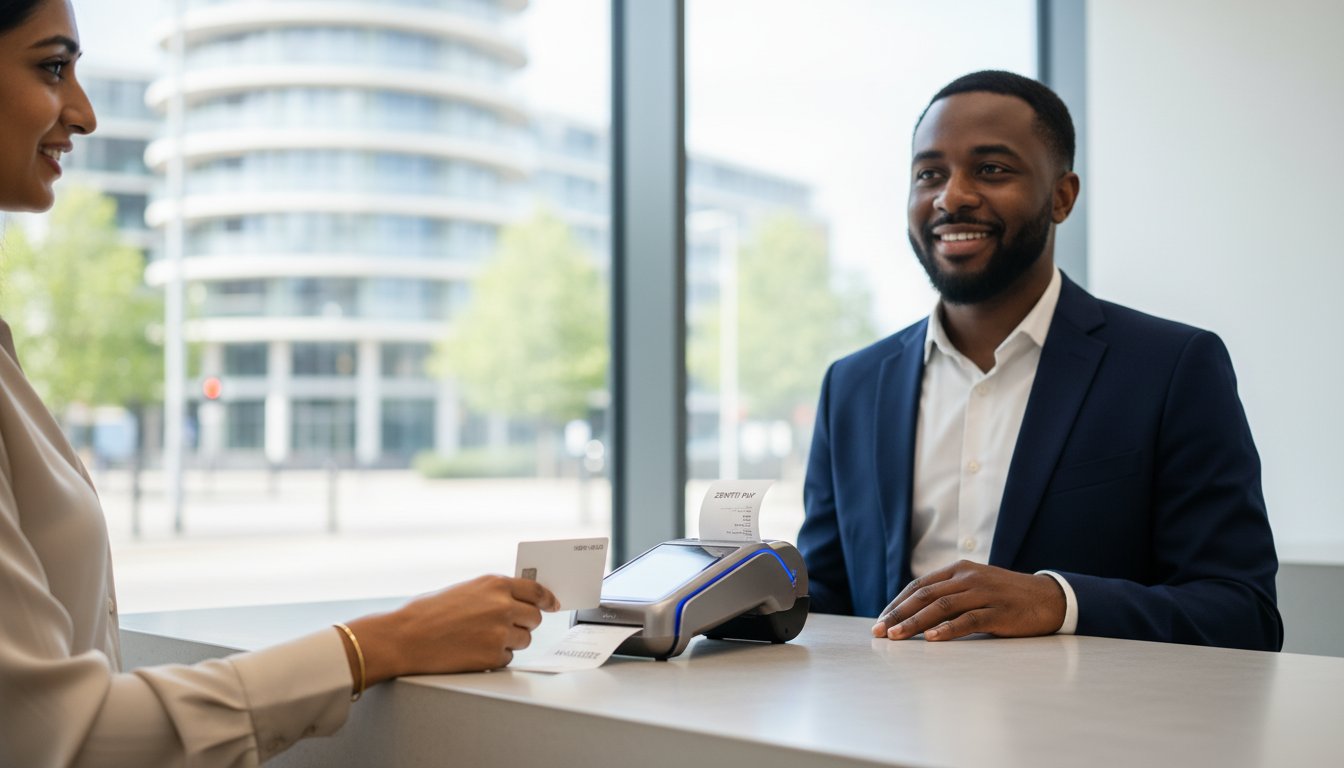
    Technical mastery of the hardware is only half the battle. When training staff on a new card machine, you must instil a sense of professional etiquette that protects both the customer and your brand. Privacy is the primary concern here. Staff should instinctively perform the “look away” whilst a customer enters their PIN. This small gesture builds immediate trust and ensures the customer feels secure in your establishment. It’s also vital to remind the team to check card signatures if the machine prompts them. Whilst rare in the age of contactless, these manual checks are a final line of defence against unauthorised use.

    Compliance isn’t just a back-office task; it lives on the shop floor. Since version 4.0 of the PCI DSS standards became mandatory on 31 March 2025, the focus has shifted toward outcome-based security. Your staff are the front line of this effort. They must ensure that cardholder data is never written down or stored in any physical or digital format. Failing to maintain these standards can lead to significant fines. These penalties range from £4,000 to £80,000 per month depending on the severity of the breach. Training staff on a new card machine means making these security habits second nature.

    Managing the “Declined” Conversation

    A declined transaction is an awkward moment for everyone involved. Your team should handle this with maximum discretion. Avoid using blunt phrases like “Your card has been declined.” Instead, use neutral language such as “The bank has not authorised this transaction at this time.” This shifts the focus away from the customer and onto the financial institution. Suggest alternative payment methods, like a different card or a mobile wallet, without being pushy. If a transaction feels “off” or the customer’s behaviour is suspicious, empower your staff to politely decline the sale and seek manager assistance.

    Fraud Prevention and Physical Security

    Physical tampering is a real threat to regional businesses. Staff should inspect the device daily to verify that it hasn’t been replaced or fitted with a skimming device. Check the security seal on the casing. If it is broken or looks tampered with, the machine must be taken out of service immediately. We recommend a “privacy first” approach to all hardware management. If you want to ensure your business stays ahead of these risks, you can view our secure payment solutions designed to meet the highest UK security standards.

    Maximising Efficiency with PurePay Hub Integrated Solutions

    Training staff on a new card machine is the first step toward a more efficient business. Once your team is confident with the basics, you can unlock the full potential of integrated technology. PurePay Hub portable card machines are designed to move with your business. In a busy restaurant or cafe, taking the payment directly to the customer reduces table-turn times significantly. It prevents the bottleneck at the counter and lets your staff focus on service rather than logistics. This efficiency is backed by the promise of next-day funding. We know that cash flow is a primary concern for regional business owners. Receiving your takings the following day ensures your finances remain stable and predictable.

    Eliminating Manual Entry Errors

    Manual entry is where most transaction mistakes happen. By using integrated EPOS systems, you remove the risk of the “fat-finger” mistake where a staff member accidentally types the wrong amount into the terminal. The EPOS sends the exact total directly to the card machine. This integration ensures that your sales records always match your bank deposits perfectly. Integrated EPOS systems sync stock and sales instantly. This automation saves your management team hours of manual reconciliation in the back office at the end of each week, allowing you to focus on growth instead of admin.

    Leveraging Real-Time Data

    Training staff on a new card machine also involves teaching them to use the digital tools that support their daily work. Show your staff how to access the PurePay Hub merchant dashboard to check transaction history in real-time. This visibility allows shift leaders to verify payments instantly without needing to call the office or check bank statements. You can use this live sales data to optimise your staff rotas and inventory levels based on your actual peak trading times. Having a clear, honest view of your business performance helps you make informed decisions with confidence.

    Even with the best training, technical questions will arise. Our UK-based support team acts as the ultimate safety net for your business. We provide straight-talking, professional advice whenever your team needs a helping hand. This ensures that a minor query never turns into a major disruption for your customers. Ready to upgrade? Explore our range of countertop and mobile card machines today.

    Empower Your Team for Future Growth

    Mastering the art of training staff on a new card machine turns a technical hurdle into a significant competitive advantage. By prioritising hands-on practice and clear communication, you replace staff anxiety with professional confidence. You ensure that every transaction is more than just a payment; it is a secure, polished interaction that reflects your brand’s integrity. Your team is now equipped to manage complex troubleshooting and maintain high security standards even during your busiest hours.

    A reliable payment system is the backbone of a thriving business. You deserve a partner that offers the same transparency and support that you give your own customers. With debit card rates from 0.3% and next-day access to your funds, we provide the financial stability you need to grow. Our UK-based technical support is available 24/7 to ensure your team always has an answer when they need it most.

    Switch to a fairer, more transparent card machine partner with PurePay Hub

    Your business is ready for the next level of efficiency. Take the lead today and watch your team deliver a faster, more secure checkout experience for every customer.

    Frequently Asked Questions

    How long does it typically take to train a new employee on a card machine?

    Basic training staff on a new card machine typically takes between 15 and 30 minutes for the core functions. However, it usually takes a full shift of supervised use before an employee feels completely confident handling busy queues independently. We recommend a dedicated sandbox session before their first live transaction to ensure they understand the interface without the pressure of a waiting customer.

    What is the most common mistake staff make with new payment terminals?

    The most frequent error is entering the wrong transaction amount, specifically misplacing the decimal point during manual entry. This mistake can lead to significant overcharges or undercharges that complicate your end-of-day reconciliation. You can eliminate this risk entirely by using an integrated EPOS system that automatically sends the correct total from your till directly to the card machine for the customer to pay.

    Is it safe to let staff process refunds without manager supervision?

    It is generally not recommended to allow staff to process refunds without manager approval or a supervisor’s PIN. Unrestricted refund access increases the risk of internal fraud where funds are moved to personal accounts. Setting a clear protocol that requires a second pair of eyes protects your business finances and ensures that every refund is legitimate, documented, and processed back to the original card.

    How can I ensure my staff are maintaining PCI compliance during payments?

    You can maintain compliance by ensuring staff never write down card details and always respect customer privacy during PIN entry. Training staff on a new card machine must include a briefing on the latest PCI DSS 4.0 standards. Regularly check your hardware for physical tampering and ensure your team knows to report any broken security seals or suspicious modifications to the device immediately.

    What should my team do if the card machine screen goes blank during a sale?

    If the screen goes blank, first check the battery level or power connection to ensure the device hasn’t simply run out of charge. Once power is restored, staff must verify the status of the last transaction before attempting to take payment again. They can do this by checking the “Last Transaction” report in the menu to avoid accidentally charging the customer twice for the same sale.

    Can I train my staff to take payments over the phone using a card machine?

    Yes, most modern card machines allow you to process “Card Not Present” transactions for phone orders. Staff must manually enter the cardholder’s long number, expiry date, and security code into the terminal. However, for higher volumes, using a dedicated Virtual Terminal or sending a secure Payment Link is often a more efficient way to handle remote sales whilst keeping your business fully compliant.

    Should staff ask customers for their favourite receipt format (email vs print)?

    Staff should always offer the customer a choice between a printed or digital receipt. Many customers now prefer email receipts because they are easier to store and harder to lose than physical paper. Offering this choice also helps your business reduce paper waste and till roll costs whilst providing a more modern and professional checkout experience for your clientele during every transaction.

    What happens if a customer claims they were double-charged?

    If a customer claims they were double-charged, staff should immediately check the transaction history on the device or your merchant dashboard. In many cases, the second charge is actually a pending authorisation that will disappear from their bank statement within a few days. If a genuine duplicate exists, you can process a refund for the extra amount as long as you have the original receipt for verification.
  • Choosing the Best Restaurant EPOS System in the UK for 2026

    Choosing the Best Restaurant EPOS System in the UK for 2026

    How much of your hard-earned Friday night profit is disappearing into opaque transaction fees before the weekend even starts? You likely know the frustration of thin margins being eaten away by hidden charges and the stress of system downtime during a peak dinner rush. It’s common to feel that your current setup, with its fragmented reporting between the till and the card machine, is holding your business back rather than helping it grow.

    Choosing the right restaurant EPOS system UK for 2026 can change that by slashing transaction costs and finally uniting your front-of-house with the kitchen. We promise to show you how to select an integrated solution that provides next-day access to your funds, lowers your merchant service charges, and ensures your operations run seamlessly. This guide explores the latest hardware and software strategies to help you reclaim your margins whilst maintaining the transparency your business deserves. You’ll learn how to move from a state of frustration to one of informed confidence, ensuring your technology acts as a supportive partner in your success.

    Key Takeaways

    • Understand how to transition from a basic till to an integrated ecosystem that manages payments, staff, and stock from one central hub.
    • Identify the essential features for a restaurant EPOS system UK, including floor plan customisation and Kitchen Display Systems that reduce order errors.
    • Learn to calculate the Total Cost of Ownership by contrasting fixed hardware costs with variable merchant service charges to protect your margins.
    • Discover the steps to ensure a seamless transition between providers without experiencing system downtime or losing a single night of trade.
    • Leverage transparent transaction rates as low as 0.3% for debit and 0.5% for credit to turn every payment into a growth opportunity.

    What is a Restaurant EPOS System and Why is it Critical in 2026?

    A What is a Point of Sale (POS) system is no longer just a box for holding cash. In 2026, a restaurant EPOS system UK acts as the central nervous system of your entire hospitality business. It’s the point where every customer interaction, kitchen order, and stock adjustment meets. The days of simple, standalone tills are over. Modern owners have transitioned toward integrated ecosystems that manage payments, staff scheduling, and inventory in one place. This shift is critical because 2026 brings unique pressures. With rising operational costs and thin margins, you need real-time data synchronisation to make informed decisions. You aren’t just managing a till anymore; you’re optimising a digital business partner that works as hard as you do.

    The Evolution of Hospitality Tech: From Tills to Ecosystems

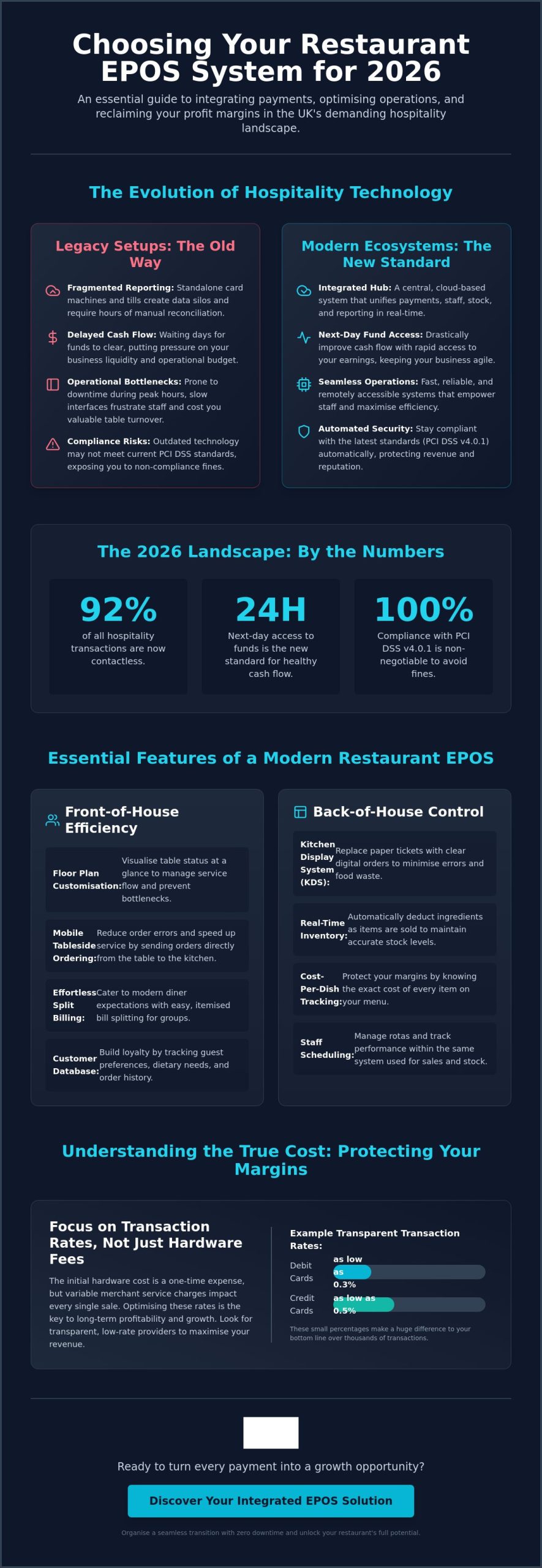
    Legacy setups often relied on standalone card machines that didn’t talk to the till. This created fragmented reporting and endless manual reconciliation. Modern EPOS systems remove this friction entirely. Because they’re cloud-based, you can monitor your restaurant’s performance from your phone whilst away from the site. This transparency is vital for spotting waste or staffing issues early. In a high-inflation economy, the speed of your cash flow is also paramount. Integrated systems provide next-day access to funds, ensuring your business stays liquid and ready for the next delivery. This reliability helps alleviate the stress that business owners feel regarding complex fee structures and delayed payments.

    Why “Good Enough” is No Longer Enough for UK Restaurants

    Consumer behaviour has changed rapidly. Statistics from early 2026 show that contactless payments now account for 92% of all hospitality transactions. If your system is slow or prone to downtime, you’re directly hurting your table turnover. A laggy interface during a peak Friday night doesn’t just frustrate staff; it costs you covers. Security is another non-negotiable factor. With PCI DSS v4.0.1 now being the sole supported standard as of 2025, using outdated tech risks monthly non-compliance fines. A modern restaurant EPOS system UK keeps you compliant automatically, protecting your reputation and your revenue. By prioritising clarity and efficiency, you ensure your technology supports your growth rather than acting as a bottleneck.

    Essential Features Every UK Restaurant EPOS Must Have

    The best systems don’t just process payments; they orchestrate the entire floor. A robust restaurant EPOS system UK provides a clear, customisable floor plan that acts as the foundation for your service speed. Your staff should be able to see, at a glance, which tables are waiting for drinks, which are mid-course, and which are ready for the bill. This visual clarity prevents bottlenecks and ensures no customer is left waiting during a frantic shift. Beyond the floor plan, your system must offer granular inventory tracking. With food prices remaining volatile in 2026, knowing your exact cost-per-dish is the only way to protect your margins. Every ingredient should be accounted for, from the premium steaks to the garnish.

    Front-of-House Efficiency: Table Management and Mobile Ordering

    Speed at the table is the heartbeat of a busy shift. By adopting restaurant industry technology trends like mobile tableside ordering, you eliminate the constant back-and-forth to a central terminal. Waitstaff can send orders directly to the kitchen the moment they are taken; this significantly reduces lead times and improves order accuracy. For weekend diners, split-billing features are no longer optional. Customers expect to pay for exactly what they had without a mathematical debate at the end of the night. These tools also allow you to build a database of your guests. Recognising a favourite customer’s previous order or dietary preference builds the kind of loyalty that keeps a local business thriving.

    Back-of-House Control: Inventory and Kitchen Integration

    Your kitchen is where your margins are won or lost. A Kitchen Display System (KDS) replaces messy paper tickets with clear, digital prompts that reduce errors and food waste. These screens ensure the kitchen team receives orders the second they are placed, keeping the rhythm of service steady. Integration with your inventory is equally vital. When a burger is sold, your system should automatically deduct a bun and a patty from your stock levels in real-time. Automated low-stock alerts prevent the awkwardness of a server having to tell a guest that a menu item is unavailable mid-service. This level of control allows you to run a leaner, more profitable operation. If you are looking to upgrade, choosing a modern EPOS system can help you centralise these complex tasks into one manageable dashboard.

    Managing your team effectively requires more than just a paper rota. Modern systems include staff management tools that track individual performance and handle shift scheduling. You can see which servers are upselling effectively and which shifts require more support. By identifying these patterns, you can optimise your labour costs whilst ensuring your best staff are rewarded. This data-driven approach turns your EPOS from a simple tool into a strategic asset for your restaurant’s long-term growth.

    Calculating the Real Cost: Software Fees vs. Transaction Rates

    Finding the most cost-effective restaurant EPOS system UK requires looking past the initial sales pitch. You must evaluate the Total Cost of Ownership (TCO) to understand how much money actually leaves your bank account each month. Many owners focus on the hardware price or the software subscription whilst ignoring the variable merchant service charges that follow. These transaction fees are often the largest expense in your technology stack. The effective rate is the true measure of payment processing costs; it represents your total monthly fees as a percentage of your total sales volume.

    A transparent financial strategy balances fixed and variable costs. Fixed monthly hardware rentals provide predictability, but they shouldn’t be bundled with opaque processing terms. You need a partner that identifies every cost clearly, from the terminal lease to the per-transaction markup. This clarity helps you move from a state of frustration regarding hidden fees toward a state of informed confidence in your margins. Your technology should be a stabilizing force for your business finances, not a source of unexpected overheads.

    The Trap of “Free” EPOS Software

    Entry-level providers often lure business owners with the promise of “free” software. This is frequently a financial trap that punishes your success. These systems usually carry high transaction rates of 1.75% or more, which can cost a thriving restaurant thousands of pounds in unnecessary fees. For a restaurant with a £20,000 monthly turnover, a “free” system at a 1.5% rate costs you £300 a month. Conversely, a paid system with a £50 monthly fee and a 0.3% rate costs you only £110 in total. The “free” option is actually £190 more expensive every single month. You should also insist on next-day access to funds as a standard feature. In a fast-moving hospitality environment, waiting days for your own money is an outdated practice you don’t have to accept.

    Understanding Merchant Service Charges (MSC)

    Transparency in Merchant Service Charges (MSC) is the no-nonsense approach every owner should demand. You deserve to know exactly what you’re paying for debit and credit transactions. Fair rates, such as those from PurePay, typically start around 0.3% for debit cards and 0.5% for credit cards. These small differences in percentage points can save you enough to hire another staff member or upgrade your kitchen equipment over the course of a year. Avoid long-term contracts that hide annual fee increases or exit penalties. A supportive business ally won’t need to lock you in with complex legalese; they’ll keep your business through fair service and honest pricing. By prioritising these clear fee structures, you ensure your technology acts as a growth engine rather than a drain on your resources.

    Choosing the Best Restaurant EPOS System in the UK for 2026

    Organising a Seamless Transition to Your New System

    Switching your restaurant EPOS system UK shouldn’t feel like a leap into the dark. It’s a strategic move. It requires a structured plan to avoid losing a single night of trade. Many owners worry about the administrative headache of setting up new technology during a busy season. The right partner makes this transition effortless by prioritising clarity over complexity. You need a system that stabilises your finances from day one. This transition follows a simple logic: identify the bottlenecks in your old setup and configure the new one to solve them. It’s about improvement, not just replacement.

    Data Migration: Moving Your Menu and Stock

    Moving your data is the perfect time for a digital spring clean. Audit your current menu before you start the import. Remove unpopular items that clutter your interface and slow down your servers. This ensures a clean import into your new setup. Crucially, you must map your VAT categories correctly. This keeps you compliant with HMRC and prevents accounting errors later. Generic global advice often ignores these UK-specific banking and tax requirements. A provider that offers dedicated technical support during this phase prevents costly mistakes. They help you bridge the gap between your old till and your new integrated ecosystem whilst ensuring your historical data remains accessible for year-end reporting.

    Staff Buy-In: Training for Peak Performance

    Your staff use the system during the frantic Saturday night rush. They need an interface that makes sense immediately. A punchy, intuitive design reduces the learning curve for new hires and seasoned veterans alike. Don’t go live without a mock service. Run a practice shift with your team to test the workflow. This builds the confidence your team needs to handle high-pressure situations without hesitation. Once live, use the granular reporting to reward your most efficient performers. You can see which staff members are upselling effectively or managing their tables with the most speed. This turns a technical change into a motivational tool for your entire team.

    A successful transition relies on a partner who values your time and your margins. You deserve a system that is as disciplined and professional as your kitchen. By following a clear onboarding framework, you can upgrade your technology without the stress usually associated with new software. If you’re ready to leave behind opaque fees and fragmented reporting, you can switch to a more transparent EPOS system today and start reclaiming your hard-earned profits.

    Why PurePay Hub is the Growth Engine for UK Restaurants

    PurePay Hub acts as a stabilising force for your restaurant’s finances. In an industry often viewed with scepticism, we provide a transparent alternative to the opaque practices of traditional banks. Choosing our restaurant EPOS system UK means you aren’t just buying hardware; you’re entering a disciplined partnership. We offer 0.3% debit and 0.5% credit transaction rates to ensure your margins remain protected. This clear fee structure allows you to forecast your overheads with absolute certainty. Our goal is to alleviate the stress that business owners feel regarding hidden costs and complex markup models.

    Integrated Payments and Next-Day Funding

    Integrated payments remove the frustration of manual entry on card machines. When your till and your terminal speak the same language, human errors disappear. This efficiency is supported by our range of Countertop Card Machines and Portable Card Machines, designed to suit any restaurant layout. We believe in calm advocacy for our partners, which is why next-day access to your funds is a standard feature. You shouldn’t have to wait for your own money to arrive whilst your suppliers need paying. By prioritising your cash flow, we ensure your technology acts as a supportive ally rather than a bottleneck.

    Unlocking Capital with Business Cash Advances

    We understand that growth requires capital, but traditional bank loans are often too rigid for the hospitality sector. Our Business Cash Advance allows you to use your future card sales to secure unsecured capital today. This is a game-changer for owners planning refurbishments or kitchen upgrades. Unlike bank loans with fixed monthly repayments, this model follows a “pay-as-you-earn” structure. Your repayments are a small, agreed percentage of your daily card sales. If you have a quieter week, your repayments automatically reduce. It’s a flexible, no-nonsense way to fund your expansion without the pressure of traditional debt cycles.

    Our focus remains on the individual business owner. We disdain hidden markups and corporate jargon, choosing instead to lead our partners toward a state of informed confidence. By centralising your payments, your reporting, and your funding, we help you lead your business with a clear head. You deserve a partner that values efficiency and straight-talking as much as you do. You can organise a transparent rate review with PurePay Hub today to discover how much your business could save.

    Reclaiming Your Margins in 2026

    The right technology should be a stabilising force for your finances, not a source of stress. You’ve seen how a modern restaurant EPOS system UK acts as a central nervous system, uniting your front-of-house with the kitchen whilst protecting your hard-earned margins. By looking past the trap of “free” software and focusing on transparent transaction rates, you can turn every payment into a growth opportunity. Whether you’re streamlining a single site or planning a multi-venue expansion, the path to a more profitable 2026 starts with clarity and integrated reporting.

    We are here to act as your fair partner in an industry that often feels opaque. You deserve a setup that offers next-day funding as standard and provides no-nonsense, UK-based support when you need it most. It’s time to stop letting hidden fees eat into your success. We provide debit rates from 0.3% and credit rates from 0.5% to ensure you keep more of what you earn every single day.

    Switch to PurePay Hub for 0.3% rates and integrated EPOS

    Take the next step toward a more efficient, profitable future for your restaurant. Your success is our priority.

    Frequently Asked Questions

    How much does a typical restaurant EPOS system cost in the UK?

    The total cost depends on your specific hardware needs and the number of terminals required for your floor plan. You will typically encounter a combination of upfront hardware costs for screens and printers; a monthly software subscription fee; and variable transaction rates. It is vital to look at the total cost of ownership rather than just the initial price tag to ensure your margins remain protected from hidden markups.

    Can I keep my existing card machine when I switch EPOS providers?

    You can technically use a standalone card machine, but you will lose the significant advantages of an integrated restaurant EPOS system UK. Integrated systems allow your till and terminal to communicate directly; this removes the need for manual data entry and prevents reconciliation errors at the end of a shift. Switching to a unified provider usually simplifies your reporting and results in faster access to your funds.

    What is the difference between an EPOS system and a standard cash register?

    A standard cash register is a passive tool for recording sales and storing cash; an EPOS system is an active partner that helps you optimise your entire business. It tracks inventory in real-time, manages staff rotas, and provides granular data on your most profitable dishes. Whilst a till only handles the final transaction, an EPOS system orchestrates everything from the initial order to the final kitchen prompt.

    How long does it take to install a new restaurant EPOS system?

    A standard installation usually takes between one and three days depending on the size of your venue and the complexity of your menu. This period includes the physical setup of your terminals and a dedicated training session to ensure your team is confident before the first live service. Choosing a partner that prioritises quick onboarding helps you transition between systems without losing a single night of trade.

    Do I need a specific internet speed to run a cloud-based EPOS?

    Stability is more important than raw speed; most cloud-based systems run perfectly on a standard fibre connection with speeds of 10-20Mbps. You should ensure your Wi-Fi coverage is consistent across your entire dining area to support portable card machines for tableside ordering. We recommend using a dedicated network for your business operations to keep your connection fast and secure during peak periods.

    Is a business cash advance better than a traditional bank loan for my restaurant?

    A business cash advance offers more flexibility for the hospitality sector because repayments are based on a small percentage of your daily card sales. This “pay-as-you-earn” model means you pay back less during quieter weeks, which protects your cash flow. Traditional bank loans require rigid monthly payments regardless of your turnover; this can create unnecessary financial pressure during the off-season or slower months.

    What happens if my internet goes down during service?

    Modern systems include an offline mode that allows you to continue taking orders and processing payments even if your connection drops. All data synchronises automatically once your internet is restored. This feature ensures that a temporary technical glitch doesn’t disrupt your service or lead to lost revenue during a busy Friday night rush. Your business remains operational and your data remains secure.

    How does an integrated EPOS help with HMRC and VAT reporting?

    An integrated restaurant EPOS system UK automatically maps every sale to the correct VAT category; this ensures your reporting is accurate and fully compliant with HMRC requirements. You can export clean, professional data directly into your accounting software, which saves hours of manual reconciliation for your bookkeeper. This level of transparency provides you with an effortless audit trail and total confidence in your financial records.

  • What is an EPOS System? The Complete Guide for UK Businesses

    What is an EPOS System? The Complete Guide for UK Businesses

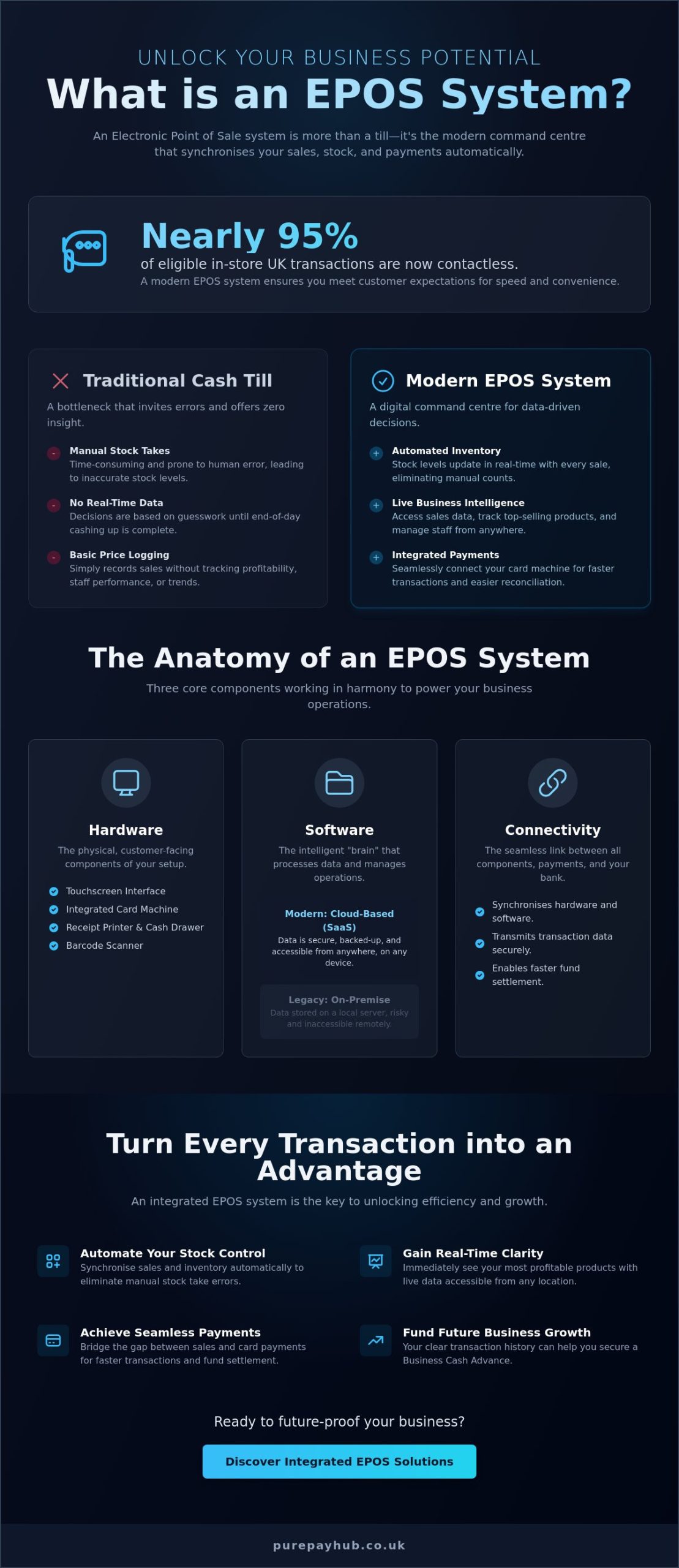
    With nearly 95% of eligible in-store transactions in the UK now being contactless, the traditional cash till has become a bottleneck for growth rather than a tool for success. If you are asking what is epos system technology and how it differs from a standard register, you are looking for a way to modernise your daily operations. You likely understand the frustration of losing hours to manual stock takes or catching human errors only after a busy shift has ended. It’s difficult to scale when you lack clarity on which items actually drive your profit.

    We believe in straightforward solutions that respect your time and your bottom line. This guide promises to show you how an EPOS system works to automate your inventory and provide real-time business data from any location. We will explore the essential components you need, from countertop card machines to seamless software integrations; ensuring your sales and payments work in perfect harmony to protect your cash flow. Discover how to turn every transaction into a strategic advantage for your business.

    Key Takeaways

    • Transform your daily operations by turning a basic till into a digital command centre that eliminates manual stock take errors.
    • Understand exactly what is epos system technology and how its combination of hardware and software synchronises your sales and inventory automatically.
    • Gain immediate clarity on your most profitable products with real-time data access that you can view from any location.
    • Learn how to bridge the gap between sales and card payments to achieve seamless integration and faster fund settlement.
    • Discover how your transaction history can help you secure a Business Cash Advance to fund your future business growth.

    What is an EPOS System? The Modern Business Command Centre

    An Electronic Point of Sale (EPOS) system is much more than a digital version of a cash drawer. It is a centralised digital ecosystem that acts as the brain of your business. Whilst a traditional till simply stores cash and prints a basic receipt, an EPOS system synchronises every sale with your inventory, accounting, and staff records in real time. For any UK merchant asking what is epos system technology, the answer lies in its ability to turn a simple transaction into a wealth of actionable data.

    The journey from mechanical registers to cloud-based intelligence has changed how we manage shops and restaurants. Modern systems don’t just sit on a counter; they live in the cloud. This means your business data is live and accessible from your phone or laptop whilst you travel. You no longer need to be physically present to know your current stock levels or your total takings for the afternoon. This level of transparency allows you to make informed decisions based on facts rather than guesswork.

    Consumer behaviour has shifted rapidly. In 2024, nearly 95% of all eligible in-store card transactions in the UK were contactless. Customers expect speed and flexibility. An EPOS system meets this demand by integrating payment processing directly into the checkout flow; ensuring you never miss a sale due to slow hardware or outdated software. It creates a professional image that builds trust with your local community.

    The Core Difference Between EPOS and a Standard Till

    A standard till relies on manual entry. These systems invite human error during busy periods and offer very little insight into your actual performance. EPOS systems use automated barcode scanning and integrated card terminals to ensure every price is accurate. The most significant benefit is the removal of the end-of-day manual reconciliation headache. Because the system tracks every penny automatically, your reports are ready the moment you close your doors. You move from simple price-logging to comprehensive business management with a single tool.

    Is EPOS the Same as POS?

    You will often hear these terms used interchangeably, but there is a subtle distinction. A Point of Sale (POS) traditionally refers to the physical location where a transaction happens, such as a checkout counter. The “E” in EPOS highlights the electronic connectivity that modern UK businesses require. It represents the software and hardware working together to manage your entire operation. In the merchant services industry, most professionals use these terms to describe the same digital solution, but understanding what is epos system functionality helps you choose the right tool for your specific needs.

    The Anatomy of EPOS: Hardware, Software, and Connectivity

    Understanding what is epos system architecture requires looking at three distinct layers: the hardware you touch, the software that thinks, and the connectivity that moves your money. When these three elements work in harmony, they create a stable foundation for your daily operations. A breakdown in any one of these areas can lead to lost sales or frustrated customers, which is why choosing a unified solution is vital for long-term reliability.

    The hardware layer is the most visible part of your setup. It typically includes a touchscreen interface, a receipt printer, and a cash drawer. However, the true engine of the checkout is your card terminal. Whether you utilise a countertop card machine at a fixed point or a portable card machine for service on the move, these devices must be robust and user-friendly. Security is equally important; your hardware choice must support PCI DSS compliance to protect cardholder data and shield your business from potential penalties. Modern providers often handle these complex security requirements for you, allowing you to focus on your customers.

    The software layer acts as the brain of the operation. In the past, businesses relied on “legacy” systems that stored data on bulky on-site servers. These are now largely obsolete because they are expensive to maintain and risky to operate. If a local server fails, your business grinds to a halt. Modern UK merchants have shifted toward cloud-based “Software as a Service” (SaaS) models. This shift ensures your data is backed up automatically and accessible from any location whilst you are away from the shop floor. For more detail on these digital shifts, you can read a comprehensive guide to EPOS systems which highlights how cloud intelligence has become the industry standard.

    Essential EPOS Hardware for UK Merchants

    Your specific industry will dictate your hardware needs. A retail boutique might favour a sleek, tablet-based system to maintain a modern aesthetic. Conversely, a busy pub will require a mix of countertop units and mobile card machines to take payments at the table. You may also need peripheral equipment such as barcode scanners for rapid stock entry or kitchen printers to send orders directly to your chefs. If you are ready to upgrade your physical setup, exploring a tailored EPOS system can help you identify the exact tools your floor plan requires.

    Software: The Difference Between Cloud and Legacy

    The biggest advantage of cloud software is the delivery of automatic updates. You don’t need to manually install new versions or worry about your system becoming obsolete. Every time a new feature is released or a security patch is required, the system updates itself in the background. This ensures your business always has the latest tools to manage inventory and staff performance without the technical headache of legacy software management. It is a fairer, more transparent way to keep your business technology current.

    What is an EPOS System? The Complete Guide for UK Businesses

    How an EPOS System Works to Organise Your Business

    When you process a sale, a complex series of background tasks occurs instantly. Understanding what is epos system logic helps you see beyond the simple beep of a scanner. The moment an item is scanned, the software doesn’t just calculate a total; it subtracts that specific unit from your inventory, logs the staff member’s ID, and prepares the data for your accounting records. This automated journey from scan to fund settlement ensures your books are always accurate without any manual intervention. It turns a busy shift into a clean, organised data set that reflects the true state of your business.

    Managing a team becomes far simpler when you have a transparent view of the shop floor. An EPOS system allows you to monitor individual staff performance and identify who your top sellers are during any given period. It also helps reduce shrinkage by highlighting discrepancies between stock levels and actual sales. By creating a database of your favourite customers, you can track their purchasing behaviour and offer personalised rewards. This level of insight was once reserved for major corporations, but modern technology has made it accessible to every local merchant, providing the tools needed to compete on a larger scale.

    Streamlining the Checkout Experience

    Queues are the enemy of retail and hospitality. An integrated system removes the friction of manual entry. By combining your till software with your card machines, you eliminate the need to type amounts into a terminal twice. This reduces human error and speeds up service significantly. You can also automate promotions. If you run a buy one get one free offer, the system applies the discount instantly. This level of precision protects your margins whilst keeping customers happy. Digital receipts are another advantage; they save on paper costs whilst allowing you to collect valuable customer emails for future marketing efforts.

    The Power of Data-Driven Reporting

    Data is your most valuable asset. A modern system allows you to identify your best-sellers and dead stock in seconds. You no longer have to guess which products are truly profitable. You can compare performance across multiple locations from a single dashboard, which is essential for business development. This transparency is also crucial for Making Tax Digital (MTD) compliance. You can export clean, organised data directly to your accountant, saving hours of administrative work. By turning every transaction into a strategic data point, you can focus on growing your business rather than just maintaining it. It provides the clarity needed to make confident decisions about your future inventory and staffing levels.

    Choosing the Right EPOS for Your Industry and Budget

    Choosing the right system is a critical decision for your business’s future. When you investigate what is epos system technology for your specific sector, you’ll find that one size rarely fits all. You need a solution that understands your daily challenges; whether that’s managing a busy lunch rush or tracking hundreds of individual stock items. We advocate for a no-nonsense approach to selection. Focus on the features that actually save you time and the fees that respect your margins.

    Evaluating the true cost of ownership is essential. You will likely encounter two main models: hardware rental or upfront purchase, combined with monthly software subscriptions. Whilst a low entry price is tempting, always look for hidden markups in the transaction-based processing fees. Support is another non-negotiable factor. If your system goes down on a busy Saturday night, you need 24/7 UK-based help to get back online. A distant help centre that only operates during office hours isn’t a partnership; it’s a liability.

    Hospitality vs Retail: What Features Do You Need?

    Hospitality businesses rely on floor plans and kitchen display systems to keep service moving. If you run a pub, you need to manage tables and split bills without causing a queue at the bar. Retailers, on the other hand, require complex size and colour matrices and automatic stock alerts. If you operate online, your in-store sales must sync with your e-commerce platform to prevent overselling. Service-based businesses like salons should look for integrated appointment booking and deposit management to reduce the financial impact of no-shows.

    Scrutinising the Fee Structure

    This is where many traditional providers hide their profit. You must understand the difference between debit and credit card rates. Debit cards account for approximately 80% of all card transactions in the UK, and these typically carry lower processing costs. You might see rates of 0.3% for debit versus 0.5% for credit. Don’t get trapped by “blended” rates that charge you the same for a basic debit card as they do for a premium credit card. Avoid long-term contracts with high exit fees. They often signal a provider who isn’t confident in their own service. Transparent, transaction-based fees are far better for your seasonal cash flow. They ensure you only pay when you are actually making money.

    If you want a partner that values honesty over hidden markups, you can get a quote for a transparent EPOS system today.

    Future-Proofing with PurePay Hub: Integrated EPOS and Payments

    Choosing the right technology is the first step, but the real power lies in how that technology integrates with your financial flow. At PurePay Hub, we move beyond the basic question of what is epos system software and focus on how it stabilises your business. We provide a centralised service that links your sales data directly to your payment processing. This integration ensures that your countertop or portable card machines communicate perfectly with your till; allowing for next-day funding that keeps your cash flow healthy and predictable.

    Our approach is built on transparency and fairness. We avoid the murky fee structures often found in traditional banking. Instead, we offer a single, clear monthly statement that shows exactly where your money goes. We act as a supportive business ally; providing a no-nonsense merchant account management service that removes the stress of hidden markups. You get the technical precision of a modern fintech company with the personal touch of a local expert who understands the regional market.

    Seamless Payment Integration

    Double-keying errors are a common frustration for busy merchants. By linking your terminal and till, you eliminate the need to enter amounts twice, which removes the risk of human error during peak trading periods. Your customers can pay using Apple Pay, Google Pay, or any major card instantly. We are committed to providing the lowest card machine rates for UK SMEs. This isn’t just about processing payments; it’s about creating a frictionless experience that encourages repeat business and builds trust with your local community. It simplifies your daily admin whilst protecting your bottom line.

    Unlocking Growth with EPOS Intelligence

    The data captured by your system is a powerful tool for expansion. We use your sales volume records to help you qualify for a Business Cash Advance. This provides you with unsecured capital without the rigid constraints or complex paperwork of a traditional bank loan. You simply repay the advance as a small, fixed percentage of your daily card sales. It is a flexible way to fund new equipment or store renovations that scales naturally with your success. If your sales are slower one day, your repayment is smaller. Contact us to see how we can stabilise your finances and help your business reach its full potential.

    Take Control of Your Business Growth

    Transitioning from a manual till to a digital command centre is about more than just taking payments. It is about gaining the visibility you need to run a more efficient operation. Understanding what is epos system capability allows you to automate your stock takes, reduce human error, and build a stronger relationship with your favourite customers. You no longer have to settle for opaque fees or slow, unresponsive service.

    We are here to act as your supportive business ally. With debit card rates from 0.3% and next-day access to your funds, we ensure your hard-earned money stays where it belongs. Our UK-based expert support is always available to provide clear, honest guidance whenever you need it. You can get a transparent quote for your integrated EPOS and card payments today. Take the next step with confidence and build the modern business you’ve always envisioned.

    Frequently Asked Questions

    Is an EPOS system expensive for a small UK business?

    Costs vary depending on your specific requirements, but there are options to suit most budgets. When asking what is epos system investment likely to be, you’ll find that businesses can choose between upfront hardware purchases or monthly rental models. Modern providers often offer free software plans where you only pay transaction fees; making it an accessible investment for startups and smaller merchants.

    Can I use an EPOS system without an internet connection?

    Yes, many modern systems feature an offline mode that allows you to continue taking payments and scanning items if your connection drops. The system stores the transaction data locally and syncs with the cloud once the internet is restored. This ensures your service remains uninterrupted during a busy shift and prevents any loss of sales data.

    How long does it take to set up a new EPOS system?

    A basic setup can be completed in a few hours, whilst more complex systems with large inventories might take a few days. The process involves configuring your software, importing your product list, and connecting your card terminals. Most providers offer guided installation to ensure your business command centre is operational as quickly as possible without disrupting your trade.

    Do I need a specific merchant account for an EPOS system?

    You generally need a merchant account that is compatible with your chosen software to ensure seamless fund settlement. Whilst some businesses try to use separate providers, an integrated merchant account simplifies your finances by providing a single monthly statement. This creates a more stable and transparent environment for managing your daily takings and tracking your overall business performance.

    What happens if my EPOS hardware breaks during a busy shift?

    Reliable providers offer rapid hardware replacement or remote support to get you back online quickly. Because modern systems are cloud-based, your data is safe even if the physical terminal fails. You can often log in to your software from a tablet or mobile device as a temporary backup to keep the queues moving whilst you wait for a replacement unit.

    Can an EPOS system help with my VAT and tax returns?

    Yes, these systems automate the collection of sales data required for Making Tax Digital (MTD) compliance. You can export clean, accurate reports directly to your accounting software, which significantly reduces the time spent on manual calculations. It provides a transparent audit trail for your VAT and annual tax returns; ensuring you stay on the right side of HMRC regulations.

    Is it difficult to switch from a traditional cash register to EPOS?

    The switch is straightforward and often provides immediate relief from manual administrative tasks. Most modern interfaces are designed to be intuitive and require minimal staff training. Once you understand what is epos system functionality and how it automates your stock levels, you will likely find it much easier to manage than a mechanical till and a paper ledger.

    Does an EPOS system work with my existing card machine?

    It depends on the compatibility of your current hardware and software. Whilst some standalone card machines can work alongside a till, an integrated solution is much more efficient for a growing business. Linking your terminal and till prevents double-keying errors and ensures your sales data and payment records are always perfectly synchronised for easier end-of-day reconciliation.

  • How to Reduce Customer Queue Times in Retail: A Guide for UK Merchants

    How to Reduce Customer Queue Times in Retail: A Guide for UK Merchants

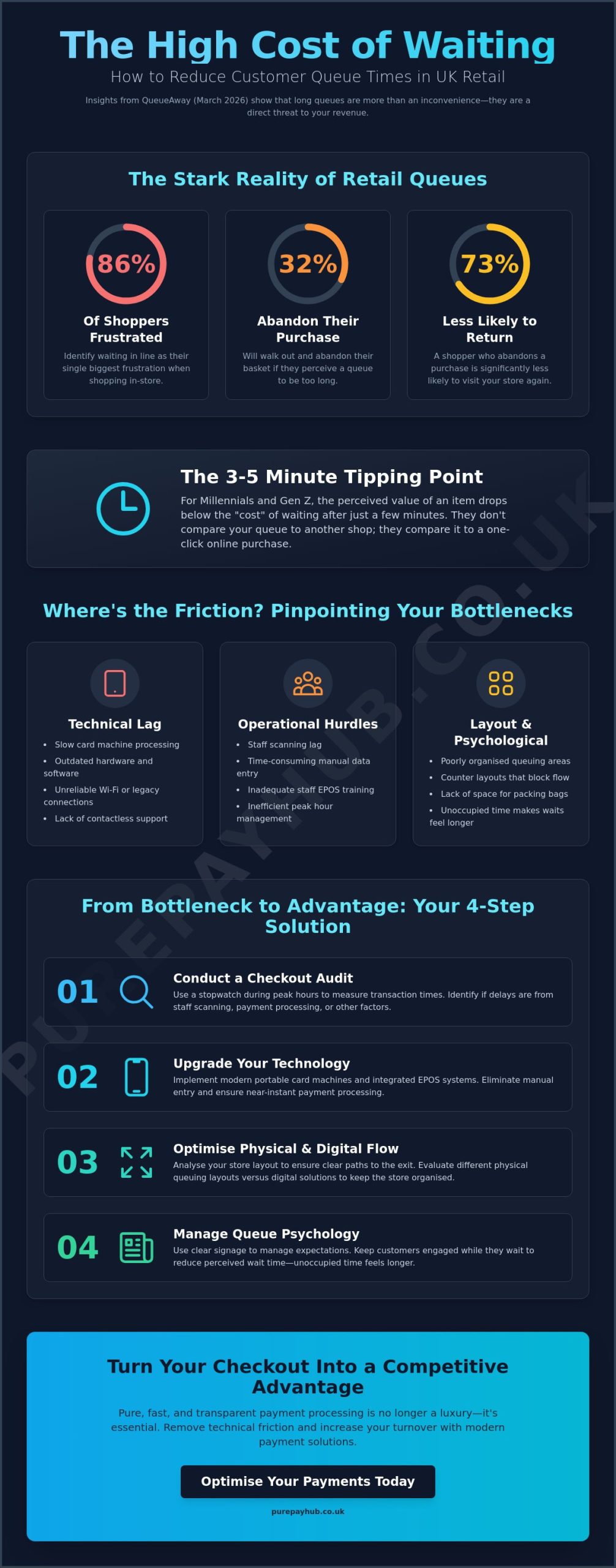
    Did you know that 86% of shoppers identify waiting in line as their single biggest frustration when shopping in-store? According to QueueAway data from March 2026, approximately 32% of your customers will walk out and abandon their purchase if they see a long queue. You’ve likely felt that familiar sting of watching a potential sale leave because your checkout process couldn’t keep up. Learning how to reduce customer queue times in retail is now essential for any UK merchant wanting to protect their bottom line.

    We believe your payment processing should be pure, fast, and completely transparent. This guide provides practical strategies to remove the technical friction that causes transaction lag at your point of sale. You’ll discover how to leverage modern portable card machines and integrated EPOS systems to increase your turnover. We’ll also explore how to use trading data to manage peak hours effectively, ensuring your staff stay calm and your customers leave with a smile. It’s time to turn your checkout from a bottleneck into a competitive advantage.

    Key Takeaways

    • Understand the financial cost of queue abandonment and learn exactly how to reduce customer queue times in retail by removing technical friction at the point of sale.
    • Discover how to conduct a professional checkout audit to identify whether your bottlenecks are caused by staff scanning lag or slow card machine processing.
    • Learn the practical steps to transition from manual data entry to an integrated EPOS system for faster, error-free transactions during peak hours.
    • Evaluate the efficiency of different physical queuing layouts versus digital solutions to ensure your store remains organised and productive.
    • Identify how speed-optimised portable hardware and transparent, transaction-based pricing can help you scale your business without the burden of hidden fees.

    The Real Cost of Long Queues in UK Retail

    Every second your customers spend standing still is a second they spend reconsidering their purchase. In UK retail, the financial impact of a slow checkout is stark. Recent data from QueueAway (March 2026) shows that 32% of shoppers will abandon their basket if they perceive the wait to be too long. This isn’t just a lost sale today; it’s a direct hit to your bottom line that compounds over time. Understanding the principles of Queueing theory helps merchants identify where these bottlenecks form and why they matter.

    It’s vital to distinguish between dwell time and transaction time. Dwell time represents the valuable minutes customers spend browsing your aisles, which you want to maximise. Transaction time is the purely functional period spent at the till, which you must minimise. When transaction time bleeds into the shopping experience, it creates friction. Learning how to reduce customer queue times in retail is about protecting that positive browsing experience from being overshadowed by a frustrating exit.

    Queue psychology is the study of how the human brain perceives wait times based on environmental factors and social fairness. By 2026, consumer patience has reached a record low. With 95% of transactions being contactless and the FCA removing the £100 single-transaction limit in March 2026, shoppers expect instant results. They don’t compare your queue to the shop next door; they compare it to the speed of a digital “one-click” purchase.

    Understanding Queue Abandonment

    For many shoppers, especially Millennials and Gen Z, the tipping point occurs between three and five minutes. Once a customer crosses this threshold, the perceived value of the item often drops below the perceived “cost” of the wait. This abandonment destroys customer lifetime value. A shopper who leaves empty-handed today is 73% less likely to return. Visible queues also act as a deterrent for new footfall, stopping potential sales before they even enter your shop.

    The Psychology of Waiting

    Perception is often more important than reality. Actual wait time is measured with a stopwatch, but perceived wait time is what the customer feels. Unoccupied time feels significantly longer than occupied time. You can reduce frustration by keeping customers engaged or providing clear signage. When shoppers see an organised system, their anxiety levels drop. Mastering how to reduce customer queue times in retail requires balancing technical speed with these psychological cues.

    Identifying Friction Points in Your Checkout Flow

    To understand how to reduce customer queue times in retail, you must first measure the problem with precision. Start by conducting a professional “checkout audit” during your busiest trading window. Use a stopwatch to track the time from when a customer reaches the counter to the moment the receipt prints. You’ll likely discover that seconds are leaked during the “scanning lag” or when staff struggle with manual data entry. Staff training plays a vital role here. If your team isn’t confident with the EPOS interface, errors will occur. These mistakes don’t just cost money; they stop the flow of your entire shop.

    A critical factor often missed by UK merchants is the difference between occupied and unoccupied time. As explored in the psychology of waiting in lines, customers who are mentally engaged feel the wait is significantly shorter. If a shopper is simply staring at a frozen screen, every second feels like ten. This is why outdated hardware is a silent killer of transaction speed. Upgrading to a high-speed Portable Card Machine can solve many of these technical delays by allowing you to take payments anywhere on the shop floor.

    Technical Bottlenecks: Card Machine Lag

    Your card machine’s “handshake” with the merchant bank should be near-instant. If you’re still relying on patchy Wi-Fi or legacy connections, you’re building a queue by default. In 2024, almost 95% of in-store transactions were contactless, according to Barclays research. This means your customers expect a “tap and go” experience. Any delay in processing signals a lack of efficiency and increases the risk of queue abandonment. High-speed, PCI-compliant processing is now a baseline requirement for maintaining turnover.

    Layout and Merchandising Friction

    Poor shop layout often causes accidental bottlenecks. While impulse buy displays increase margins, they shouldn’t block the physical path to the exit. Analyse your counter height and bag-packing space. If a customer cannot bag their items comfortably, the next person in line cannot start their transaction. It’s a domino effect that slows everyone down. Organising your queue area to keep aisles clear ensures that browsing customers aren’t put off by the crowd at the till. A well-designed “payment zone” respects the customer’s personal space and speeds up the final step of their journey.

    How to Reduce Customer Queue Times in Retail: A Guide for UK Merchants

    Digital vs Physical: Strategies to Minimise Wait Times

    Choosing between a single-line serpentine queue and a multi-checkout system depends on your shop’s footprint and typical basket size. Research into the effect of express checkouts suggests that separating small basket transactions can significantly improve flow and perceived fairness. For a small UK retailer, this doesn’t always require a dedicated physical lane. It might simply mean having a staff member ready with a Mobile Card Machine to process shoppers with one or two items. Understanding how to reduce customer queue times in retail involves balancing this physical layout with digital agility.

    Self-service kiosks are an option for high-volume environments, but they often lack the personal touch that defines local British businesses. A more effective middle ground is the use of integrated EPOS Systems. These systems synchronise your stock and sales data instantly, removing the need for staff to double-check prices or manual inventory levels during a transaction. When your digital and physical systems talk to each other, the “transaction lag” we identified earlier virtually disappears. We see this as the “Pure” approach to retail; it’s clean, fast, and removes the clutter from your counter.

    Staffing Models for Peak Periods

    Success during peak trading hours relies on a flexible “float” staff method. This involves moving team members from merchandising or stockroom duties to the tills the moment a queue exceeds three people. You can take this further by implementing “queue busting.” Instead of waiting for customers to reach the counter, a staff member can use a Portable Card Machine to take payments from people whilst they are still in line. This is particularly effective for handling complex transactions like returns or exchanges away from the main till, keeping the primary flow moving for simple purchases.

    Technology Integration

    Integrated payments are the cornerstone of a modern checkout. When your card terminal is linked directly to your EPOS, you eliminate the risk of manual entry errors. This doesn’t just save money; it saves time. The rise of NFC technology has made the “tap and go” process the standard for UK shoppers. By using the data from your POS, you can predict exactly when your peak hours will occur each week. This allows you to organise your staff rotas with precision, ensuring you’re never understaffed when the rush begins. At PurePay Hub, we act as your merchant’s ally by providing the tools that turn these data insights into faster transaction speeds.

    A Step-by-Step Guide to Streamlining Your In-Store Experience

    Moving from theory to practice requires a structured approach. If you want to master how to reduce customer queue times in retail, you must treat your checkout as a data-driven process. Follow these five steps to identify and eliminate the friction points holding your business back.

    • Step 1: Conduct a Peak-Hour Audit. Grab a stopwatch during your busiest window, typically between 12:00 and 14:00 on a Saturday. Measure the time from the first item scanned to the final receipt print. If this exceeds 60 seconds for a standard basket, you have a bottleneck.
    • Step 2: Upgrade to an Integrated EPOS System. Manual data entry is the enemy of speed. An integrated system ensures your till and card terminal talk to each other instantly. This removes the need for staff to double-key amounts, which prevents errors and saves roughly 10 to 15 seconds per transaction.
    • Step 3: Deploy Portable Card Machines. Don’t let your counter be the only place people can pay. Use a Portable Card Machine to bust queues by serving customers whilst they are still standing in line. This is especially effective during seasonal rushes.
    • Step 4: Optimise Your Connectivity. For countertop units, an Ethernet connection is always superior to Wi-Fi. It provides a dedicated, stable line that ensures your terminal’s “handshake” with the bank is near-instant.
    • Step 5: Refine Staff Incentive Programmes. Motivate your team based on checkout throughput and accuracy. High-performing staff should be recognised for maintaining a steady flow without sacrificing the quality of the customer interaction.

    Optimising the Payment Moment

    The technical “handshake” between your card reader and the merchant bank is often where seconds are lost. A slow connection can add five seconds to every transaction. Over 100 customers, that’s nearly ten minutes of pure delay. Ensure your hardware is set for the fastest possible response. We also recommend choosing a provider that offers next-day funding. This maintains your operational momentum, allowing you to reinvest in your shop’s efficiency without waiting days for your hard-earned capital to arrive.

    Monitoring and Feedback

    Your checkout flow should evolve alongside your business. Regularly review your transaction logs to spot patterns in slow service times. Is it always a Tuesday morning? Perhaps that’s when a specific staff member needs more training. Use customer feedback to identify “invisible” frustrations, such as a lack of bagging space or confusing signage. Continuous improvement ensures that your transaction speed remains a core strength of your brand. It’s about creating a pure, frictionless journey from the aisle to the exit.

    How PurePay Hub Optimises Your Transaction Speed

    We’ve discussed the technical and psychological barriers to a fast checkout. Now, you need the right tools to implement those changes. PurePay Hub provides speed-focused hardware designed specifically for the pace of UK high streets. Our Countertop and Portable card machines are engineered to eliminate the “handshake” lag that causes queues to stall. When you understand how to reduce customer queue times in retail, you realise that hardware is your first line of defence. Choosing a partner that prioritises purity in processing ensures every tap, dip, or swipe happens in a heartbeat.

    Our approach is built on transparency and fairness. We offer a transaction-based fee model with rates as low as 0.3% for debit cards and 0.5% for credit cards. There are no long-term contracts or hidden monthly service fees for basic accounts. This means you can grow your volume during peak seasons without being penalised by murky markups. We act as a central, stabilising force for your business finances. This is the “Hub” concept; it’s one reliable place for all your retail payment needs.

    Getting started shouldn’t be a hurdle. Our no-nonsense onboarding process is designed to get you taking payments faster than traditional banks. We understand that every day spent waiting for a terminal is a day of lost revenue. By simplifying the technicalities, we help you focus on how to reduce customer queue times in retail through better service and faster hardware.

    Integrated EPOS for Seamless Retail

    Our EPOS systems are built to talk directly to our card machines. This integration saves vital seconds per customer by removing the need for manual data entry. It also provides real-time reporting. You can see exactly when your shop gets busy, allowing you to organise staff rotas for peak times with total precision. Because our rates are transparent, your business growth is never hindered by unexpected costs. You keep more of what you earn whilst providing a better experience for your shoppers.

    Reliable Support for UK Merchants

    We position ourselves as your ally. If you encounter a technical glitch during a busy Saturday rush, you need a partner who answers the phone. We provide supportive, expert troubleshooting to keep your lines moving. Operational momentum is further supported by our next-day access to funds. You won’t be left waiting for your capital to clear. It’s time to experience a fairer way to process payments. Visit the PurePay Hub homepage for a transparent quote and see how we can transform your checkout speed today.

    Taking Control of Your Shop Floor Flow

    Reducing wait times is about more than just moving faster; it’s about eliminating the technical friction that causes 32% of shoppers to walk away. Throughout this guide, we’ve explored how a simple audit can reveal lost seconds and why integrated technology is the ultimate solution for modern UK merchants. By implementing these practical strategies, you’ll finally master how to reduce customer queue times in retail whilst building a more resilient, data-driven business that respects your customers’ time.

    We’re here to act as your ally with transparent debit rates from 0.3% and integrated UK EPOS solutions that keep your transactions pure and simple. You shouldn’t have to wait days for your money to clear, which is why next-day funding comes as standard for our partners. Switch to PurePay Hub for faster, fairer card payments and start protecting your hard-earned revenue today. Your customers value their time. It’s time to show them you value it just as much. Let’s make your checkout the fastest part of their journey.

    Frequently Asked Questions

    How long is the average acceptable wait time in UK retail?

    Most UK shoppers consider two to three minutes the maximum acceptable wait time before frustration sets in. Research from QueueAway in March 2026 indicates that millennials and Gen Z are the least patient, with many abandoning their purchase after just 180 seconds. In a convenience or high street environment, your goal should be a transaction speed that keeps the line moving every 60 seconds. Exceeding this threshold significantly increases the risk of basket abandonment and lost revenue.

    Can a faster card machine really reduce my queue times?

    A high speed card machine can shave up to ten seconds off every transaction by reducing the “handshake” time between the terminal and the bank. Over 100 customers, this saves nearly 17 minutes of total queue time. It’s a vital part of how to reduce customer queue times in retail because it eliminates technical friction that staff cannot control manually. Modern hardware ensures that the final payment step is the quickest part of the customer journey.

    What is queue busting and how do I implement it?

    Queue busting is the practice of processing payments for customers whilst they are still standing in line. You implement this by deploying Portable Card Machines during peak trading hours. A staff member can walk down the queue and handle simple transactions or returns away from the main counter. This prevents a single complex sale from blocking the entire flow of your shop and makes the wait feel shorter for those remaining in line.

    Are self-checkout systems worth the investment for small shops?

    Self checkout systems are often too expensive and impersonal for small UK retailers. While they can handle high volumes, they require significant floor space and constant supervision to prevent theft or technical errors. Most SMEs find that an integrated EPOS system combined with a portable card terminal offers better value. This setup provides the speed of self service whilst maintaining the personal partnership between the merchant and the customer.

    How does an integrated EPOS system speed up the checkout process?

    Integrated EPOS systems speed up the checkout by eliminating the need for manual data entry. When your till and card terminal are linked, the transaction amount is sent automatically with a single click. This saves approximately 15 seconds per customer and prevents costly human errors. It’s a clean, pure way to manage your sales data without slowing down your customers during the most critical part of their visit.

    What are the best ways to distract customers in a long queue?

    Occupying a customer’s mind reduces their perceived wait time significantly. You can achieve this by placing small, interesting merchandise near the till or using digital signage to display useful shop information. According to established queueing theory, unoccupied time feels much longer than occupied time. Providing a distraction turns a boring wait into an engaging part of the shopping experience, which helps maintain brand loyalty even during busy periods.

    How do I calculate my store’s queue abandonment rate?

    You calculate your queue abandonment rate by comparing your total footfall against completed transactions during a specific peak window. If 100 people enter your shop during a busy hour but only 68 make a purchase, you have a potential abandonment rate of 32%. Use your EPOS data to track these patterns over time. Identifying when these drops occur is the first step in learning how to reduce customer queue times in retail effectively.

    Is contactless payment always faster than Chip and PIN?

    Contactless payment is typically 10 to 15 seconds faster than traditional Chip and PIN. It removes the need for the customer to enter a code or wait for the machine to read the physical chip. As of March 2026, the FCA has removed the £100 single transaction limit for contactless payments. This allows for even faster processing of larger baskets, making it the most efficient method for UK merchants to keep their lines moving.

  • Choosing the Best Countertop Card Machine with Receipt Printer in 2026

    Choosing the Best Countertop Card Machine with Receipt Printer in 2026

    Is your countertop card machine with receipt printer actually a silent drain on your monthly profits? While a fast printer keeps your queues moving, the hidden “admin” fees and opaque markups often attached to these devices can quietly erode your hard-earned margins. You deserve a payment setup that works as hard as you do, providing both hardware reliability and total financial clarity.

    We understand the frustration of seeing complex fee structures eat into your bottom line whilst you wait days for your funds to clear. It’s time to stop settling for “standard” rates that don’t reflect your actual business volume. This guide will show you how to secure a reliable, high-speed terminal that balances modern features with the lowest transaction rates in the UK. You’ll learn how to move away from expensive flat-rate models and embrace a transparent, transaction-based approach that supports your growth.

    We’ll preview the top-rated machines for 2026 that meet the mandatory PCI DSS v4.0 security standards and offer next-day access to your cash. By the end of this article, you’ll know exactly how to choose hardware that makes your checkout fast, fair, and purely professional.

    Key Takeaways

    • Learn why a fixed countertop card machine with receipt printer builds more customer trust and retail stability than portable alternatives.
    • Discover how to slash processing costs by switching from expensive flat rates to transparent, transaction-based pricing models.
    • Identify the essential connectivity and security features, including PCI DSS v4.0 compliance, needed for a reliable 2026 checkout.
    • Master your till point layout to eliminate cable clutter and speed up transaction times for your customers.
    • Find out how to access your money faster with next-day funding that bypasses traditional banking delays.

    Beyond the Tap: Why Your Business Needs a Countertop Card Machine with a Receipt Printer

    A physical receipt is more than just a scrap of paper; it’s a symbol of a completed, professional agreement. Even as we move further into 2026, the psychological impact of a tangible proof of purchase remains significant. Statistics show that 45% of UK consumers still prefer a physical receipt for high-value purchases exceeding £100. This small gesture builds immediate trust and provides peace of mind for both the shopper and the merchant. It signals that your business is established, transparent, and prepared to stand behind every sale.

    For UK VAT-registered businesses, meticulous record-keeping is a legal necessity rather than a choice. Providing a detailed, printed receipt helps your customers manage their own VAT returns whilst ensuring you maintain a clear, physical audit trail for HMRC. This documentation also serves as a vital frontline defence against chargeback anxiety. Having an immediate, printed proof of purchase significantly reduces the likelihood of disputed transactions or “friendly fraud” that can often plague modern retail environments. Choosing a robust payment terminal ensures your business remains the gold standard in professionalism and security.

    Whilst mobile devices have their place, they often lack the gravitas of a fixed unit. A countertop card machine with receipt printer tells your customers that your checkout is a stable, secure point of sale. It eliminates the “where do I pay?” confusion that can occur in busy retail spaces, creating a dedicated centre for your financial operations.

    The Role of Physical Receipts in 2026

    Modern thermal printing has transformed the checkout experience into something fast and efficient. These machines are incredibly quiet and don’t require expensive ink cartridges, which keeps your daily overheads low. Beyond the transaction details, your receipts are a powerful branding tool. You can easily customise them with your brand logo, social media handles, or a personalised “thank you” message to encourage repeat visits. This turns a simple transaction into a lasting brand touchpoint that the customer takes home with them.

    Reliability Over Portability: The Countertop Advantage

    High-volume retail requires a constant, uninterrupted power supply that only a wired unit can provide. Relying on a battery-powered device during a frantic Saturday rush is a risk you don’t need to take. A countertop card machine with receipt printer connects directly to your mains, meaning you’ll never miss a sale due to a dead battery.

    Stability is the second pillar of the countertop advantage. Whilst mobile units often struggle with patchy Wi-Fi or 4G signals, a fixed terminal can be hardwired via Ethernet. This ensures 100% uptime and significantly faster processing speeds. Ergonomics also play a vital role; fixed units are generally easier for elderly or less tech-savvy customers to use, as the stable base and clear display provide a much more accessible experience than smaller, handheld alternatives.

    Key Features of a Reliable Countertop Payment Terminal

    Selecting a countertop card machine with receipt printer requires looking beyond the sleek casing to the technology underneath. Reliability in 2026 is defined by three specific pillars: connectivity, security, and integration. Your business cannot afford downtime during a peak period. This is why the best terminals offer a “triple-threat” of connectivity options. They use high-speed Ethernet as a primary line, Wi-Fi as a secondary, and 4G as a fail-safe backup. If your local broadband drops, your machine switches to mobile data in seconds. You keep trading whilst your competitors are left apologising to frustrated customers.

    Security is equally non-negotiable for a modern merchant. As of May 2026, PCI DSS v4.0 is the mandatory standard for all UK organisations handling card data. Modern terminals use end-to-end encryption to ensure cardholder data never touches your internal network in a readable format. This simplifies your compliance journey and protects your hard-earned reputation. When considering POS system costs, remember that hardware which integrates seamlessly with your EPOS saves you money on manual entry errors and admin time. Our “Pure” design philosophy focuses on clean, intuitive interfaces. This means your staff can master the terminal in minutes, reducing training overheads and checkout friction.

    High-Speed Thermal Printing Specs

    In a busy retail environment, every second counts. Look for a printer that delivers at least 30 lines per second. This ensures your customer isn’t standing awkwardly at the till waiting for a long receipt to finish. Efficiency also means an easy-load mechanism. You should be able to drop in a new roll and click it shut in under five seconds. Most professional terminals use standard 57mm thermal rolls. These are widely available and affordable, ensuring you aren’t locked into proprietary, expensive consumables that eat into your margins.

    Payment Versatility and NFC

    Your terminal must be a universal receiver. It needs to handle Apple Pay, Google Pay, and Samsung Pay with the same speed as a physical card. With contactless payments projected to surpass £10 trillion globally by 2027, your hardware must be ready for high-value tap-and-go transactions. Whilst the UK contactless limit remains a primary checkout tool, your hardware should be future-proofed for potential increases in transaction caps. Never overlook the physical keypad. A high-quality, tactile keypad is essential for chip and PIN reliability, especially for older customers or during transactions that exceed contactless limits.

    If you’re looking for a setup that combines these features without the hidden fees, explore our integrated payment solutions designed specifically for the UK market.

    Choosing the Best Countertop Card Machine with Receipt Printer in 2026

    The Real Cost of Payments: Flat Rates vs Transaction-Based Processing

    Choosing a countertop card machine with receipt printer is only half the battle. The hardware facilitates the sale, but your processing model determines how much of that sale you actually keep. Many UK merchants are lured by the simplicity of “flat-rate” pricing, often set at 1.75% or higher. Whilst this looks clean on a marketing brochure, it frequently acts as a hidden tax on your growth. For a small business processing £10,000 a month, a 1.75% flat rate costs £175 in fees. In contrast, a transaction-based model with a 0.3% debit rate plus a modest monthly fee could reduce that cost to under £50. This is a saving of £1,500 every year that stays in your business instead of going to a distant processor.

    We believe in the “Pure” fee model, where transparency is the priority. This means separating the Merchant Service Charge (MSC) into its honest components. For most UK businesses, this translates to debit card rates as low as 0.3% and credit cards at 0.5%. Understanding these numbers is vital because it moves you away from “Qualifying” vs “Non-Qualifying” tiered pricing headaches. Interchange fees are the base costs set by card schemes like Visa and Mastercard that processors must pay to the card-issuing bank. By using an interchange-plus model, you pay the real cost plus a small, transparent markup, rather than a padded flat rate that assumes every customer is using an expensive corporate rewards card.

    Why “No Monthly Fee” Can Be a Trap

    The promise of £0 per month is a powerful marketing tool used by mobile-first providers. However, the break-even point for switching to a professional countertop contract is often much lower than you think. Once your turnover exceeds £2,000 per month, the high transaction fees of “free” accounts begin to cost more than a fixed monthly subscription with lower rates. You must also watch out for “admin,” “statement,” or “compliance” fees buried in the small print. Maintaining high PCI Security Standards is essential, but these costs should be clearly stated, not used as a back-door way to inflate your monthly bill.

    Transparency in Transaction Billing

    PurePay Hub advocates for transaction-based clarity because it aligns our success with yours. We don’t believe in murky pricing structures that change based on how a card is swiped or tapped. Our Hub concept ensures that whether you are using your countertop card machine with receipt printer or an online gateway, your rates remain fair and predictable. This level of clarity allows you to forecast your margins with precision, turning your payment processing from a confusing overhead into a strategic advantage for your business.

    How to Organise Your Till Point for Maximum Efficiency

    A messy counter creates friction. Whilst the technical specs of your countertop card machine with receipt printer are vital, the physical layout of your till point dictates the actual speed of your service. Professionalism starts with a clean, intentional workspace. You must ensure your power and Ethernet lines are tucked away using cable tidies or under-counter mounts. Loose wires aren’t just an eyesore; they’re a significant health and safety risk. A 2024 retail safety study found that trip hazards at the point of sale account for 15% of in-store accidents. Keeping your cables disciplined ensures your terminal remains stable and your staff stay safe.

    Positioning is the next pillar of efficiency. We recommend a customer-facing setup using a high-quality swivel stand. This allows your staff to initiate the sale and then rotate the terminal so the customer can enter their PIN or tap their device in comfort. This physical “handover” creates a clear boundary for the transaction and speeds up the process. It also protects the privacy of the customer. Daily maintenance is the final piece of the puzzle. Use a simple microfibre cloth to keep the keypad clean and occasionally use a cleaning card to remove dust from the thermal print head. This prevents “faded” receipts and ensures your branding remains sharp and legible every single time.

    The Ergonomics of the Checkout

    Accessibility is a legal requirement under the Equality Act 2010. You must ensure your terminal is reachable for all customers, including those using wheelchairs. If you don’t use a swivel stand, ensure your device has a coiled cable with at least 1.5 metres of reach. Lighting also plays a silent role in your success. Avoid placing your terminal directly under harsh spotlights. Glare on the screen can cause customers to hesitate or enter their PIN incorrectly, which adds unnecessary seconds to your queue times.

    Workflow Optimisation

    Modern terminals allow you to toggle between “Automatic Printing” and “Print on Demand”. For small, low-value sales, offering a choice can save you up to 30% on paper roll costs over a year. However, for high-value retail, automatic printing is the gold standard for trust. You should also use your terminal to simplify your admin. Modern units can generate end-of-day reconciliation reports in seconds, matching your physical takings to your digital records with “Pure” accuracy. This eliminates the headache of manual counting and helps you spot discrepancies immediately.

    Ready to upgrade your till point with hardware that works as hard as you do? Explore our range of professional countertop terminals designed for maximum retail efficiency.

    The PurePay Hub Advantage: Transparent Rates and Next-Day Funding

    In the fast-paced UK retail market, cash flow isn’t just a metric; it’s your lifeblood. Many traditional providers still force you to wait three to five working days for your funds to clear. This delay is a relic of the past that hampers your ability to restock inventory or pay staff. PurePay Hub eliminates this friction by offering next-day access to your funds as standard. We believe your money should be in your account, not sitting in a bank’s ledger. Our onboarding process is equally efficient. We can get your new countertop card machine with receipt printer live and ready for transactions in as little as 48 hours.

    Our Hub concept is designed to be the central, stabilising force for your business finances. It doesn’t matter if you operate in retail, hospitality, or online. We centralise all your payment data into one clear, manageable platform. If you ever run into a technical hitch, our UK-based support team is available to help. You won’t be navigating a complex automated menu; you’ll speak to real humans who understand the local market. This direct partnership approach ensures that when your Wi-Fi drops or a printer jams, you’re back in business quickly. We don’t hide behind distant call centres or impersonal ticket systems. Instead, we act as your local expert, providing the clarity you need to grow.

    Purity in Processing

    We’ve built our reputation on a commitment to zero hidden markups. Traditional processors often hide their profits behind complex interchange fees and “admin” costs. We do things differently. By favouring small business growth over corporate profit margins, we provide statements that you can actually read. You don’t need a degree in finance to understand where your money is going. Our transparent reporting gives you a clear view of every transaction, ensuring your processing is always Pure and untainted by unexpected charges. This simplicity allows you to focus on your customers rather than your spreadsheets.

    Beyond the Machine: Business Cash Advances

    Your countertop card machine with receipt printer can do more than just process sales; it can unlock your next stage of growth. Through our Business Cash Advance offering, your daily turnover can provide access to unsecured capital for expansion. Repayments are flexible and based entirely on a small percentage of your future card sales. This means when you have a quiet day, your repayments automatically adjust to match your income. It’s a fair, supportive way to fund renovations or new equipment without the stress of fixed monthly bank loans.

    Get a transparent quote for your countertop card machine today

    Secure a Fairer Future for Your Business Checkout

    Choosing the right countertop card machine with receipt printer is more than just a hardware upgrade. It’s a strategic move to protect your margins and build lasting customer trust. You’ve seen how moving away from restrictive flat-rate models can stop the quiet drain on your profits. A professional, fixed terminal provides the stability and speed your high-volume retail environment demands while ensuring you stay compliant with the latest security standards.

    PurePay Hub is here to act as your ally. We offer debit card rates from 0.3% and provide next-day funding as standard. You won’t find any hidden markups or exit fee traps in our contracts. We prioritise your growth by delivering transaction-based clarity and UK-based support that actually listens. It’s time to stop settling for opaque fees and start enjoying the benefits of a truly transparent partnership.

    Switch to a PurePay Hub Countertop Machine and Start Saving

    Your business deserves a payment setup that is as reliable and honest as the service you provide every day. Take control of your processing costs and give your checkout the professional edge it deserves.

    Frequently Asked Questions

    Do I need a separate merchant account for a countertop card machine?

    Yes, you require a merchant account to process payments, but we simplify this by providing an integrated solution. Your countertop card machine with receipt printer arrives pre-configured with your account details. This avoids the hassle of dealing with multiple banks and ensures your hardware and processing fees are managed in one transparent hub. It’s a faster way to get your business ready for sales without the usual administrative delays.

    Can I use a countertop card machine without a phone line?

    Yes, modern terminals have moved beyond the limitations of traditional phone lines. Most professional units now connect via high-speed Ethernet or Wi-Fi for significantly faster processing. If your primary connection fails, our machines include 4G SIM cards as a fail-safe backup. This ensures you never miss a sale due to a local broadband outage or a snapped phone cable. You stay connected and ready to trade at all times.

    What is the cheapest card machine rate for a UK small business?

    Interchange-plus pricing is consistently the most cost-effective model for businesses processing over £2,000 per month. Whilst flat rates of 1.75% look simple, they are often much more expensive than a transaction-based model. We offer debit card rates from 0.3% and credit card rates from 0.5%. This transparency allows you to keep a larger share of every sale you process. It’s a fairer approach that supports your long-term growth.

    How much does thermal receipt paper cost for these machines?

    Standard 57mm thermal paper rolls are very affordable and widely available amongst UK suppliers. You can typically purchase a box of 20 rolls for approximately £15 to £20. Since these machines use thermal technology, you don’t have to worry about the cost of ink or ribbons. This keeps your ongoing maintenance costs predictable and low for your busy retail environment. It’s a silent saving that adds up over the year.

    What happens if my internet goes down while taking a payment?

    Our terminals feature automatic failover to 4G mobile data to keep your business running smoothly. If your Wi-Fi or Ethernet connection drops, the terminal switches to a mobile network in seconds. This prevents the frustration of declined transactions during a busy rush. It’s a vital safety net that provides total peace of mind for high-volume retail and hospitality environments. You won’t have to turn away customers because of a technical glitch.

    Is a receipt printer built into all countertop machines?

    No, not all card machines include a printer, but a dedicated countertop card machine with receipt printer features an integrated thermal unit. These “all-in-one” devices are specifically designed for fixed till points where speed and professionalism are priorities. Choosing an integrated unit saves precious counter space and eliminates the need for separate, bulky external printers and additional power cables. It keeps your checkout area looking clean and organised.

    How long does it take for card payments to reach my bank account?

    While many UK providers still take three to five working days, we provide next-day funding as standard. This means the takings from your Monday sales will typically be in your business bank account by Tuesday. Improving your cash flow allows you to settle supplier invoices faster and manage your daily operations with much greater confidence. You shouldn’t have to wait for the money you’ve already earned.

    Are there any hidden PCI compliance fees with PurePay Hub?

    No, we don’t believe in “hidden” markups or surprise admin charges. All compliance requirements are discussed openly during your onboarding process to ensure your business meets the mandatory PCI DSS v4.0 standards. We provide clear, simplified reporting so you can see exactly what you are paying for each month. Our goal is to eliminate the skepticism surrounding payment processing by being your most honest and transparent business partner.