Month: July 2026

  • Secure Online Payment Gateway for Ecommerce: The 2026 Merchant Guide

    Secure Online Payment Gateway for Ecommerce: The 2026 Merchant Guide

    Total payment fraud losses in the UK reached £1.28 billion in 2025, a stark reminder that your checkout is often the most vulnerable part of your business. Finding a secure online payment gateway for ecommerce isn’t just about technical compliance. It’s about protecting your revenue and building genuine trust with every customer. You’ve likely felt the frustration of abandoned carts caused by clunky checkouts, or the stress of seeing your funds held for days on end by traditional, distant providers.

    We believe in a no-nonsense approach to finance that prioritises the merchant. You deserve a partner that offers clarity instead of corporate jargon and hidden fees. This guide will help you master the technical and security essentials required to protect your business whilst providing a seamless checkout experience for your UK customers. We’ll show you how to turn your payment setup into a competitive advantage.

    We’ll examine the requirements of PCI DSS v4.0.1 and the July 2026 Mastercard data mandate. You’ll also discover how to secure next-day access to your sales revenue and achieve transaction rates that actually support your growth. It’s time to move from frustration toward a state of informed confidence.

    Key Takeaways

    • Understand why your digital “handshake” is the key to reducing basket abandonment and building lasting trust with your UK customer base.
    • Learn how to navigate the latest PCI-DSS v4.0.1 requirements and 3D Secure 2.0 to protect your business from rising fraud.
    • Discover why next-day funding is a critical feature for maintaining healthy cash flow compared to the slow settlement times of major aggregators.
    • Master the essentials of choosing a secure online payment gateway for ecommerce that offers transparent pricing and integrates with your card machines.
    • Demystify the complex journey of a transaction from the moment a customer clicks “Pay Now” to the final settlement in your account.

    Why a Secure Online Payment Gateway is Critical for Your UK Ecommerce Growth

    Think of your gateway as the digital “handshake” between your website and the global banking network. It is the precise moment where trust is either solidified or broken. Implementing a secure online payment gateway for ecommerce is no longer just a technical tick-box exercise. It is a fundamental requirement for survival in a market where 76% of UK consumers now prioritise data security when choosing an online merchant. If that handshake feels weak or suspicious, your customers will simply walk away.

    There is a direct correlation between visible security markers and reduced basket abandonment. British shoppers are savvy; they look for reassurance before entering their card details. When a checkout looks professional and displays recognised security protocols, friction disappears. Conversely, the cost of insecurity is absolute. A single data breach can end a small UK business overnight. Beyond the immediate financial penalties, the loss of reputation is often impossible to recover. With UK payment fraud losses reaching £1.28 billion in 2025, your gateway acts as your first and strongest line of defence.

    The goal for 2026 is a “frictionless” secure checkout. Security should never be a hurdle that slows down a legitimate purchase. Modern gateways use background authentication to verify users without forcing them through endless pop-up windows. This balance keeps your revenue safe whilst ensuring the user journey remains fast and intuitive.

    The Role of the Gateway in the Payment Ecosystem

    Confusion often exists between a gateway and a merchant account. Your gateway is the messenger that carries transaction data. The merchant account is the destination where your funds are held before being settled into your business bank account. You need both to accept card payments online in the UK. To understand the technical journey, it helps to research How Payment Gateways Work as a secure relay. This system doesn’t just move data; it protects you from fraudulent chargebacks by verifying the legitimacy of every request in real-time.

    Building Customer Trust in 2026

    Trust is built through familiarity and technical excellence. Standards like 3D Secure 2.0, including “Verified by Visa” and “Mastercard ID Check”, are now the expected norm for British shoppers. These tools provide an extra layer of protection that reduces your liability for fraud. Localised payment methods also play a vital role in conversion. A secure online payment gateway for ecommerce should feel local to the shopper, offering the currencies and card types they use every day. A payment gateway is a secure bridge for encrypted transaction data. By ensuring this bridge is robust, you provide the stability your business needs to grow.

    Behind the Scenes: How Payment Gateways Secure Every Transaction

    When your customer clicks “Pay Now”, a complex sequence of events triggers in less than a second. This millisecond journey is the difference between a successful sale and a potential security breach. A secure online payment gateway for ecommerce acts as the invisible orchestrator between your website, the card schemes, and the banking network. It ensures that sensitive data travels safely whilst filtering out malicious actors before they can impact your bottom line.

    The process involves two primary financial institutions: the Acquiring Bank and the Issuing Bank. The Acquiring Bank is your business bank, responsible for receiving the funds. The Issuing Bank belongs to your customer and is the entity that approves or declines the transaction based on available funds and security checks. Between these two points, encryption serves as a protective tunnel. By using SSL/TLS protocols at the browser level, the gateway prevents “man-in-the-middle” attacks, where hackers attempt to intercept data as it moves through the internet.

    The 5-Step Security Sequence

    • Step 1: Data Capture and Encryption. Card details are immediately encrypted at the point of entry. This ensures your website never actually “sees” or stores the raw data.
    • Step 2: Authentication. The system uses 3D Secure protocols to verify the cardholder’s identity, often through a mobile app notification or biometric check.
    • Step 3: Authorisation. A request is sent through card schemes like Visa or Mastercard to the Issuing Bank to confirm the transaction is legitimate.
    • Step 4: Fraud Scrubbing. The gateway applies advanced filters to check for suspicious patterns, such as high-risk IP addresses or unusual purchase behaviour.
    • Step 5: Final Response. The gateway relays the approval or decline back to your checkout page to complete the user journey.

    This rigorous verification and response phase happens instantly. If you are looking for a partner to manage this complexity with total transparency, our Online Payment Gateway is designed specifically for the needs of British merchants.

    Tokenisation: The Future of Card Data Security

    Tokenisation is a game-changer for modern ecommerce. It replaces sensitive card numbers with unique, non-sensitive “tokens”. If a hacker were to breach a database of tokens, the information would be useless to them. This technology significantly reduces your burden when adhering to PCI-DSS Security Standards. Because the actual card data stays with the processor, your compliance requirements are simplified.

    Beyond security, tokenisation enables the seamless experiences customers now expect. It powers “one-click” checkouts and manages recurring subscriptions without requiring the customer to re-enter their details. This balance of safety and speed is what defines a truly effective secure online payment gateway for ecommerce in 2026. It allows you to focus on growth whilst the technical heavy lifting happens safely in the background.

    Security standards are often viewed as a burden; however, they are your best defence against the growing threat of cybercrime. For any merchant, a secure online payment gateway for ecommerce must adhere to the Payment Card Industry Data Security Standard (PCI-DSS). This is not a suggestion. It is a global requirement to ensure all companies that process, store, or transmit card information maintain a secure environment. If you fail to meet these standards, the consequences are significant.

    The legal implications for non-compliance in the UK are severe. Beyond the risk of heavy fines from card schemes, you face the potential loss of your ability to process payments entirely. Most small businesses don’t have the resources to build a digital fortress. This is where a hosted payment page becomes invaluable. By redirecting your customers to a secure environment managed by your provider, you offload 99% of your security risk. Your servers never touch the sensitive data, which simplifies your life and protects your customers.

    Understanding Your PCI Compliance Responsibilities

    Compliance levels vary based on how you handle data. Most small ecommerce sites fall under SAQ A, which applies when you use a hosted page. If you store card data on your own servers, you face the much more rigorous SAQ D. We help our merchants navigate these requirements to avoid the monthly non-compliance fees that often catch business owners off guard. Choosing a Level 1 PCI Service Provider is non-negotiable. It ensures your partner meets the highest possible security audit standards.

    The Evolution of 3D Secure

    The original 3D Secure was a conversion killer. It forced customers to remember complex passwords, leading to abandoned carts. 3D Secure 2.0 (3DS2) has changed the game by using biometrics and app-based verification. This aligns with the requirements for Strong Customer Authentication (SCA) in the UK. It ensures that high-risk transactions are verified without ruining the user experience.

    Customers today are more aware of secure online shopping practices than ever before. They expect a checkout that feels modern and safe. A major benefit of using 3DS2 is the liability shift. By successfully authenticating a transaction through 3DS2, the liability for fraudulent chargebacks shifts from the merchant to the bank. This provides an essential layer of financial protection for your business. Implementing a secure online payment gateway for ecommerce that supports these protocols isn’t just about safety. It is about building a resilient, trusted brand that prioritises customer security.

    Secure Online Payment Gateway for Ecommerce: The 2026 Merchant Guide

    Choosing Your Provider: Beyond Just Transaction Rates

    Choosing a secure online payment gateway for ecommerce involves looking past the flashy marketing of global aggregators. Many merchants fall into the trap of only comparing the headline transaction fee. Whilst a low percentage looks attractive on paper, it often masks inefficiencies that can cripple your daily operations. Large, multi-national payment platforms are popular for their quick setup. However, they often lack the localised support and flexible funding options that an independent UK provider can offer.

    You must also be vigilant regarding hidden costs. It’s common to see extra charges for gateway access, PCI compliance, and monthly statements. These micro-fees quickly add up, eating into your margins. A transparent partner will lay these out clearly from the start. If you sell both online and in-person, ensure your gateway integrates with your EPOS Systems. Having a single view of your sales across all channels simplifies your accounting and inventory management.

    Settlement Speeds: Why 7 Days is Too Long

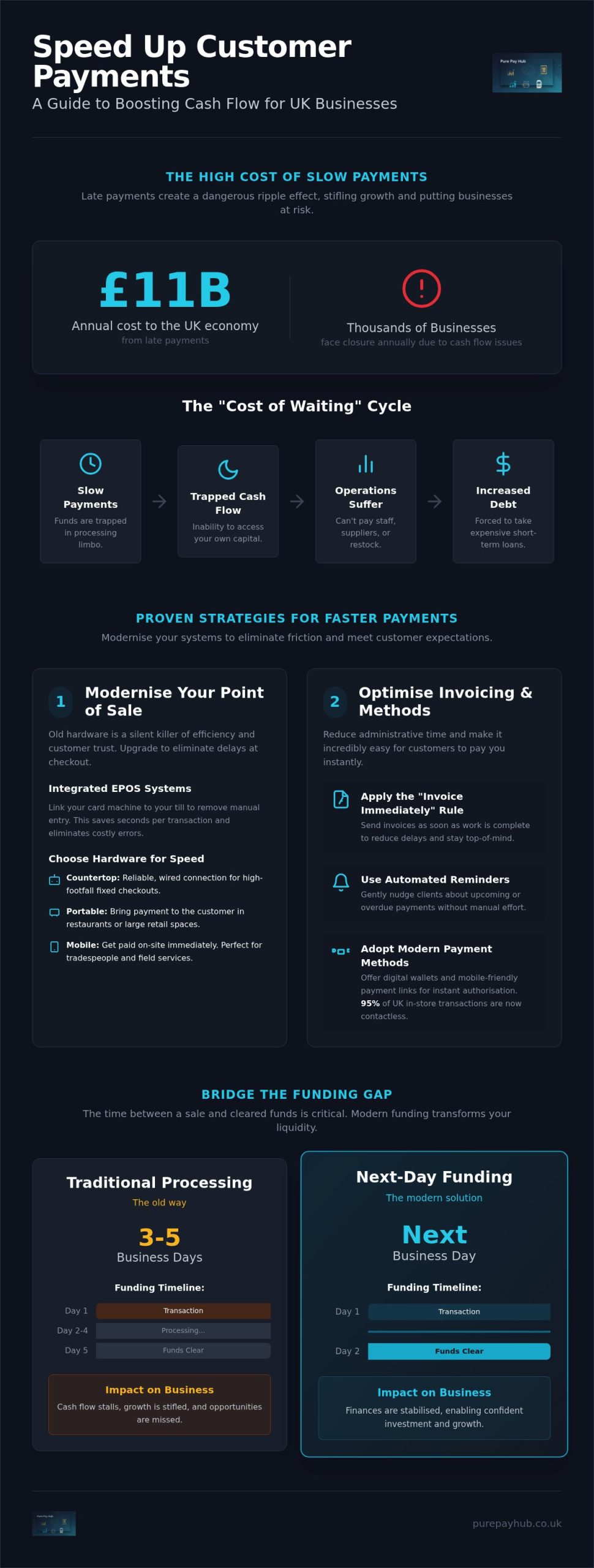
    The funding gap is the silent killer of small business cash flow. This is the delay between a customer paying and the money actually landing in your bank account. Standard settlement windows can stretch to seven days or more. This delay makes it difficult to manage payroll, pay suppliers, or restock inventory. We believe you should have next-day access to your sales revenue. Accelerated settlement provides a significant competitive edge for UK SMEs, allowing you to reinvest your hard-earned cash immediately rather than waiting for a distant processor to release it.

    Pricing Models: Interchange-Plus vs Flat Rate

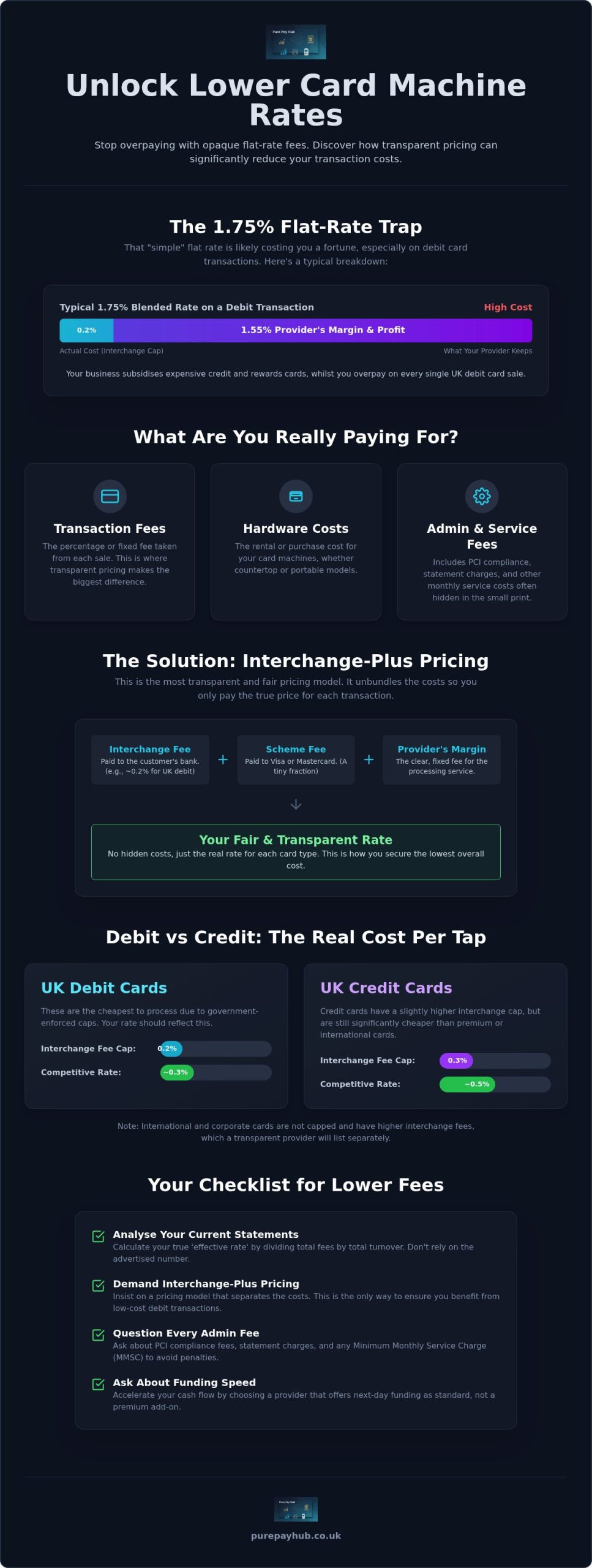
    Flat-rate pricing is simple but often expensive. If you pay a flat 1.75% on every transaction, you’re likely overpaying for debit card payments. Debit cards carry much lower processing costs than premium credit cards. Interchange-plus pricing is the no-nonsense alternative. It provides total transparency by separating the actual cost of the transaction from the processor’s markup. This ensures you only pay a fair margin on top of the base rates. PurePay Hub offers rates as low as 0.3% for debit and 0.5% for credit cards, reflecting our commitment to fair and honest pricing for the local merchant community. If you’re ready for a fairer deal, you can get a transparent quote today to see how much you could save.

    A secure online payment gateway for ecommerce should be a tool for growth, not a source of frustration. By prioritising settlement speed and pricing transparency, you ensure your business remains agile and profitable in an increasingly competitive UK market.

    PurePay Hub: Transparent, Secure, and Built for British Business

    Traditional corporate processors often treat merchants like entries on a spreadsheet. They hide behind layers of jargon and opaque fee structures that make it impossible to know what you are actually paying. PurePay Hub was founded to disrupt this culture. We provide a no-nonsense alternative designed specifically for regional business owners who value honesty and integrity. We aren’t a distant financial institution. We are a fair partner committed to your growth.

    One of the biggest frustrations for merchants is the lack of support when things go wrong. Most technical guides focus on the code, but they ignore the human reality of a gateway failure. When a transaction won’t process during your busiest hour, you don’t need a chatbot or a generic ticket number. You need a UK-based expert who understands your market and can provide immediate clarity. Our support team is disciplined and knowledgeable, ensuring you never feel abandoned by your technology. We’ve simplified the onboarding process, allowing most businesses to start taking payments within 24 to 48 hours.

    The PurePay Hub Advantage for Ecommerce

    Efficiency shouldn’t be complicated. Our secure online payment gateway for ecommerce integrates seamlessly with major platforms like Shopify, WooCommerce, and Magento. This ensures your technical transition is smooth and your checkout remains stable from day one. We also address the funding gap mentioned earlier by providing next-day funding as standard. This keeps your cash flow healthy and allows you to reinvest in your business without delay. You can track every penny through our centralised merchant dashboard, which offers transparent reporting untainted by hidden markups.

    Supporting Your Growth with Business Cash Advances

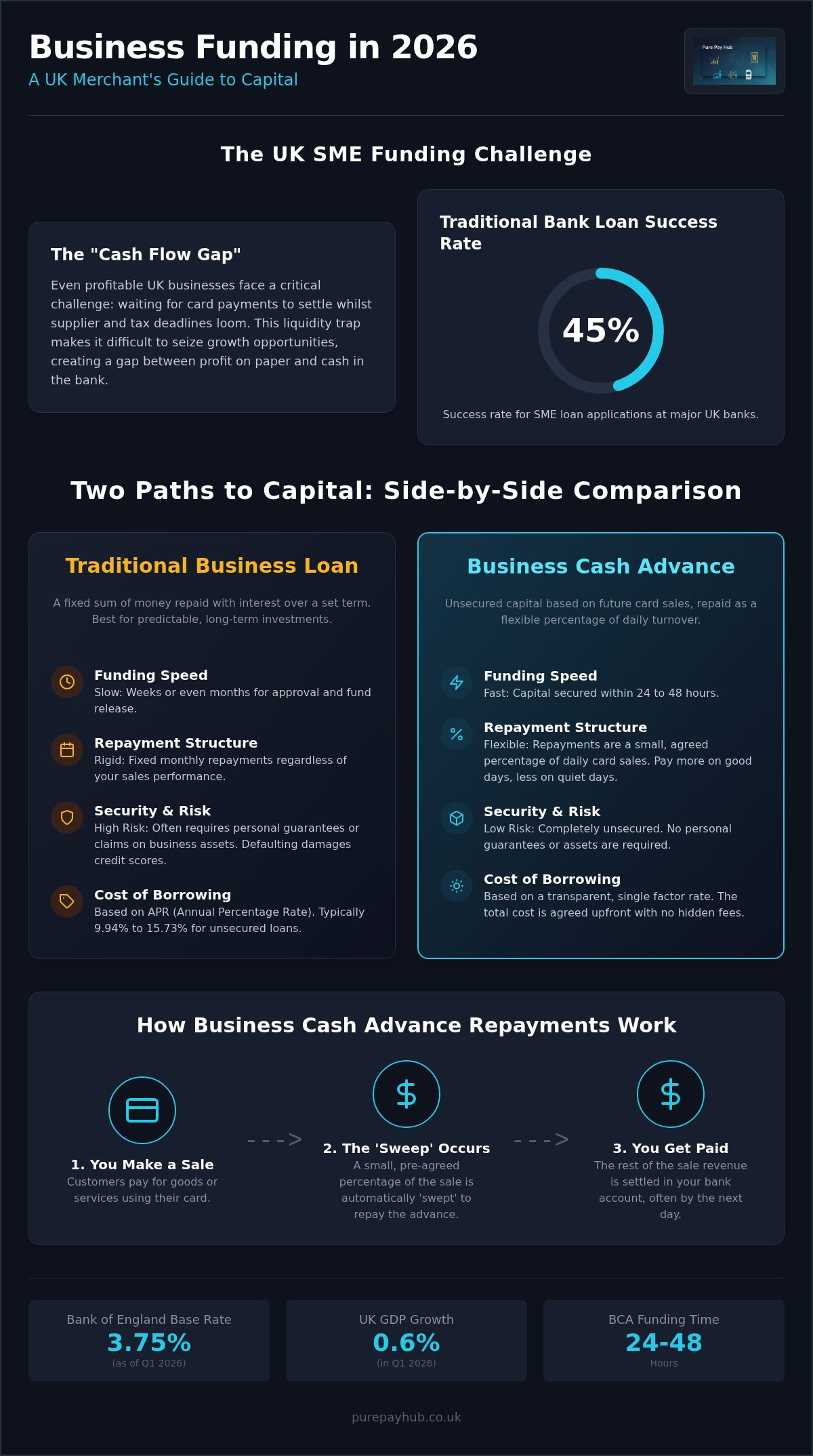
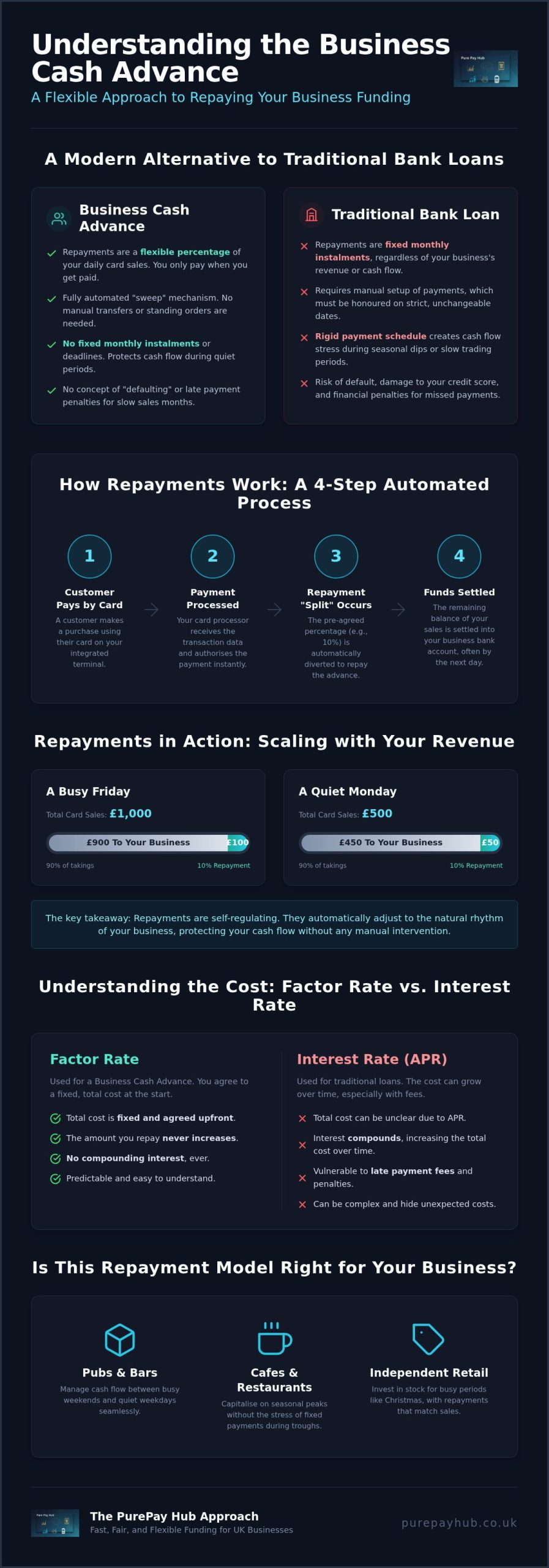
    Growth often requires capital, but traditional bank loans can be rigid and slow. We offer a Business Cash Advance as a flexible alternative for retailers. This facility provides capital based on your future card sales. Instead of fixed monthly payments, the advance is repaid as a small percentage of your daily takings. This means your repayments stay in sync with your actual revenue; if you have a quiet day, you pay back less. It is a fairer way to fund inventory or expansion without the stress of a traditional debt schedule.

    Choosing a secure online payment gateway for ecommerce is about more than just security protocols. It is about finding a single partner that can handle your card machines, online payments, and growth capital with total transparency. If you are ready to move away from the opaque practices of traditional competitors, we are here to help. Organise your secure payment gateway with PurePay Hub today and experience a fairer way to take payments.

    Secure Your Future with a Fairer Payment Partner

    The landscape of digital payments in 2026 demands a balance between rigorous security and an effortless user experience. You now know that a secure online payment gateway for ecommerce is more than just a technical necessity. It’s the foundation of your customer’s trust and your business’s financial health. By prioritising Level 1 PCI security and embracing 3DS2 protocols, you protect your revenue whilst reducing friction at the checkout.

    Don’t let slow settlement times or opaque fee structures hold your growth back. You deserve a partner that offers clarity and rewards your hard work with faster access to your funds. Transitioning to a system that puts the merchant first provides the stability you need to scale in the competitive UK market. It’s about moving from technical confusion to a state of total confidence.

    Switch to a fairer, more secure payment gateway with PurePay Hub and benefit from debit card rates from 0.3%, next-day funding for UK merchants, and Level 1 PCI-compliant security. We’re ready to help you build a more resilient and profitable business today.

    Frequently Asked Questions

    What is the difference between a payment gateway and a payment processor?

    A payment gateway is the digital “handshake” that encrypts transaction data at the point of sale. The processor is the back-end system that actually moves the money between the different banks involved. You need both to function, though many modern providers bundle these services together for simplicity. This integration helps you avoid the technical headache of managing multiple different contracts and connections.

    How much does a secure online payment gateway cost in the UK?

    Costs vary based on your transaction volume and the pricing model you choose. Most providers charge a percentage per transaction plus a small fixed fee. You should also look for monthly gateway fees or PCI compliance charges that might be hidden in the small print. A transparent provider will always show you these costs upfront to help you manage your business cash flow effectively.

    Is my business too small to need a secure payment gateway?

    No business is too small to prioritise security. Every merchant needs a secure online payment gateway for ecommerce regardless of their turnover. Fraudsters often target smaller sites because they assume the security measures are weaker. Protecting your customer data is a legal requirement in the UK and is essential for building a brand that shoppers can actually trust.

    How long does it take to set up an online payment gateway?

    Setting up a modern gateway typically takes between 24 and 48 hours. This includes the time needed for identity checks and linking the system to your website. Once your account is approved, integration is usually a simple process of installing a plugin or entering an API key. You can be taking payments and generating revenue almost immediately after your application is processed.

    Can I use the same gateway for my physical shop and my online store?

    Yes, you can use an integrated system to manage both your physical shop and your online store. This is often achieved through an EPOS system that synchronises your inventory and sales data in one centralised place. It simplifies your accounting significantly and provides a consistent experience for your customers, whether they are buying from you in person or through your website.

    What happens if my payment gateway goes down?

    If a gateway goes down, your website cannot accept payments, which leads to immediate revenue loss and frustrated customers. High-quality providers maintain multiple redundant servers to ensure maximum uptime. You should always choose a partner with a proven track record of stability. This ensures your business remains open for orders every hour of the day without technical interruptions.

    Do I need a separate merchant account for my ecommerce gateway?

    You do need a merchant account to receive funds, but it doesn’t always have to be a separate contract. Some providers offer a bundled service where the secure online payment gateway for ecommerce and the merchant account are provided as one package. This often makes the setup process much faster for new businesses and provides you with a single point of contact for support.

    How does 3D Secure 2.0 affect my checkout conversion rate?

    3D Secure 2.0 actually helps improve conversion rates by making the authentication process frictionless for the shopper. Unlike the old system that required complex passwords, 3DS2 uses biometrics and background data checks to verify the cardholder. This reduces basket abandonment whilst providing the high level of security your customers expect. It turns a potential hurdle into a smooth and reassuring experience.

  • Improving Checkout Experience In-Store: A 2026 Guide for UK Retailers

    Improving Checkout Experience In-Store: A 2026 Guide for UK Retailers

    What if the biggest barrier to your next sale isn’t your stock or your prices, but the final thirty seconds your customer spends at the till? You have likely seen it happen: a shopper spots a long queue, sighs, and leaves their basket behind. It is a frustrating way to lose revenue, especially when outdated card machines or clunky EPOS systems are the primary culprits. Improving checkout experience in store is no longer just a luxury for UK retailers; it is a vital strategy for survival in a market where 42% of consumers still prefer shopping in person but have zero patience for friction.

    We understand that you want a till point that works as hard as you do, without hidden fees eating into your hard-earned margins. This guide shows you exactly how to eliminate queues, modernise your payment hardware, and create a seamless journey that keeps customers coming back. We will explore the latest 2026 trends in portable card machines and intelligent EPOS systems, giving you the practical tools to turn your checkout from a bottleneck into a genuine competitive advantage.

    Key Takeaways

    • Understand the psychology of “queue anxiety” and how modern standards for speed directly influence customer loyalty and basket abandonment.
    • Learn how to optimise your shop floor layout and use clear signage to guide customers naturally toward a frictionless point of sale.
    • Discover how upgrading to high-speed payment hardware is the simplest way of improving checkout experience in store whilst protecting your margins.
    • Explore strategies for training your team to balance technical efficiency with a professional, helpful British service style.
    • See how integrating your EPOS and card machines through PurePay Hub creates a unified data view and supports your cash flow with next-day funding.

    The Psychology of the Queue: Why Checkout Speed Matters in 2026

    In 2026, a frictionless checkout is no longer a luxury; it is the baseline for modern British retail. UK shoppers have been conditioned by the lightning speed of online shopping to expect the same level of efficiency on the high street. When a customer reaches the end of their journey, they want to pay and leave without a struggle. This final interaction is your “Last Impression”. It is the memory that lingers long after they have left the shop. Even if your service was impeccable and your products are perfect, a slow or confusing till experience can sour the entire visit and stop a customer from returning.

    This is where “Queue Anxiety” becomes a genuine threat to your bottom line. It is that sinking feeling a shopper gets when they see a line snaking through the aisles. It leads directly to basket abandonment. If the perceived wait time outweighs the value of the purchase, the customer will simply walk away. In 2026, consumer behaviour prioritises speed over almost all other in-store factors. Shoppers value their time more than ever, and they will reward businesses that respect it with their loyalty.

    The Cost of a Poor Checkout Experience

    A clunky till point does more than just lose a single sale. It damages your brand’s “Social Proof”. When passers-by look through your shop window and see a stagnant queue, they often decide not to enter at all. They assume your business is inefficient or understaffed. There is also a significant digital fallout to consider. A single bad experience often leads to negative online reviews, where “slow service” is a recurring complaint that deters potential visitors. Whilst some retailers have integrated self-checkout systems to manage the flow of smaller baskets, the primary goal remains the same: reducing the physical and mental effort required to finish a transaction. Improving checkout experience in store is about protecting your reputation as much as your revenue.

    Setting Benchmarks for Your Store

    You cannot improve what you do not measure. Start by tracking your average transaction time from the moment the first item is scanned until the payment is confirmed. Identify your “Peak Friction” hours; these are the times when your staff are busiest and your card machines are under the most pressure. Having a clear data view allows you to see where the bottlenecks actually occur. Improving checkout experience in store requires a clear target to aim for. The “Golden Three Minutes” is the maximum acceptable wait time for UK shoppers; once that limit is passed, customer satisfaction drops significantly. By making small, intentional changes to your workflow, you can ensure your team consistently hits this benchmark, even during the busiest periods of the day.

    Optimising Your Physical Layout for Frictionless Flow

    Your shop floor is more than just a showroom; it is a guided journey. Whilst the “Decompression Zone” at your entrance lets customers adjust to your environment, the path leading to the till must be equally intuitive. Improving checkout experience in store starts with a layout that removes physical barriers and psychological stress. If a customer feels trapped or crowded, their patience evaporates. You should aim for a flow that feels open and logical, guiding the shopper toward the exit without forcing them through a maze.

    Research from Harvard Business School highlights the concept of Last Place Aversion, where customers at the end of a queue feel the highest level of dissatisfaction. You can combat this by using curved queuing paths or wider aisles that make the space feel expansive rather than cramped. Strategic placement of impulse items is a classic retail tactic, but you must avoid creating bottlenecks. Use low-profile shelving that doesn’t obstruct the view of the till. If customers can see the staff, their anxiety decreases. Bright, warm lighting at the point of sale also makes the wait feel shorter by creating an inviting atmosphere that signals the end of their journey.

    Implementing Effective Line-Busting Strategies

    Static counters often become the biggest hurdle during peak hours. You can solve this by deploying staff with a Portable Card Machine to process transactions amongst the aisles. This “line-busting” technique prevents a single long queue from forming and keeps the shop floor moving. Train your team to identify “Peak Friction” moments. When more than three people are waiting, a second “floating” till should open immediately. Reducing the physical footprint of your countertop payment centre also frees up space, making the area feel less congested and more professional.

    Signage and Communication

    Confusion is the enemy of efficiency. Use clear, favourite visual cues to direct customers to the correct area. If you have separate points for collections or returns, signpost them boldly. Improving checkout experience in store also means being transparent about technology. Clearly display that you accept Apple Pay, Google Pay, and all major contactless cards. This small detail prevents the “fumble for the wallet” moment at the till. During exceptionally busy periods, a staff member should manage the queue, offering a friendly greeting and a realistic estimate of the wait time to keep morale high.

    Leveraging Modern Payment Hardware to Eliminate Bottlenecks

    Your hardware is the engine room of your store. If your card machine is five years old, it is likely running on outdated processors that struggle with modern encryption standards. This creates a lag of several seconds per transaction. Whilst a few seconds sounds minor, it adds up to hours of lost productivity over a month of trading. Improving checkout experience in store requires hardware that processes payments at the speed of the customer’s intent. You need a system that responds instantly, ensuring the final step of the journey is as swift as the first.

    Reliability is equally critical for a professional retail environment. A card terminal that loses its Wi-Fi connection during a busy Saturday afternoon is a disaster for shop floor morale and customer trust. Modern devices now feature “Always-On” connectivity with automatic 4G or 5G failover. If your broadband dips, your terminal switches to a mobile network instantly. This prevents the frustration of a stalled queue and ensures you never have to turn a customer away because your system is “down”.

    Security should never be a bottleneck for your business. PCI compliance is a non-negotiable requirement for UK retailers, but it shouldn’t mean a clunky or slow interface. Modern terminals handle complex security protocols in the background, keeping your data safe whilst maintaining a rapid transaction flow. This balance of safety and speed is what defines a dependable payment partner.

    Choosing the Right Terminal for Your Store

    • Countertop Card Machine: These are the workhorses of the high street. They are best for high-volume, fixed-position retail environments like newsagents, boutiques, or pharmacies where transactions happen at a central point.
    • Portable Card Machine: These units are ideal for hospitality or large showrooms. They allow you to take the till to the customer, which is a highly effective way of reducing physical queues.
    • Mobile Card Machine: Essential for pop-ups, market stalls, or “line-busting” during seasonal peaks. They offer the ultimate flexibility for businesses on the move.

    The Rise of Digital Wallets

    UK shoppers have fully embraced the digital wallet. In 2024, almost 95% of eligible in-store card transactions were contactless, and that trend has only accelerated. By 2026, Apple Pay and Google Pay have moved from being alternatives to being the preferred choice for many. These platforms use biometric authentication, such as FaceID or TouchID, which is significantly faster than entering a PIN. As the £100 single-transaction limit was removed in March 2026, customers can now use their phones for even larger purchases. Improving checkout experience in store means being ready for this shift. Preparing your hardware for the next wave of wearable payment technology, including smartwatches and payment rings, ensures your business remains modern and accessible.

    Improving Checkout Experience In-Store: A 2026 Guide for UK Retailers

    Staff Training and the Human Element of the Transaction

    Technology provides the framework, but your team provides the friction-free reality. Improving checkout experience in store requires a delicate balance between high-speed processing and a warm, professional British service style. Your staff are the face of your business. If they appear stressed or overwhelmed by a long queue, that tension transfers to the customer. A confident, well-trained employee can make a three-minute wait feel like thirty seconds simply through calm advocacy and clear communication.

    Technical hitches are inevitable in retail. Whether it is a slow Wi-Fi signal or a momentary lag in the payment gateway, your staff must be trained to handle these moments without panicking. Instead of staring at a loading screen in silence, they should keep the conversation flowing. This prevents the customer from focusing on the delay. Discretion is also vital when resolving payment issues. If a card is declined, your team should handle it quietly. Suggesting an alternative method, such as trying a different terminal or using Payment Links for remote settlement, allows the customer to resolve the issue without embarrassment or stalling the rest of the queue.

    The “Speedy Upsell” is a skill that combines sales with efficiency. Train your staff to suggest small, relevant items only whilst they are already scanning the main basket. If the suggestion requires a long explanation, it is not a checkout upsell. It should be a natural, five-second addition that increases your average basket value without adding a single minute to the total transaction time. This approach keeps the queue moving whilst maximising the potential of every visitor.

    Efficiency Through Expertise

    Every team member must be a “Power User” of your software. They should know the shortcuts and common functions by heart. Standardising the “Wrap and Pack” process is another simple way to shave seconds off every sale. By creating a favourite internal “Checkout Handbook”, you ensure that new starters adopt these efficient habits from day one. Investing in modern EPOS Systems ensures your team has the tools they need to maintain this high standard of service even during peak seasonal rushes.

    Managing Returns and Exchanges

    Mixed queues are a primary cause of frustration. A customer buying a single item shouldn’t be stuck behind someone processing a complex return. Where space allows, a separate desk for exchanges is vital for maintaining the main queue flow. Moving toward digital receipts also speeds up the post-purchase experience, as they are easier to store and retrieve than crumpled paper. An integrated EPOS system can process a return in under 30 seconds. This speed ensures that even the less pleasant parts of the shopping journey remain frictionless and professional, protecting your brand reputation and improving checkout experience in store for everyone.

    Future-Proofing Your Store with PurePay Hub Solutions

    PurePay Hub provides the stabilising force your business needs to thrive in a competitive market. By integrating your EPOS system directly with your card machines, we eliminate the need for manual data entry. This reduces human error and ensures your records are always accurate. Improving checkout experience in store is far easier when your back-office and your shop floor speak the same language. You get a unified data view that shows exactly how your store is performing in real-time, allowing you to make informed decisions with confidence and clarity.

    Cash flow is the lifeblood of any retail operation, yet many traditional providers make you wait days for your funds to clear. We provide next-day funding as standard to ensure your business stays liquid and responsive. This allows you to maintain high stock levels and keep your shop floor morale high. When you aren’t waiting for your money, you can react faster to customer trends and seasonal demands. Our transparent pricing, including 0.3% debit rates, ensures you keep more of your hard-earned revenue. You can then reinvest these savings into better store layouts or staff development. If a technical hitch occurs, our 24/7 UK-based support is always ready to help. Your checkout will never stay offline for long.

    Streamlining Your Back-Office

    Automated reporting saves you hours of tedious admin time every week. It frees up managers to spend more time on the shop floor amongst the customers, where they are needed most. By using your transaction data, you can accurately predict your busiest periods with precision. This allows you to schedule enough staff for peak checkout times, preventing the queue anxiety that often leads to basket abandonment. Integrated systems simply make your business run more smoothly and professionally, turning your data into a tool for growth.

    Scaling with Ease

    Your business should never be held back by its technology or its finances. With PurePay Hub, you can add new terminals instantly as your customer base grows. Whether you need an extra Countertop Card Machine for a new till point or a Mobile Card Machine for a seasonal pop-up, the process is seamless and fast. We also offer a Business Cash Advance to help you fund store refurbishments or layout changes. This support ensures you can continue improving checkout experience in store as your brand evolves, keeping you ahead of the competition whilst maintaining a fair and honest partnership with your payment provider.

    Click here to see how PurePay Hub can transform your in-store checkout experience today.

    Take Control of Your Store’s Final Impression

    Your checkout is the ultimate moment of truth for your business. By optimising your physical layout and investing in high-speed hardware, you remove the barriers that cause basket abandonment. We have explored how a combination of strategic signage, expert staff training, and reliable technology creates a journey that customers actually enjoy. Improving checkout experience in store isn’t just about speed; it’s about building lasting trust through every transaction.

    You deserve a payment partner that prioritises your growth with fair, transparent terms. We offer debit card rates from 0.3% and provide next-day access to your funds, ensuring your cash flow remains as steady as your service. Our structure is built on honesty, with no hidden fees to worry about. It’s time to move away from clunky systems and opaque pricing models that hold your business back.

    Upgrade your checkout experience with PurePay Hub today. Let’s turn your till point into your greatest asset and ensure every customer leaves your store with a smile.

    Frequently Asked Questions

    How can I reduce queues in my small shop without hiring more staff?

    You can reduce queues by deploying portable payment technology that allows your team to process sales anywhere on the shop floor. This approach focuses on improving checkout experience in store by removing the reliance on a single fixed till point. By using line-busting techniques during busy periods, your existing staff can handle more transactions without the need for additional headcount. A logical layout and clear signage also help customers navigate your store more efficiently.

    Is a portable card machine better than a countertop one for retail?

    The choice depends on your specific shop layout and typical transaction volume. A Countertop Card Machine is a robust workhorse for businesses with a dedicated till area and high-speed requirements. However, a Portable Card Machine offers the flexibility to take payments directly to the customer, which is ideal for large showrooms or boutique environments. Many modern UK retailers now use a combination of both to ensure they can manage peak times effectively.

    What is the fastest way to process a card payment in-store?

    Contactless payments using digital wallets like Apple Pay or Google Pay are currently the fastest method available. These systems use NFC technology and biometric authentication, such as FaceID, which eliminates the need for a customer to enter a PIN. Since the single-transaction limit was removed in March 2026, these methods are even more efficient for higher-value sales. This speed is a critical factor in improving checkout experience in store for time-pressed shoppers.

    How much do integrated EPOS systems cost for UK small businesses?

    Costs for integrated EPOS systems vary based on the complexity of your inventory and the number of terminals you require. Rather than looking for the lowest headline price, you should focus on a transparent fee model that avoids hidden markups. A fair partner will provide a clear breakdown of costs, allowing you to understand exactly how your investment supports your back-office efficiency and real-time stock management without any unexpected surprises.

    Can I use a mobile card reader for line-busting during busy periods?

    Yes, a Mobile Card Machine is specifically designed for this purpose and is an essential tool for managing seasonal peaks. These devices connect via 4G or 5G networks, allowing your staff to process payments anywhere in the store or even outside. This flexibility prevents a single long queue from forming and ensures you don’t lose sales because of a perceived wait time at the main counter.

    What are the benefits of Apple Pay for in-store checkout speed?

    Apple Pay significantly reduces the total time spent at the till by removing the physical steps of finding a wallet and entering a PIN. The transaction is authenticated almost instantly via the customer’s phone or watch, making it one of the most frictionless methods available. It also offers enhanced security through tokenisation, which protects both your business and your customers from fraud whilst maintaining a rapid transaction flow.

    How do I switch card machine providers without interrupting my store operations?

    Switching providers is a straightforward process that involves a short period of parallel running. You should set up your new card machines and EPOS system whilst your current contract is still active to ensure there is no gap in service. A reliable provider will guide you through the configuration and testing phases, ensuring your team is fully trained before you make the final switch to the new system.

    What is next-day funding and how does it help my retail business?

    Next-day funding ensures that the money from your card sales is cleared into your business bank account on the following working day. This rapid access to your revenue is a vital stabilising force for your finances, allowing you to pay suppliers and manage stock levels without delay. It removes the stress of waiting for traditional clearing cycles, giving you a much clearer view of your daily cash position.

  • How to Choose a Card Machine for a Startup: The 2026 Founder’s Guide

    How to Choose a Card Machine for a Startup: The 2026 Founder’s Guide

    The slickest-looking card reader on the market could be the very thing that drains your startup’s bank account before you’ve even found your feet. Many founders focus on the hardware’s aesthetic, but learning how to choose a card machine for a startup is actually about protecting your bottom line from predatory fee structures. In 2026, with nearly all UK transactions being contactless and the FCA relaxing limit caps, the stakes for your cash flow have never been higher.

    You’re likely feeling the pressure of hidden monthly costs and the confusing jargon of interchange fees versus merchant service charges. It’s frustrating to feel like you’re signing away your freedom to a long-term contract just to take a simple payment. We understand that anxiety. This guide will show you how to secure transparent pricing and next-day funding whilst choosing hardware that looks professional to your customers. We will break down the technicalities of PCI DSS v4.0.1 and show you exactly how to find a payment partner that scales with your ambition rather than holding it back.

    Key Takeaways

    • Understand why your card machine is the heartbeat of your revenue and why “free” hardware often hides the most expensive transaction rates.
    • Learn to decode the Merchant Service Charge and discover why lower debit card rates offer a vital boost to your startup’s margins.
    • Select the right hardware for your specific business model, whether you require a Countertop Card Machine for a fixed location or a Mobile Card Machine for life on the move.
    • Master how to choose a card machine for a startup by prioritising next-day funding speed and avoiding restrictive, multi-year contract traps.
    • Discover how to scale your venture with transparent payment solutions that prioritise clarity and cash flow over complex, hidden markups.

    Why Your Choice of Card Machine is a Strategic Startup Decision

    Your card machine is the heartbeat of your startup’s revenue stream. It represents the exact moment your hard work converts into liquid cash. Many founders treat this as a last-minute errand, but understanding how to choose a card machine for a startup is a vital strategic move. A poor choice doesn’t just look unprofessional; it can actively stifle your growth by locking you into high rates or delaying access to your own money.

    Beware of the “free hardware” lure. In the payments industry, “free” usually means you’ll pay significantly more through inflated transaction fees. These costs eat into your margins every time a customer taps their card. For a new business, those pennies add up to pounds that could have been reinvested in stock or marketing. Beyond the cost, there is a psychological weight to payment reliability. If your machine fails during a peak period, you lose more than a sale; you lose the trust of a first-time customer.

    Your processing history also acts as a financial CV. When you eventually look for a Business Cash Advance or other forms of growth capital, lenders will scrutinise your transaction data. A stable, professional setup shows your business is a reliable prospect for future funding. It demonstrates that you have a disciplined approach to your finances from day one.

    The Shift from Cash to Contactless in the UK

    The UK has moved decisively away from cash. In 2024, nearly 95% of eligible in-store transactions were contactless. Consumer behaviour has shifted toward digital wallets like Apple Pay and Google Pay as a minimum standard. For a startup, a “card only” strategy is no longer a risk; it’s often a safer, more efficient way to operate that reduces the security burden of handling physical cash. Ensuring your Payment Terminal is equipped with the latest NFC technology is essential for meeting these expectations.

    Merchant Accounts vs. Payment Aggregators

    When deciding how to choose a card machine for a startup, you must consider the difference between sharing an ID and having your own. Startups often begin with aggregators because the setup is fast. However, these platforms pool multiple businesses under one Merchant ID, which can lead to sudden account freezes if your sales spike. A dedicated merchant account provides far more stability. PurePay Hub offers this professional stability whilst keeping the onboarding process fast and transparent. By securing your own Merchant ID, you gain more control over your funds and build a resilient foundation for your growing venture.

    Decoding Startup Payment Costs: Rates, Rentals, and Hidden Fees

    Every penny counts during your first year of trading. Understanding the Merchant Service Charge (MSC) is the first step in mastering how to choose a card machine for a startup. This charge is the total percentage you pay on every transaction. It isn’t a single fee, but a combination of three distinct costs: interchange fees, scheme fees, and the provider’s markup. Many traditional banks bundle these together, making it nearly impossible to see where your money is actually going.

    The most significant cost difference you’ll notice is between debit and credit cards. Debit card rates can start as low as 0.3%, whilst credit cards are often significantly higher. This is because debit transactions carry less risk for the banks; the money is already in the customer’s account. Before signing any contract, it’s wise to review the standard steps to accept card payments to ensure you aren’t skipping vital security or registration requirements that could inflate these rates later.

    Stealth fees are the silent killers of startup cash flow. You might encounter PCI non-compliance charges if you don’t keep up with the latest v4.0.1 security standards. Some providers also enforce a “minimum monthly service fee.” If you don’t process enough transactions to meet their threshold, they’ll charge you the difference anyway. Whilst you compare these structures, consider how a transparent pricing model can simplify your monthly overheads and keep your margins predictable.

    Interchange Fees and Scheme Fees Explained

    Interchange fees are set by the card issuer (the customer’s bank), whilst scheme fees are paid to the card brand, such as Visa or Mastercard. These are non-negotiable base costs. A trustworthy partner will be open about these “at-cost” rates. If a provider refuses to show you the breakdown between the base rate and their own markup, they’re likely hiding a heavy commission that will hurt your business as it scales.

    The Real Cost of “No Monthly Fee” Models

    Many startups are drawn to providers that offer “no monthly fees” and high flat-rate transaction costs, often around 1.75%. This feels safe when you’re starting out, but the “break-even” point arrives sooner than you think. If your startup processes £5,000 a month, a 1.75% fee costs you £87.50. In contrast, a how to choose a card machine for a startup strategy that includes a small monthly rental and a 0.3% debit rate could save you over £50 every single month. Those savings are better spent on your own growth than on a processor’s bottom line.

    Choosing the Right Hardware for Your Startup Business Model

    The physical environment of your business dictates your technical requirements. A coffee shop in a busy city centre has vastly different needs compared to a plumber working from a van. When researching how to choose a card machine for a startup, you must first map out your customer’s journey to the payment point. Is the transaction happening at a fixed counter, or are you bringing the machine to a table? Your choice here affects everything from transaction speed to the perceived legitimacy of your brand.

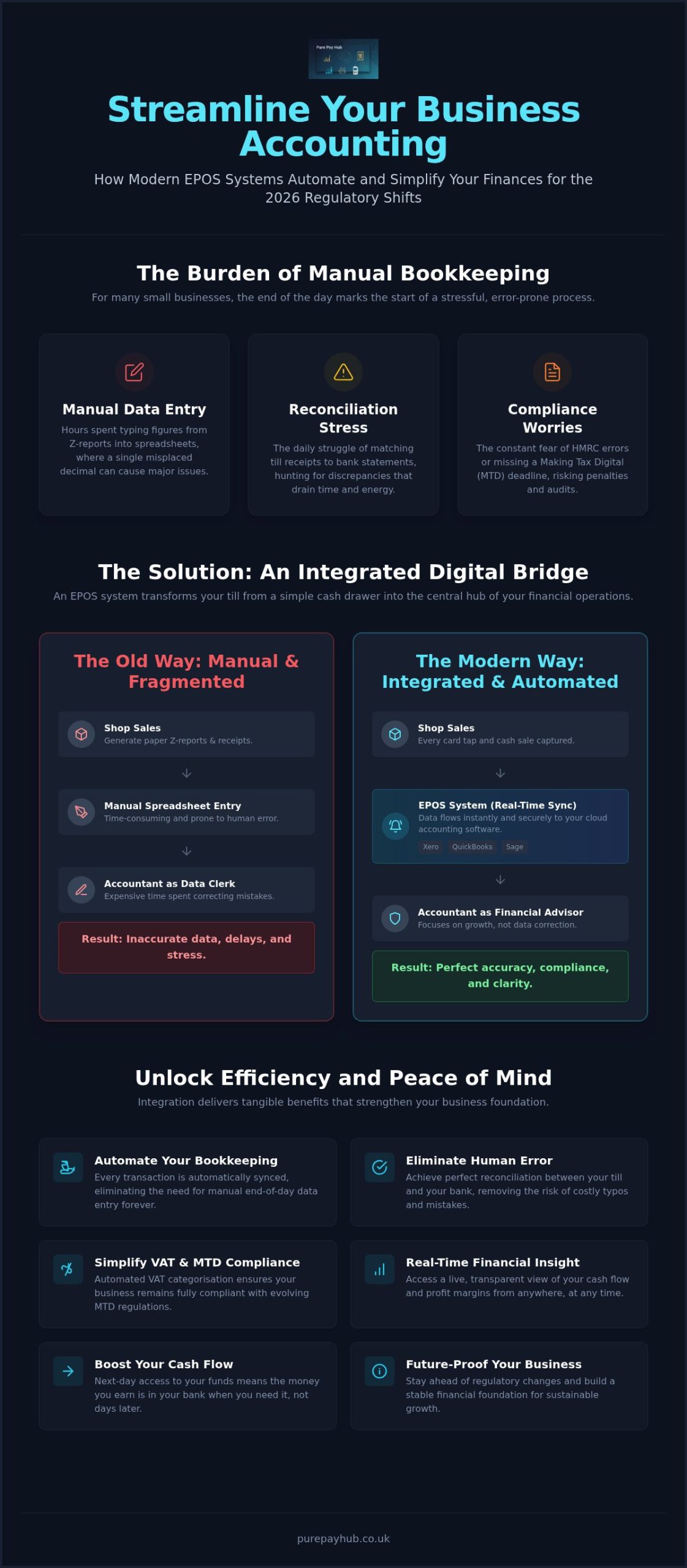
    For hospitality ventures, integrated EPOS Systems are a non-negotiable requirement. These systems sync your sales data with your inventory and accounting software in real-time. This level of integration prevents human error and saves hours of manual reconciliation at the end of the day. When Choosing the Right Payment Processor, the hardware you select becomes the physical face of your brand. A sleek, heavy countertop unit suggests permanence and reliability, whilst a tiny, plastic mobile reader might not provide the same sense of security for high-value transactions.

    Countertop and Portable Terminals

    A Countertop Card Machine is the bedrock of retail shops and boutiques. These units connect via Ethernet or phone lines, providing unmatched connection stability. They don’t rely on battery life; this makes them perfect for high-volume environments where you can’t afford a device dying mid-afternoon. If your business requires movement within a fixed premises, a Portable Card Machine is the logical step. These units use Bluetooth or Wi-Fi to allow for “at the table” payments. They offer the flexibility of movement whilst maintaining a professional, robust appearance that customers recognise and trust.

    Mobile Readers and Virtual Terminals

    Mobile Card Machines are designed specifically for the modern tradesperson or mobile service provider. These devices use 4G connectivity via a built-in SIM card, ensuring you can take a payment anywhere with a mobile signal. This eliminates the awkwardness of asking a customer for their Wi-Fi password. For businesses that don’t need physical hardware at all, a Virtual Terminal allows you to process card details securely over the phone. You can also utilise Payment Links to send secure checkout pages via social media or email. These digital-first solutions are excellent for startups that operate remotely or sell primarily through digital consultations.

    How to Choose a Card Machine for a Startup: The 2026 Founder’s Guide

    The Startup Checklist: 5 Essentials Before Signing an Agreement

    Before you put pen to paper, you must look beyond the shiny hardware. Learning how to choose a card machine for a startup involves a deep dive into the small print that affects your daily operations. Your agility as a new business depends on the terms you accept today. Here are the five essentials every founder must verify before committing to a provider.

    • Funding Speed: Your cash flow is your lifeblood. Some providers wait three to five working days to settle your funds. For a new business, this delay is unacceptable. Demand next-day access to your money to keep your stock levels high and your bills paid.
    • Contract Flexibility: Avoid the multi-year trap. Many traditional banks lock you into three-year terms with heavy exit fees. If your business model shifts, you’re stuck. Seek out rolling contracts or short-term agreements that respect your need for flexibility.
    • Onboarding Support: Some platforms claim you can sign up in minutes, but getting your hardware delivered and your account fully verified can take weeks. Ask for a clear timeline on when you’ll actually be taking your first payment.
    • PCI Compliance: This isn’t just a tick-box exercise. It’s a security standard that protects your customers. A partner that manages this for you saves you from the stress of monthly non-compliance fines.
    • Technical Support: When your machine stops working on a busy Saturday afternoon, a chatbot won’t help. You need to speak to a human expert immediately whilst your customers are waiting.

    Security and Compliance for New Founders

    PCI DSS v4.0.1 is the current security gold standard. It ensures that every transaction is encrypted from end to end. If you don’t meet these requirements, you face significant financial penalties. A professional provider will guide you through the compliance process, turning a complex technical hurdle into a simple, manageable task. This protection preserves your reputation and maintains your favour amongst your first customers.

    Integration and Future-Proofing

    Your card machine shouldn’t be an island. It needs to talk to your accounting software and your EPOS Systems. Real-time reporting allows you to track your early growth without manually entering data into spreadsheets. Choosing a scalable system now prevents a painful and expensive migration once your transaction volume increases. Ready to secure a partner that values your cash flow as much as you do? Explore our transparent merchant services and get your startup live with next-day funding.

    Scaling Your Venture with PurePay Hub’s Transparent Solutions

    Traditional banks often view new ventures with suspicion, hiding high rates behind complex corporate jargon. PurePay Hub is the straight-talking alternative. We prioritise clarity and fairness because we know that a startup’s success depends on predictable overheads. When you’re deciding how to choose a card machine for a startup, you need a partner that advocates for your growth rather than one that merely provides a piece of hardware. We position ourselves as a supportive ally to the local merchant community.

    Our 0.3% debit rates provide an immediate boost to your margins. In the early stages of a business, every saved pound is capital you can use to hire your first employee or expand your product line. We don’t believe in the murky markups used by traditional competitors. Instead, we offer a modern fintech experience that keeps its focus on the individual business owner. This transparency builds the trust necessary for a long-term professional partnership.

    Next-Day Funding: The Startup Lifeline

    Waiting three to five working days for your money to clear is a relic of a slower era. In 2026, your supply chain moves fast. You need your revenue available to restock inventory or settle urgent invoices immediately. PurePay Hub’s quick settlement ensures your cash flow remains fluid and your momentum never stalls. Next-day funding is the standard for modern UK merchant services.

    Unlocking Capital with Business Cash Advances

    Scaling a business often requires a sudden injection of capital. Whether you need to fund a marketing push or buy stock in bulk, a Business Cash Advance offers a flexible solution. Unlike traditional loans, this is unsecured capital based on your card turnover. You repay the advance as a small, agreed percentage of your daily card sales. This means your repayments always stay in proportion with your actual income.

    This model is particularly safe for seasonal startups. If you have a quiet week, your repayments automatically reduce. It’s a supportive way to grow that mirrors the actual performance of your venture. Our UK-based support team is here to guide you through every step of this process, providing the expert partnership your startup deserves. Understanding how to choose a card machine for a startup is just the beginning of our journey together. We are ready to help you scale with confidence and clarity.

    Get your startup started with a PurePay Hub card machine today.

    Secure Your Startup’s Financial Future Today

    Choosing your payment partner is one of the most significant hurdles you’ll face as a new founder. By prioritising funding speed and transparent fee structures, you protect your business’s ability to scale without being weighed down by predatory costs. Mastering how to choose a card machine for a startup isn’t just about selecting a device; it’s about building a resilient revenue stream that works as hard as you do. You now understand that “free” hardware often masks expensive transaction rates and that next-day funding is essential for maintaining a healthy supply chain.

    We believe in a straight-talking approach that puts the business owner first. With debit rates from 0.3% and next-day funding as standard, we ensure your hard-earned money stays where it belongs: in your bank account. Our no-nonsense UK-based support team acts as a reliable expert to help you navigate any technical challenges whilst you focus on growth. Join the UK startups choosing transparency with PurePay Hub and take control of your payments from day one. Your ambition deserves a partner that values clarity over complexity. We are ready to help you turn your vision into a thriving, profitable reality.

    Frequently Asked Questions

    How long does it take to set up a card machine for a new business?

    You can typically expect your card machine to be live and ready for use within three to five working days. This timeframe includes the necessary security checks and the physical delivery of your hardware. Whilst some providers claim near-instant setup, these often lack the stability of a dedicated merchant account. We prioritise a thorough but efficient onboarding process to ensure your business is protected and compliant from day one.

    Can I get a card machine if I have a poor credit history as a founder?

    Yes, a poor credit history doesn’t automatically disqualify you from accepting card payments. Merchant service providers focus primarily on the risk associated with your business model rather than just your personal credit score. You might find that some providers require a rolling reserve or slightly different terms initially. We look at the potential of your venture and provide a fair assessment based on your projected transaction volumes and business type.

    Is it cheaper to buy or rent a card payment terminal?

    Renting is often the more cost-effective choice for startups because it includes ongoing technical support and automatic hardware upgrades. Buying a device outright involves a larger upfront cost and leaves you responsible for repairs or replacements if the technology becomes obsolete. When deciding how to choose a card machine for a startup, consider that rental models often provide better long-term value through inclusive maintenance and security updates.

    What documents do I need to provide for a startup merchant account?

    You will generally need to provide valid photo identification, proof of your home address, and a recent business bank statement. If you’ve incorporated, you’ll also need your Companies House registration details. These documents help providers verify your identity and ensure your business is legitimate. Providing clear, digital copies of these files during your application will significantly speed up the verification process and get you trading sooner.

    Do I need a separate business bank account for my card machine payments?

    Yes, having a dedicated business bank account is essential for maintaining clear financial records and is a requirement for most professional merchant services. It ensures that your business revenue is never blurred with your personal finances, making tax returns and accounting much simpler. Using a separate account also builds a professional profile for your startup, which is vital when you eventually seek further business funding or growth capital.

    Can my startup take payments over the phone or via email links?

    You can easily accept payments remotely using a Virtual Terminal or secure Payment Links. A Virtual Terminal turns your computer or tablet into a card reader for phone orders, whilst Payment Links allow you to send a secure checkout page directly to a customer via email or social media. These tools are perfect for startups that don’t always interact with their customers in a face-to-face retail environment or those offering remote consultations.

    What happens if my Wi-Fi goes down during a transaction?

    Most modern machines, such as a Mobile Card Machine, feature a built-in SIM card that automatically switches to a 4G mobile network if your Wi-Fi fails. This ensures you never miss a sale due to a poor internet connection. If you’re using a fixed Countertop Card Machine, having a backup mobile hotspot or choosing a device with dual-connectivity is a smart way to protect your revenue during local technical outages.

    Are there any hidden exit fees if my startup needs to switch providers?

    Some traditional providers hide steep cancellation charges in the small print of long-term contracts. It’s crucial to check for these fees before you sign any agreement. We advocate for contract flexibility, offering rolling agreements that don’t trap you if your business needs change. When researching how to choose a card machine for a startup, always prioritise providers that allow you to leave without facing punitive financial penalties or complex notice periods.

  • Payment Processing for Seasonal Businesses: A Guide to Flexible UK Merchant Services

    Payment Processing for Seasonal Businesses: A Guide to Flexible UK Merchant Services

    Why should you pay for a card machine that is sitting in a darkened office whilst your business is closed for the winter? It’s a question thousands of UK merchants ask every year as they watch fixed monthly rental fees chip away at their hard-earned reserves. Finding the right payment processing for seasonal businesses shouldn’t feel like a trap. You need a setup that scales with you. It should provide robust support during the summer rush or Christmas peak without penalising you when the tourists go home.

    We understand that your cash flow doesn’t follow a straight line. With debit cards now accounting for more than half of all UK payments, having reliable hardware is essential, but it must be on your terms. This guide shows you how to eliminate wasted off-season costs and maximise peak-period revenue with solutions built for your specific rhythm. We’ll look at flexible hardware that works anywhere, next-day funding to manage high-volume stock demands, and turnover-based financing that actually understands how your income fluctuates. You can finally stop worrying about the bank and focus on your busiest season yet.

    Key Takeaways

    • Identify the most effective hardware for your specific trading environment, ensuring reliable 4G or 5G connectivity for outdoor or remote locations.
    • Discover how flexible payment processing for seasonal businesses eliminates rigid monthly minimums and ensures you only pay for the service whilst you are actually trading.
    • Learn how to navigate transparent transaction rates and avoid hidden costs like exit or re-activation fees that often trap merchants during the off-season.
    • Understand how a Business Cash Advance provides a low-stress alternative to traditional loans by linking repayments directly to your daily turnover.

    What is Payment Processing for Seasonal Businesses?

    Seasonal payment processing is a merchant service model designed to align your costs with your actual trading periods. Traditional providers often expect a steady stream of income every month. They don’t account for the reality of British tourism or holiday retail. To understand the foundational mechanics of these accounts, one might ask: What is Payment Processing for Seasonal Businesses? It’s a solution that breathes with your business. For a trader who earns 80% of their revenue in four months, a standard bank contract feels like a heavy weight. You shouldn’t be punished for the natural rhythm of your industry.

    Effective payment processing for seasonal businesses must be flexible. We distinguish between “truly seasonal” traders, like seaside kiosks that close entirely for winter, and “peak-heavy” businesses. The latter might stay open year-round but see turnover fluctuate by 500% during the Christmas rush. In both cases, you need a transparent fee structure. You shouldn’t be subsidising your provider during your quietest weeks. When your income drops, your overheads must follow suit. This ensures your peak-period profits stay in your pocket rather than being drained by off-season fees.

    The Seasonal Business Landscape in the UK

    The UK’s seasonal economy is diverse, spanning coastal hospitality to festive markets. The recent staycation trend has increased demand for reliable payments in rural and coastal areas. By 2026, consumer behaviour has shifted entirely towards contactless and digital wallets. Whether you’re running a temporary festival stall or a summer surf school, your customers expect to tap and go. If your system is sluggish or fails in a remote spot, you lose sales. Modern payment processing for seasonal businesses ensures you have the technology to meet these expectations without the year-round price tag.

    The Hidden Costs of Traditional Merchant Accounts

    Traditional banks often hide traps in their fine print. The Minimum Monthly Service Charge (MMSC) is a prime example. If your sales drop below a certain level, the bank charges you a penalty fee to make up the difference. Then there are PCI compliance fines. Some providers penalise you if a terminal is “inactive” for too long. Perhaps most damaging are long-term hardware leases. Paying for a countertop unit for three years when you only use it for four months is a drain on your cash flow. You need a partner that understands the off-season shouldn’t be a financial burden. We focus on clarity, ensuring you know exactly what you’re paying and why.

    Choosing the Right Hardware: Portable vs Mobile vs Countertop

    Your trading environment dictates your hardware needs. A beachfront kiosk in Cornwall faces different challenges than a festive market stall in Manchester. For many, the choice between a Portable Card Machine and a Mobile Card Machine comes down to connectivity. If you’re trading outdoors, you can’t rely on patchy public Wi-Fi. You need a device with a built-in 4G or 5G SIM to ensure every transaction goes through instantly. Battery life is equally critical. There’s nothing worse than a dead terminal during a Saturday afternoon rush. Reliable payment processing for seasonal businesses requires kit that works as hard as you do.

    Portable and Mobile Card Machines for On-the-Go Trading

    Mobile units are the favourite choice for festival vendors and pop-up shops. These devices use GPRS technology to find the strongest signal available, allowing you to take payments anywhere in the UK. Speed is the priority here. During peak times, queue-busting becomes your main objective. A slow connection doesn’t just frustrate customers; it costs you sales. Our range of mobile solutions prioritises rapid processing to keep your queues moving. Whether you’re serving coffee from a van or selling crafts at a fair, your hardware should be a silent, efficient partner in your success.

    Countertop Units and EPOS for Peak Volume Efficiency

    As your business grows, you might find that a simple mobile reader isn’t enough. If you’ve moved into a permanent summer venue or a large indoor market, a Countertop Card Machine offers superior stability. These units plug directly into your broadband, providing the fastest possible transaction speeds. For high-volume hospitality, integrating EPOS Systems is a game-changer. It allows you to manage stock levels in real-time whilst the sales are flying in. You’ll know exactly when you’re running low on your best-selling items without having to leave the till.

    Transitioning from mobile to countertop hardware is a sign of scaling success. However, high volume brings its own pressure. You need your money fast to restock and pay staff. This is where next-day funding becomes the lifeblood of your operation. Waiting five days for your funds to clear isn’t an option when you have a delivery arriving tomorrow. Modern payment processing for seasonal businesses should bridge the gap between making a sale and having that cash ready to reinvest. By choosing the right mix of hardware and funding speed, you create a stable foundation for your busiest months.

    Transparency is the foundation of any fair partnership. In the merchant services industry, headline rates often mask the true cost of ownership. You might see a provider offering incredibly low transaction fees, only to find your profit swallowed by monthly admin charges. For effective payment processing for seasonal businesses, you should look for a balance. A transparent fee structure usually starts with competitive base rates, such as 0.3% for consumer debit cards and 0.5% for consumer credit cards. These figures represent the actual cost of moving money. If your provider isn’t clear about these benchmarks, they’re likely hiding a markup elsewhere.

    Don’t be swayed by the promise of “free” card readers. In this industry, nothing is truly free. Providers who give away hardware often recoup those costs through significantly higher transaction rates. For a high-volume summer business, a 1.75% flat rate can be far more expensive than paying a small monthly rental for a professional terminal with lower processing fees. You must calculate your total spend over the entire season. A professional Portable Card Machine might have an upfront cost, but the savings on every tap will quickly add up during your busiest weeks.

    Understanding Interchange Plus vs Blended Pricing

    Interchange Plus is often the most transparent model for high-volume traders. It separates the card issuer’s fee from the processor’s margin, so you see exactly where every penny goes. Conversely, blended pricing combines everything into one flat rate. This can simplify accounting for smaller stalls or pop-up shops, but it often lacks the granular detail needed to optimise costs. In 2026, the merchant service charge represents the total percentage-based cost of processing a transaction, encompassing interchange fees, scheme fees, and the acquirer’s margin.

    Negotiating Flexibility into Your Merchant Agreement

    The biggest stress for seasonal merchants is the “dead” period. You must ask your provider about account hibernation. Can you pause your service in January without paying “re-activation” or “exit” fees? A fair partner understands that your shop is shut and won’t penalise you for inactivity. You should also prioritise the following terms in your agreement:

    • Next-day funding: Essential for maintaining cash flow when you need to restock quickly.
    • No-cost PCI management: Compliance should be a standard part of the service, not a hidden monthly extra.
    • UK-based technical support: You need a human on the phone if your system goes down during a bank holiday weekend.

    By securing these terms, you protect your business from off-season drain. Your merchant account should be a tool for growth, not a source of constant financial anxiety whilst your doors are closed.

    Payment Processing for Seasonal Businesses: A Guide to Flexible UK Merchant Services

    Managing Cash Flow with Business Cash Advances

    Traditional banks often struggle to support seasonal traders. They look for steady monthly income and often demand fixed repayments regardless of your current sales. A Business Cash Advance is different. It’s an unsecured capital injection based on your future card turnover. This makes it the ideal companion for payment processing for seasonal businesses. Instead of a rigid monthly bill, you repay the advance through a small, pre-agreed percentage of your daily card sales. If you have a quiet Tuesday, your repayment is lower. If you have a record-breaking Saturday, you pay back a bit more. It’s a system that breathes with your turnover.

    This model prioritises your business’s health by aligning debt with income. Most seasonal owners find that their biggest expenses hit just as their cash reserves are at their lowest. By using your card processing history as proof of earnings, you can access funding that traditional lenders might refuse. It removes the stress of meeting a fixed payment during a “washout” week or an unexpectedly quiet shoulder season. You focus on the work, whilst the repayment takes care of itself in the background.

    Bridging the Pre-Season Funding Gap

    The weeks leading up to your peak period are often the most financially straining. You need to hire seasonal staff, refurbish your venue, or buy bulk inventory before the first customer walks through the door. Securing a traditional loan can take weeks of paperwork and stress. In contrast, this model uses your previous season’s card processing history to prove your business’s health. You can often access the funds in just a few days. This speed allows you to seize opportunities, like a last-minute discount from a supplier, without draining your personal savings. Typical use cases include:

    • Hospitality: Refurbishing a seaside hotel or beer garden before the summer rush.
    • Retail: Purchasing bulk stock for Christmas markets or holiday pop-ups.
    • Marketing: Funding social media campaigns to drive bookings for the coming peak.

    Transparent Repayment Structures

    Clarity is essential when managing debt. With this model, there is no compound interest and no fixed monthly cost. You only pay a pre-agreed factor fee. This means you know the total cost of the advance from day one. It won’t fluctuate if the Bank of England changes rates. This structure offers a unique layer of protection. If bad weather keeps the crowds away and your sales dip, your bank balance isn’t hit by a massive, inflexible loan payment. You only repay whilst you are earning. Ready to prepare for your peak? Apply for a Business Cash Advance today and secure the capital your business needs to thrive.

    Scaling Your Seasonal Success with PurePay Hub

    PurePay Hub is built for the reality of regional business. We don’t believe in corporate jargon or hidden markups. Our commitment is to provide a “Pure” experience. This means transparency is at the heart of every contract we sign. For merchants, payment processing for seasonal businesses should be about keeping more of your revenue. Our 0.3% debit rates are designed to do exactly that. We help you maximise your peak earnings rather than losing them to opaque fee structures. We act as a fair partner to regional business owners, providing the stability you need to grow.

    Customisation is another pillar of our service. You might start your season with a single Mobile Card Machine for a coastal pop-up stall. As your volume increases, you can easily integrate EPOS Systems or add a Countertop Card Machine for a permanent indoor venue. We provide the specific hardware bundles that fit your current stage of growth. Our onboarding process is disciplined and fast. We ensure you are ready to trade in record time. You won’t miss a single day of your peak season due to administrative delays or slow hardware delivery.

    The PurePay Hub Advantage for Seasonal Traders

    Next-day funding comes as standard with our service. We know you need to pay suppliers and staff immediately. Waiting for a distant financial institution to clear your funds is a luxury you don’t have during a summer rush. Our UK-based support team is always available. If you face a technical glitch on a busy bank holiday weekend, we are here to solve it. Our “Pure” approach means no hidden traps or “re-activation” fees when you return for the next season. We position our offering as a stabilizing force for your finances, ensuring you have clear sight of every penny earned.

    Ready for the Next Peak? Get Started Today

    Switching providers shouldn’t be a headache. We offer a free statement analysis to help you uncover the hidden costs of your current contract. Our team will show you exactly where you can save. To get started, follow this simple checklist:

    • Review your current notice period to avoid exit penalties.
    • Gather your last three months of merchant statements for a clear comparison.
    • Identify the hardware that fits your upcoming trading location.
    • Contact our team for a transparent, no-nonsense quote.

    You are in control of your financial future. We provide the tools and the clarity to help you succeed. Don’t let rigid bank contracts drain your off-season reserves. Organise your seasonal payments with PurePay Hub and experience a fairer way to process your sales.

    Secure Your Seasonal Success

    Managing a business that fluctuates with the weather or the calendar requires more than just a card reader. It demands a partnership built on transparency and mutual growth. You’ve seen how the right payment processing for seasonal businesses can eliminate the drain of off-season rental fees whilst providing the high-speed connectivity needed for peak-time rushes. By choosing hardware that matches your environment and a fee structure that respects your bottom line, you protect your hard-earned margins from unnecessary costs.

    We’re here to provide that stabilising force for your finances. With debit card rates starting from 0.3% and next-day funding to keep your supply chain moving, we ensure your cash flow remains healthy throughout the year. There are no hidden markups or corporate jargon; just a fair, reliable service that works as hard as you do. Get a transparent quote for your seasonal business today. We look forward to helping you make your next peak your most successful and profitable one yet.

    Frequently Asked Questions

    Can I pause my card machine contract during the off-season?

    Yes, you can pause your contract if you have a flexible merchant agreement. Traditional banks often enforce 12-month minimums, but a tailored solution for seasonal traders allows for hibernation periods. This ensures you aren’t paying for a service you aren’t using whilst your shop is closed. Always check for “re-activation fees” before signing; transparent providers will offer a zero-penalty pause to support your cash flow during the winter.

    What happens if I don’t use my card reader for several months?

    If your card reader is inactive for several months, some providers charge “inactivity fees” or trigger PCI compliance alerts. However, with flexible payment processing for seasonal businesses, we account for these dormant periods. It’s vital to keep your terminal charged and occasionally powered on to receive security updates. A fair partner won’t penalise you for the natural downtime of your industry, provided you’ve communicated your seasonal trading schedule clearly during the initial setup process.

    How much does it cost to rent a card machine for just the summer?

    Rental costs depend on the hardware type and the specific length of your peak season. Whilst we avoid listing fixed prices, you should expect to pay a small monthly fee for a professional terminal rather than a high flat-rate transaction fee. This model is often more cost-effective for high-volume summer traders who want lower processing rates. We recommend getting a tailored quote to see how a short-term rental compares to year-round bank commitments.

    Is a business cash advance better than a bank loan for a seasonal business?

    A Business Cash Advance is often superior for seasonal traders because repayments are linked directly to your sales volume. Unlike a bank loan with fixed monthly costs, the advance is repaid as a pre-agreed percentage of your daily card takings. If you have a slow week due to bad weather, your repayments naturally drop. This flexibility protects your bank balance during the off-season, making it a lower-risk option for businesses with fluctuating or unpredictable income patterns.

    How quickly can I get set up with a mobile card machine for a pop-up shop?

    You can typically get set up with a mobile card machine in just a few working days. Our onboarding process is designed to be disciplined and efficient, ensuring you don’t miss the start of a festival or holiday market. Once your account is approved, the hardware is dispatched via next-day delivery. This speed is essential for pop-up vendors who need to move quickly to secure a trading spot and start taking contactless payments immediately.

    Do I still have to pay PCI compliance fees if I am not trading?

    You are still required to maintain PCI compliance even whilst you are not trading, but you shouldn’t be charged extra for it. Some providers use “non-compliance fees” as a hidden markup for inactive accounts. A transparent partner includes PCI management as a standard part of your service. This ensures your data remains secure year-round without adding an unnecessary financial burden to your off-season overheads. Always demand clarity on these administrative costs before signing any agreement.

    What are the best card machines for outdoor events with poor Wi-Fi?

    A Mobile Card Machine with a built-in 4G or 5G SIM is the best choice for outdoor events with poor Wi-Fi. These units don’t rely on local internet connections; they find the strongest mobile signal available across multiple networks. This ensures you can take payments at a beachfront kiosk or a remote festival stall. Reliable connectivity is the backbone of successful payment processing for seasonal businesses, preventing lost sales and frustrated customers during your most critical trading hours.

    Can I accept Apple Pay and Google Pay with a portable card machine?

    Yes, every Portable Card Machine we provide fully supports Apple Pay, Google Pay, and other digital wallets. Modern consumers expect contactless options as standard, and your hardware must keep pace with these behaviours. These transactions are processed with the same speed and security as traditional chip-and-pin payments. Offering these digital options helps reduce queue times during your busiest periods, ensuring a smoother experience for your customers whilst maximising your peak revenue.

  • Emergency Card Machine Replacement: How to Restore Your Business Payments

    Emergency Card Machine Replacement: How to Restore Your Business Payments

    Imagine it’s a busy Saturday afternoon and your shop is full, but suddenly your terminal displays a “System Tamper” error. Within minutes, a queue forms and you’re forced to tape a “Cash Only” sign to your front door. It’s a nightmare scenario that costs you revenue and reputation. If your current provider is dragging their feet, you need an emergency card machine replacement to get your business back online before the next customer walks away.

    We understand how frustrating it is to feel abandoned by legacy providers when your livelihood is on the line. With nearly 95% of in-store transactions now being contactless, being unable to take card payments is no longer a minor hiccup; it’s a total shutdown. You shouldn’t have to wait days for a resolution or navigate complex onboarding during a crisis. Business owners deserve a partner that acts with the same urgency they do.

    This article will help you secure a rapid replacement terminal and keep your business trading whilst your main system is down. We’ll look at the quickest ways to restore your payments, the importance of modern hardware compatibility, and how a supportive partner can turn a technical disaster into a seamless transition.

    Key Takeaways

    • Learn the immediate troubleshooting steps to take when a terminal fails, from performing hard resets to verifying network-wide outages with your provider.
    • Discover how to keep revenue flowing using a Virtual Terminal or Payment Links whilst your physical hardware is out of action.
    • Understand the timeline for an emergency card machine replacement and why digital onboarding speed is the real bottleneck for most businesses.
    • Identify the key contract features, such as swap-out warranties and UK-based support, that protect your business from future payment disruptions.
    • Compare the slow response times of legacy banks against modern providers that prioritise rapid account activation and next-day hardware delivery.

    Immediate Steps to Take When Your Card Machine Fails

    When your card machine stops working, the clock starts ticking on your daily revenue. Don’t panic. Start with a hard reset. Power the unit down completely, wait thirty seconds, and restart. This simple step often clears temporary software glitches that stall transactions. If the screen remains blank or frozen, check your connectivity. Most modern hardware relies on stable Wi-Fi or a GPRS signal to communicate with the bank. A Payment terminal is a sophisticated piece of kit, but it’s only as good as the network it sits on. Ensure your router is functioning and that other devices can connect to the same network.

    If the reset fails, call your provider immediately. You need to know if you’re facing a widespread network outage or a localised hardware failure. Ask the support agent for a specific error code. Documenting this code is vital. It speeds up the technical support process and proves you’ve done your due diligence. If they confirm the hardware is dead and cannot be fixed over the phone, you’re officially in the market for an emergency card machine replacement. Do not wait for a “call back” that might never come; insist on a clear timeline for a new unit.

    Whilst you wait for a resolution, switch to a backup method. Don’t turn customers away with a “Cash Only” sign. If you have access to a Virtual Terminal or can generate Payment Links, use them. These tools allow you to process payments via a tablet or smartphone. They keep the queue moving while your main terminal is out of action. It’s about maintaining momentum and showing your customers that you’re prepared for technical hitches.

    Troubleshooting Common Terminal Errors

    “Tamper” alerts are the red flag of the payment world. They usually mean the internal security sensors have been tripped, often due to a drop or a power surge. This hardware is permanently compromised for security reasons and cannot be reset. Also, check the basics. Is the charging base faulty? Try a different cable to rule out power issues. For portable units, reseat the SIM card. A loose connection here can mimic a total system failure and is a quick fix that avoids an unnecessary emergency card machine replacement.

    When to Declare a Hardware Emergency

    Identify the point of no return early. If there’s visible physical damage or the software is stuck in a reboot loop, it’s time to act. Calculate your downtime. If your current provider quotes a seven-day lead time but you’re losing hundreds of pounds an hour, that’s a genuine hardware emergency. You need a partner who offers next-day dispatch to minimise the damage to your bottom line. Remember that just buying a generic reader from a local shop won’t work instantly. You need a provider who can handle the digital onboarding and account linking just as fast as the physical delivery.

    Speed of Replacement: How Quickly Can You Get Back to Trading?

    Speed is a relative term in the payments industry. For a legacy bank, “fast” might mean a replacement unit arriving in a week. For a local merchant losing sales, “fast” means tomorrow morning. When you’re searching for an emergency card machine replacement, you must distinguish between the delivery of the hardware and the activation of the service. A shiny new device sitting on your counter is just an expensive paperweight until the software is live and linked to your account. You need both the physical and digital tracks moving at the same pace to restore your cash flow.

    Traditional high-street banks often struggle with this dual requirement. They rely on outdated logistics networks and manual approval processes that aren’t designed for a crisis. It’s common for these institutions to quote 7-10 working days for a replacement. In a modern retail environment, that delay is a disaster. You shouldn’t be penalised for hardware failure, yet slow support from a legacy provider does exactly that. Choosing a provider that treats your downtime with urgency is the only way to protect your bottom line.

    Hardware Delivery Timelines in the UK

    In the UK, the logistics of merchant services are well-established. Reliable providers use dedicated courier networks to ensure next-day delivery for countertop and portable machines. This is the baseline you should demand. If a provider cannot guarantee a 24-hour window, they aren’t equipped for emergency scenarios. Always verify that the replacement package is comprehensive. This includes the terminal, the correct power adapter, and the specific charging cradle for your model. Retail and hospitality businesses don’t have time to hunt for spare cables whilst customers are waiting to pay. A complete “plug-and-play” kit is essential for a smooth emergency card machine replacement.

    The Onboarding Bottleneck

    The digital onboarding process is the most common cause of extended downtime. Even with hardware in hand, you might be stuck waiting for background checks. To bypass this, choose a partner that uses automated verification systems for “Instant Activation”. You can play your part by keeping your business documentation organised and ready for upload. This includes your latest business bank statements and valid photo identification. Having these files ready allows a modern provider to verify your account in hours rather than days. At PurePay Hub, we’ve stripped away the unnecessary red tape. Our system is built for speed and transparency, ensuring your account is ready to process transactions the moment your hardware is unboxed. We believe that restoring your payments should be a simple, straight-talking process that gets you back to trading without the typical corporate run-around.

    Accepting Payments Without a Physical Terminal

    Waiting for your emergency card machine replacement to arrive doesn’t mean your business has to grind to a halt. You can bridge the gap between a hardware failure and the arrival of a new unit by using software-based payment tools. These interim solutions allow you to keep processing transactions without a physical terminal in your hand. They’re quick to set up and ensure that your customers aren’t met with a “Cash Only” sign. By diversifying how you accept money, you build a more resilient business that can survive technical hitches.

    Most modern merchant accounts include access to digital payment methods as standard. If you’ve been relying solely on a countertop or portable unit, now is the time to explore your dashboard. These tools aren’t just for emergencies; they’re valuable additions to your trading arsenal. They offer flexibility for phone orders, off-site events, or simply managing a sudden surge in customers when your main system is under pressure.

    Virtual Terminals as a Backup Plan

    A Virtual Terminal is a cloud-based checkout for manual entry. It allows you to turn any device with an internet connection into a secure payment point. You simply log in to your provider’s secure browser-based portal and type in the customer’s card details. This is particularly effective for taking deposits or processing orders over the phone. It’s a professional way to handle transactions whilst you wait for your emergency card machine replacement. Ideally, you should verify that this feature is activated on your account before a crisis occurs, as it provides an instant safety net for your revenue.

    Payment Links for Socially Distanced Sales

    Payment Links are another powerful tool for maintaining trade. You can create a unique URL for a specific transaction amount in seconds and send it to your customer via SMS, email, or even a QR code. The customer then pays on their own smartphone using their preferred method, such as Apple Pay or Google Pay. This keeps your queues moving and removes the need for physical contact with a terminal. You can track these link payments in real-time through your merchant dashboard, giving you total clarity on your cash flow even without a working card reader on your counter.

    For mobile merchants, Tap-to-Pay technology can turn a standard smartphone into a temporary card reader. This allows you to accept contactless payments directly onto your phone. It’s a discreet and efficient way to trade during a hardware emergency. However, no matter which interim method you choose, you must ensure your solution remains PCI compliant. As of 2026, PCI DSS v4.0.1 is the sole active standard. Your provider should handle the heavy lifting of security, but you must remain disciplined about never storing sensitive card data on your own devices. Security shouldn’t be sacrificed for speed, even in a crisis.

    Emergency Card Machine Replacement: How to Restore Your Business Payments

    Choosing a Provider That Minimises Future Downtime

    Securing an emergency card machine replacement is a vital reactive step, but the ultimate goal is to ensure you never face a total blackout again. The reliability of your payment system depends heavily on the infrastructure of your provider. Many legacy banks offer hardware as an afterthought to their main banking services, which leads to slow support and outdated technology. You need a partner that treats payment processing as a mission-critical function. This means prioritising providers that offer “Swap-Out” warranties. Under these agreements, a new unit is dispatched the moment a fault is logged, rather than waiting for a technician to attempt a repair on-site.

    Contract flexibility is another essential factor. Avoid being locked into long-term, restrictive agreements with providers that have already failed you during a crisis. If a company cannot meet its service-level agreements during an outage, you should have the freedom to move. A modern provider wins your loyalty through consistent performance and transparent fees, not through fine-print traps. Look for rolling monthly contracts or short-term commitments that keep the pressure on the provider to deliver excellent service every single day.

    The Importance of UK-Based Support

    When your machine fails on a busy Saturday night, you cannot afford to wait for a support centre in a different time zone to open. UK-based technical support is a non-negotiable requirement for regional merchants. You need to speak with someone who understands the local retail environment and the specific banking regulations that govern UK payments. Direct phone support is always superior to slow, ticket-based systems that leave you in the dark for hours. A quick conversation with an expert can often resolve a configuration issue in minutes, potentially saving you from needing a full emergency card machine replacement.

    Technical Resilience in Modern Card Machines

    Modern hardware should be built to withstand network failures. Look for multi-comms terminals that feature automatic roaming. These units can switch seamlessly between Wi-Fi and 4G signals if one connection drops out. This dual-path connectivity is essential for portable units used in busy restaurants or at outdoor events. Additionally, consider integrated EPOS systems that offer “offline caching”. These systems can securely store transaction data during a temporary internet outage and process them once the connection is restored. Auditing a provider’s historical uptime is a sensible step before you sign any lease; a dependable partner will be happy to share their reliability record.

    If your current provider is letting you down, it is time to switch to a partner that values your business continuity. You can view our range of resilient card machines to find a solution that keeps your payments stable and your queues moving.

    Switching to PurePay Hub for Reliable Payment Continuity

    When your current system fails, you need more than just a new box on the counter. You need a partner that understands the high-stakes reality of a busy retail environment. At PurePay Hub, we’ve built our service around the needs of regional merchants who can’t afford to wait. We offer an emergency card machine replacement process that focuses on both physical speed and digital readiness. Our team ensures your hardware is dispatched for next-day delivery, but we don’t stop there. We also prioritise next-day funding. This ensures the money you earn today is in your bank account tomorrow, keeping your cash flow stable whilst you transition to a more reliable system.

    Traditional banks often treat small business owners as a number in a long queue. We take a different approach. Our onboarding is designed to be punchy and efficient. You won’t be trapped in a cycle of endless paperwork or vague timelines. Instead, you’ll have direct access to account managers who understand that every hour without a terminal is an hour of lost revenue. We believe in straight-talking and fair partnership, ensuring you’re never left in the dark during a technical crisis.

    Rapid Setup for UK Businesses

    Our streamlined application process is specifically designed to get you back to work. We’ve removed the unnecessary hurdles that legacy institutions often put in your way. By using modern verification tools, we can approve your account in a fraction of the time it takes a traditional bank. PurePay Hub prioritises business continuity through fast-track approval. This means your digital account is often live and ready to process transactions before the courier even arrives with your new device. You get a direct line to experts who prioritise urgent requests, ensuring your emergency card machine replacement is handled with the gravity it deserves.

    A Fairer Approach to Merchant Services

    Transparency is the core of our identity. We’ve seen the murky fee structures and hidden markups used by legacy providers, and we’ve chosen a cleaner path. There are no opaque charges, even for urgent setups. We also include our Virtual Terminal and Payment Links as standard for every client. These tools act as your permanent safety net, allowing you to take payments over the phone or via SMS if your hardware ever fails again. If you need a capital injection to help your business grow, we also offer a business cash advance based on your card turnover. It’s a flexible way to fund development without the stress of fixed monthly repayments. Restore your payments today with PurePay Hub and experience a service built on honesty, efficiency, and reliability.

    Secure Your Trading Future with Resilient Payments

    A hardware failure is a stressful event, but it’s also an opportunity to build a more resilient business. By understanding the immediate steps to take and utilising interim tools like Payment Links, you can protect your revenue during a crisis. Ultimately, the impact of a technical fault depends on the agility of your provider. An emergency card machine replacement should be a swift, transparent process that prioritises your continuity over corporate bureaucracy.

    You shouldn’t have to settle for slow support or hidden fees when your livelihood is on the line. We provide the stability your business needs with next-day delivery, UK-based expert support, and fair rates starting from 0.3% for debit cards. It’s time to move away from legacy systems that let you down when you need them most. Our goal is to replace frustration with informed confidence.

    Get your business back on track with a reliable card machine from PurePay Hub. Take control of your payments today. Ensure you’re always ready to trade, no matter what happens to your hardware.

    Frequently Asked Questions

    How long does it take to get a replacement card machine?

    A replacement typically arrives within 24 hours when you use a provider that offers next-day delivery. Legacy banks often take much longer, sometimes up to 10 working days, which can be devastating for your cash flow. You should always check if your contract includes a swap-out warranty to ensure the fastest possible dispatch. Modern providers prioritise hardware logistics to minimise your downtime.

    Can I use my phone as a card machine while I wait for a replacement?

    You can use your smartphone to accept payments by utilising Tap-to-Pay technology or generating Payment Links. These digital tools turn your mobile device into a temporary terminal, allowing you to process contactless transactions without physical hardware. It is an excellent way to maintain trading momentum whilst waiting for your emergency card machine replacement. Most modern accounts include these features as standard.

    Do I have to pay for a replacement card terminal?

    Whether you pay for a replacement depends on your specific merchant agreement and the cause of the failure. Most rental or lease plans include hardware support and free replacements for technical faults. However, if you purchased the machine outright or the damage is accidental, you may need to pay for a new unit. Always review your service-level agreement to see what coverage you have.

    Will a replacement machine work with my existing merchant account?

    A replacement machine will work with your existing account as long as it is supplied and configured by your current merchant service provider. You cannot simply buy a generic reader from a retail shop and link it to your old account instantly. The hardware must be mapped to your unique merchant ID by your provider’s technical team to ensure secure processing.

    What is the fastest way to get a card reader for my business?

    The fastest route is to partner with a modern fintech provider that offers next-day hardware delivery and rapid digital onboarding. Whilst some retail shops sell basic card readers over the counter, these still require account approval which can take several days. Choosing a partner that handles both the logistics and the verification in-house is the most efficient solution for a business in a hurry.

    Is it possible to get a card machine with same-day activation?

    Same-day activation is generally only possible for digital tools like Virtual Terminals and Payment Links. While physical hardware usually requires at least 24 hours for courier delivery, a modern provider can often approve your digital account within a few hours. This allows you to start taking phone or online payments on the very same day you apply for an emergency card machine replacement.

    What should I do if my card machine is stolen?

    You must contact your merchant service provider immediately to deactivate the terminal and prevent fraudulent use. Because card machines contain sensitive security keys, a stolen unit poses a significant risk to your business data. Once the old unit is blacklisted, your provider will help you secure a replacement and ensure your account remains PCI compliant during the transition.

    Can I switch providers if my current terminal is broken?

    You can switch providers at any time, and doing so is often the quickest way to escape poor service from a legacy bank. If your current provider is quoting long lead times or charging high fees for support, moving to a specialist can get you back to trading faster. Just ensure you check your existing contract for any notice periods or exit fees before making the move.

  • What Happens If a Card Machine Breaks? A Merchant’s Recovery Guide

    What Happens If a Card Machine Breaks? A Merchant’s Recovery Guide

    Imagine it is a busy Saturday afternoon and your shop is full of customers. A shopper reaches for their card, but your terminal screen remains stubbornly blank. As the queue grows, the atmosphere shifts from lively to uncomfortable. You are suddenly faced with the reality of what happens if a card machine breaks during your peak trading hours. It is a stressful moment that can lead to lost revenue and awkward conversations with frustrated diners or shoppers.

    We understand that hardware failure feels like a direct threat to your livelihood. With contactless payments now making up over 65% of in-person transactions, a faulty device is more than a minor glitch. This guide will show you how to maintain your revenue and resolve technical failures quickly. You will discover immediate alternative payment methods, such as Payment Links or Virtual Terminals, to keep your business moving. We also provide clear troubleshooting steps to get you back online and explain how to choose a more reliable hardware partner to ensure your peace of mind.

    Key Takeaways

    • Learn the specific button combination required to perform a soft reset and clear common terminal errors instantly.
    • Understand what happens if a card machine breaks and how to transition to a Virtual Terminal to process payments over the phone.
    • Establish a clear professional procedure for handling diners who do not carry cash when your system is down.
    • Recognise the hardware features, such as next-day replacement and multi-comms, that minimise the risk of long-term trade loss.

    Immediate Steps: What to Do When Your Card Machine Fails

    A hardware failure in the middle of a busy shift is a merchant’s nightmare. Your priority is to maintain trade while you investigate the cause. Don’t panic. If you appear stressed, your customers will feel anxious too. Instead, take a breath and follow a logical recovery process. Many business owners worry about what happens if a card machine breaks, fearing they’ll have to turn everyone away and lose a day’s takings. In reality, most issues are temporary and fixable within minutes.

    Start with a ‘soft reset’. On most modern devices, you can do this by holding down the ‘Power’ button and the ‘Yellow Clear’ button simultaneously. This forces the software to reboot without wiping your settings. Whilst the unit restarts, check your router or mobile data signal. A lot of “broken” machines are actually just struggling with a dropped connection. If you’re using a mobile card machine, try switching between Wi-Fi and GPRS to see if the signal improves. Understanding what happens if a card machine breaks is the first step towards building a resilient business that can handle technical hiccups without stress.

    If the reset doesn’t work, switch to a backup method immediately. Don’t let a queue form. You can use a Virtual Terminal on your tablet or send Payment Links to customers’ mobiles to keep the money flowing. Tell your staff exactly what is happening. This ensures they relay the same message to every diner or shopper, preventing confusion and maintaining a professional atmosphere. Consistent communication is the best way to keep your customers on your side during a technical fault.

    Rapid Troubleshooting for Common Terminal Errors

    Sometimes the issue is physical rather than digital. Look at the screen for an ‘Alert Irruption’ message. This usually means the internal security triggers have been tripped, often due to a drop or a hard knock. A Payment terminal is designed to be highly secure; if it thinks it’s being tampered with, it will lock down. Also, check the simple things. Ensure the paper roll isn’t jammed and that the sensor is clean. For portable units, wipe the battery terminals with a dry cloth to remove any dust that might be blocking the charge.

    Communicating with Customers to Minimise Friction

    Transparency builds trust. Place a polite sign at the centre of your counter or the entrance. This manages expectations before people reach the till. If a customer is particularly inconvenienced, offer a small discount or a free item. It’s a small price to pay to protect your reputation. Explain that you have alternative payment options available whilst you fix the issue. Most people are happy to use a payment link or wait an extra minute if you handle the situation with professional calm and clarity.

    Understanding the Failure: Why Card Terminals Stop Working

    When a terminal stops processing, it is often difficult to tell if the device is truly broken or just temporarily confused. Distinguishing between a physical hardware fault and a local network outage is the first step in your recovery. A business continuity plan should include a checklist to identify these differences quickly. If your terminal displays a “No Connection” message, the fault likely lies with your router or internet service provider rather than the unit itself. Conversely, if the screen is dead or the chip reader fails to recognise any card, you are likely facing a hardware issue.

    Environmental factors also play a significant role in device longevity. High-heat environments, such as a professional kitchen, can cause internal components to expand and eventually fail. Similarly, moisture from damp counters or spillages can corrode delicate circuitry over time. Understanding what happens if a card machine breaks due to these factors helps you better position your equipment to avoid future downtime. If your terminal is constantly exposed to steam or grease, it will eventually require a provider-level replacement.

    Hardware Faults vs. Connectivity Issues

    Testing your device on a different network is the most effective way to rule out connectivity problems. If your Wi-Fi is down, try connecting your terminal to a mobile hotspot from your phone. If it processes the transaction successfully, your hardware is fine; your shop’s internet is the culprit. You should also inspect the charging base and power cables for visible wear. Frayed wires or bent pins in the charging port often lead to intermittent power loss, which merchants frequently mistake for a total system failure. Using a high-quality Portable Card Machine with robust charging contacts can mitigate these physical risks.

    Software Glitches and Security Lockouts

    Software is just as likely to cause a stoppage as hardware. Outdated firmware can lead to failed security “handshakes” between the terminal and the bank. This results in transaction approvals being blocked. As of March 31, 2025, PCI DSS v4.0 requirements became mandatory; many older terminals may lock out if they cannot meet these new security standards. You might also encounter ‘Pedal’ or ‘System’ errors on your screen. These are internal software flags that usually indicate the device’s encryption keys have been lost or corrupted. Understanding what happens if a card machine breaks involves recognising that security is paramount; in these cases, the machine will need to be re-imaged or replaced by your provider.

    Business Continuity: Alternative Ways to Accept Payments

    A broken physical terminal is a hurdle, not a dead end for your trade. It is a common misconception that your ability to take payments is tied solely to that single piece of plastic and silicon. Understanding what happens if a card machine breaks means knowing that your merchant account remains fully operational even when the hardware isn’t. You still have the authority to process transactions; you simply need a different interface to do so. Maintaining your revenue requires a shift from physical card-present transactions to digital alternatives that bypass the faulty unit entirely.

    Your first line of defence is often your existing EPOS system. Most modern setups allow you to record ‘offline’ or cash transactions to ensure your inventory and accounting remain accurate whilst you resolve the hardware issue. For essential business-to-business sales, you might also implement a manual ‘fallback’ procedure, such as issuing a pro-forma invoice. However, for retail and hospitality, the goal is to keep the checkout process as seamless as possible for the customer. By using the digital tools already included in your merchant package, you can prevent walk-away customers and maintain a steady cash flow.

    Utilising Secure Payment Links for Instant Settlement

    Payment Links are a professional way to handle a hardware failure without sending customers to a distant ATM. You can generate a secure link via your provider’s dashboard and send it directly to the customer’s mobile via SMS or email. The shopper then completes the transaction on their own device. This method is highly effective because it supports Apple Pay and Google Pay, which are increasingly popular. By 2026, over 5.2 billion people are expected to use digital wallets. Offering this familiar interface ensures your business stays modern and resilient. You still benefit from secure settlement and next-day access to funds, exactly as you would with a physical terminal.

    The Role of the Virtual Terminal in Emergencies

    The Virtual Terminal acts as your digital backup. It is a web-based portal that you can access from any laptop, tablet, or smartphone. When a customer is standing at your counter and your machine fails, you can manually enter their card details into this secure interface. This is technically a ‘Card Not Present’ transaction, but it allows you to complete the sale immediately. It is a vital tool for what happens if a card machine breaks, as it maintains full PCI compliance whilst bypassing the broken hardware. You don’t need to install new software; you simply log in and keep trading. This ensures that a technical glitch never turns into a lost business opportunity.

    What Happens If a Card Machine Breaks? A Merchant’s Recovery Guide

    Managing the ‘No Cash’ Scenario Professionally

    Handling a customer who cannot pay cash when your digital systems fail requires a blend of legal knowledge and social tact. In a retail environment, the solution is simple: the goods remain on the shelf. However, in hospitality, the situation is more complex. Understanding what happens if a card machine breaks after a diner has already finished their meal is critical for protecting your revenue without damaging your reputation. You must manage these moments with a calm, principled approach that prioritises the customer relationship whilst ensuring the debt is settled.

    Avoid the temptation to stick a scrawled “Card machine broken” sign on your front door using a marker pen and cardboard. This looks unprofessional and suggests a permanent failure rather than a temporary technical glitch. Instead, instruct your staff to inform customers of the situation before they order. If a failure occurs mid-service, be transparent. If a deferred payment is necessary, document the customer’s details securely. Use a formal form to record their name, address, and phone number; this signals that you take your business finances seriously and expect the same from them.

    Legal Rights and Customer Obligations in the UK

    In the UK, the legal position is clear. When a customer orders food or services, a contract is formed. The technical failure of a terminal does not void their obligation to pay. However, you cannot legally ‘detain’ a customer or prevent them from leaving; doing so could lead to accusations of false imprisonment. Your best course of action is to issue an invoice for later payment. This creates a formal paper trail that you can follow up if the payment isn’t made within a specified timeframe. Most customers are honest and will settle the bill via a bank transfer or a digital payment link once they are home.

    Implementing a Backup Payment Protocol

    Resilience is built through preparation. Every business should keep a spare Portable Card Machine or Mobile Card Machine fully charged and ready for use. If your primary Countertop Card Machine relies on a fixed phone line, ensure your backup uses a 4G SIM. This provides a completely independent connectivity path. Training is also vital. Your team should know how to pivot to these backups instantly. If a hardware failure is terminal and requires an immediate, unplanned investment in new EPOS systems, you might consider a Business Cash Advance. This allows you to secure the funds for new equipment quickly, with repayments based on your future card sales rather than fixed monthly amounts.

    Future-Proofing Your Business with Reliable Payment Hardware

    Investing in high-quality hardware is a strategic decision for any regional merchant. You should always prioritise stability over the lowest possible monthly rental fee. When you calculate the true cost of a lost Saturday afternoon, the price of a premium device becomes negligible. Knowing what happens if a card machine breaks allows you to prepare for the worst before it occurs. By choosing a partner that offers 24/7 UK-based technical support, you ensure that expert help is always a phone call away. This human connection is far more valuable than a generic chatbot when your revenue is on the line.

    Modern terminals should feature ‘multi-comms’ as standard. This technology allows the device to switch between Wi-Fi, GPRS, and Bluetooth automatically. If your shop’s broadband fails, your terminal simply pivots to the strongest mobile signal available. This level of cross-channel reliability is essential for maintaining a steady flow of trade. You should also evaluate the cost of downtime against the cost of a premium rental. A slightly higher monthly fee is a small price to pay for a system that stays online when your competitors’ systems fail.

    The Importance of Next-Day Hardware Replacement

    Trade does not wait for slow repairs. PurePay Hub prioritises rapid recovery by ensuring that next-day hardware replacement is a standard part of your service. We understand that every minute of downtime is a minute of lost profit. There is a significant difference between a contract that offers to ‘repair’ a unit and one that promises to ‘replace’ it. Repairs can take days or even weeks. A replacement arrives via rapid shipping, allowing you to plug in and start trading again almost immediately. For high-volume sites, we recommend keeping a backup Countertop Card Machine on-site to eliminate the risk of trade loss entirely.

    Choosing the Right Partner for Uptime

    Your payment partner should be an ally, not a distant financial institution. Look for transparent fee structures that do not penalise you for hardware failures or technical glitches. An integrated EPOS system can also provide an extra layer of reliability by syncing your sales data across multiple channels. This ensures that even if one device has an issue, your overall business records remain accurate and accessible. Reliability is built on honest partnerships and disciplined service standards. What happens if a card machine breaks depends entirely on the support network you have behind you.

    Protect your business from downtime with PurePay Hub’s reliable card machines

    Securing Your Business Against Technical Downtime

    Hardware failures don’t have to paralyse your trade. By mastering simple troubleshooting and utilising digital backups like Payment Links, you ensure that your business remains operational regardless of physical glitches. Understanding what happens if a card machine breaks allows you to lead your team with professional calm instead of reacting with panic. You now have the strategic tools to keep queues moving and protect your hard-earned reputation during peak trading hours.

    Long-term resilience depends on a partnership built on transparency and rapid response. Don’t wait for the next failure to secure your finances. Upgrade to a reliable card machine with 24/7 support from PurePay Hub. Our partners benefit from debit card rates starting from 0.3%, next-day access to funds, and the peace of mind that comes with expert UK-based technical support. Take control of your payments today and keep your business moving forward with confidence.

    Frequently Asked Questions

    What should I do immediately if my card machine stops working during a sale?

    You should stay calm and inform the customer that you are experiencing a temporary technical glitch. Perform a soft reset by holding the power and yellow clear buttons simultaneously to see if a reboot resolves the issue. If the machine remains unresponsive, switch to an alternative method like a Payment Link or Virtual Terminal immediately to keep the queue moving and avoid customer frustration.

    Can I still take payments manually if the chip reader is broken?

    You can still process transactions manually by using a Virtual Terminal on your tablet or smartphone. Whilst some older terminals allow you to key in card numbers directly, most modern providers prefer the security of a web-based portal for manual entry. This ensures you can safely take “Card Not Present” payments even when the physical chip reader on your device is faulty.

    How long does it typically take to get a replacement card machine in the UK?

    Replacement times vary between providers, but a professional partner should offer next-day delivery as standard. In the UK, receiving a new unit within 24 hours is the industry benchmark for reliable service. If your current provider takes several days or weeks to ship a replacement, your business is at risk of significant revenue loss and customer dissatisfaction.

    Is it legal to charge a customer later if my terminal fails?

    It is perfectly legal to request payment at a later date if your terminal fails after a service has been provided. When a customer consumes a meal or receives a service, a binding contract is formed. If you cannot process their card, you should issue a formal invoice for a bank transfer or send a secure Payment Link for them to settle once they are home.

    Will I be charged for a replacement card machine if it breaks through normal wear?

    Most providers will replace a terminal at no cost if the failure is due to a technical fault or normal wear and tear. However, you will likely be charged a replacement fee if the damage was caused by a liquid spillage, a significant drop, or hardware tampering. You should check your service contract to understand the specific terms regarding accidental damage and hardware support.

    Can I use my mobile phone as a card machine if my main terminal fails?

    You can use your mobile phone as a temporary backup by accessing your merchant portal’s Virtual Terminal or generating Payment Links for customers to scan. This is a highly effective way to manage what happens if a card machine breaks during a busy shift. It allows you to bypass the broken hardware entirely without needing to invest in extra equipment during an emergency.

    What are the most common reasons for a card machine to show an ‘Alert Irruption’ error?

    An ‘Alert Irruption’ message is a security feature triggered when the terminal’s internal anti-tamper sensors are activated. This usually happens if the machine is dropped, receives a hard knock, or if someone attempts to open the casing. Once this error appears, the device is permanently locked for security reasons and will require a full replacement from your hardware provider.

    How can I prevent my card machine from breaking in the first place?

    You can prevent most hardware failures by keeping your terminal clean and away from high-heat areas like ovens or steamers. Regularly wipe the battery contacts with a dry cloth and ensure the charging cable is not frayed or tightly coiled. Using a protective silicone case can also absorb the impact of accidental drops, significantly extending the lifespan of your Portable Card Machine.

  • Using EPOS Data to Increase Sales: A Strategic Guide for UK Businesses in 2026

    Using EPOS Data to Increase Sales: A Strategic Guide for UK Businesses in 2026

    What if the secret to clearing your slowest-moving stock and doubling your average basket value was already sitting on your hard drive, waiting to be read? Many UK business owners feel buried under complex reports that offer plenty of numbers but very little direction. It is frustrating to watch your capital sit on a shelf in the form of unsold inventory, especially when you are also trying to manage staff schedules during unpredictable quiet periods. You likely suspect that using EPOS data to increase sales is possible, but the path from raw data to real-world profit often feels blocked by technical jargon.

    We believe that your transaction history should be your greatest asset, not a source of stress. This guide will show you how to transform those daily figures into a clear, actionable roadmap for your business. You will learn how to leverage the latest 2026 standards, including the Data (Use and Access) Act 2025, to optimise your stock levels, reduce waste, and build a loyalty programme that keeps your customers coming back. We are going to break down exactly how to turn your transaction records into a blueprint for a more profitable and efficient shop floor.

    Key Takeaways

    • Transition from reactive bookkeeping to proactive revenue generation by treating your transaction history as a digital blueprint for growth.
    • Identify your “Hero” products and eliminate “Dead” stock to ensure your business capital is always working for you.
    • Master the art of predictive analytics to prepare for seasonal peaks and avoid the hidden costs of the “Out of Stock” trap.
    • Implement four practical strategies, including using EPOS data to increase sales through targeted promotions and customer loyalty programmes.
    • Understand the critical role of seamless payment integration in maintaining data accuracy and protecting your hard-earned profit margins.

    Beyond the Transaction: Why Your EPOS Data is an Untapped Revenue Stream

    Every time a customer taps their card or requests a receipt, they leave a digital trail. This is the essence of your Point of Sale (POS) system. It is far more than a digital cash drawer. It is a living record of preferences, peak trading times, and inventory movement. In the 2026 UK market, the businesses that thrive are moving away from reactive bookkeeping. They no longer look at reports once a month just to see what happened. Instead, they are using EPOS data to increase sales by predicting what will happen tomorrow.

    The 2026 retail landscape is more regulated and competitive than ever. With new Electronic Sales Suppression (ESS) standards in place since June 2026, the accuracy of your records is no longer optional. It is a legal requirement. This shift actually benefits legitimate businesses. It forces a level of transparency that makes using EPOS data to increase sales a natural next step for any principled owner. Relying on a “gut feeling” is a common trap. You might think Friday afternoons are your busiest time because the shop feels crowded, but your data might show that Tuesday mornings actually generate higher-value transactions. National chains use this type of analysis to win. To compete, you need that same level of clarity.

    Ignoring your data comes with a heavy price tag. It leads to the “Out of Stock” trap, where you lose revenue because a popular item isn’t on the shelf. Conversely, it results in overstocking products that simply don’t move, tying up your vital cash flow. You might also find yourself understaffed during a sudden rush or paying for idle hands during a quiet spell. These inefficiencies quietly drain your profit margins.

    The Anatomy of a High-Performing EPOS System

    Modern EPOS Systems are built on the synergy between hardware and software. Your card machine should never be a separate island of information. Whether you use a Countertop Card Machine or a Portable Card Machine, it must sync instantly with your central software. Real-time syncing ensures you aren’t making decisions based on yesterday’s news. This integration centres the customer experience whilst collecting the vital metrics you need to grow. It allows for faster checkouts and more accurate stock counts simultaneously.

    Moving from “Ringing Up” to “Analysing Up”

    Most businesses use their till for “ringing up” sales. Strategic owners use it for “analysing up” their entire operation. There is a massive gap between simply processing a payment and leveraging that interaction to drive a second purchase. Transparency in your data builds a foundation of trust and financial health. It allows you to see exactly where your margins are being squeezed and where cross-selling opportunities are being missed. EPOS data is the primary driver of modern SME competitive advantage, transforming every transaction into a strategic building block for long-term growth.

    The Three Pillars of EPOS Analytics: What to Track to Optimise Growth

    Data without focus is just noise. To move from basic transaction recording to strategic growth, you must categorise your metrics into three distinct pillars. These pillars allow you to see exactly where your revenue is coming from and where your capital is being wasted. By using EPOS data to increase sales, you transform your till from a simple payment point into a powerful diagnostic tool. This structured approach ensures you aren’t just looking at the total takings at the end of the day, but understanding the mechanics behind every pound earned.

    The first pillar is Product Performance. This involves identifying your “Hero” products, the items that drive the majority of your profit, and your “Dead” stock, which sits on shelves and ties up your cash flow. The second pillar is Staff Efficiency. This focuses on matching your labour costs to actual peak trading hours. Finally, the third pillar is Customer Behaviour. This uses customer data analytics to track Average Transaction Value (ATV) and visit frequency. When you consolidate these pillars, you gain a holistic view of your business health that allows for confident decision-making.

    Identifying Your Most Profitable Items

    The 80/20 rule is a fundamental principle for UK merchants. It suggests that 20% of your products likely drive 80% of your total profit. Your EPOS system can verify this instantly. High-volume items are often mistaken for best sellers, but if their margins are slim, they might not be your most valuable stock. By performing a “basket analysis,” you can see which products are frequently bought together. This allows you to organise your shop floor or menu to encourage cross-selling. If data shows that customers who buy item A almost always buy item B, placing them near each other is a simple way of using EPOS data to increase sales without spending a penny on marketing.

    Optimising Your Workforce with Labour-to-Sales Ratios

    Staffing is often your largest overhead. Using heat maps from your EPOS data allows you to identify exactly when you need more hands on deck. You can reduce “dead time” by organising staff breaks and administrative tasks during data-verified lulls. This ensures you are never understaffed during a sudden rush or paying for idle labour during quiet periods. You can also motivate your team with data-driven sales targets. Tracking performance allows you to reward your most efficient workers and identify where training is needed. Finding the right EPOS Systems is the first step toward gaining this level of operational clarity. It turns your workforce into a lean, data-driven team that directly contributes to your bottom line.

    Reactive management is a common cycle for many independent merchants. You notice a shelf is empty, you order more, and you wait for the delivery. By the time the stock arrives, the peak has often passed. This is the “Out of Stock” trap. It costs you more than just a single transaction. It damages customer trust and pushes them toward your competitors. Using EPOS data to increase sales means breaking this cycle. You use your historical figures to see the surge coming before it hits your shop floor.

    Your transaction history is a map of consumer behaviour. By calculating the true cost of lost sales, you see the urgency of predictive ordering. Modern systems allow you to set automated stock alerts. These triggers notify you when inventory hits a specific level, ensuring you never face an empty shelf during a busy weekend. You should also consider external factors. A local festival or a sudden heatwave in the UK can shift your EPOS trends overnight. High-performing businesses track these variables to ensure they are always prepared and never miss a revenue opportunity.

    Forecasting for Success

    Building a 12-month sales calendar is essential for stability. You should use your 2025 data to prepare for 2026 peaks. According to the Office for National Statistics, retail sales volumes in Great Britain rose by 1.2% in May 2026. This type of growth requires careful planning. Adjust your stock levels to match these shifting consumer spending patterns whilst maintaining your margins. Predictive analysis is the bridge between survival and scaling.

    Using Data to Secure Growth Capital

    Your EPOS turnover data is a powerful tool for securing funding. Many traditional lenders are hesitant to support small businesses without extensive collateral. However, your data tells a different story. It shows consistent revenue and reliable customer interest. This makes your business a prime candidate for a Business Cash Advance. Lenders prefer data-rich businesses because the risk is transparent and manageable. It is a fairer way to access the capital you need to expand.

    PurePay Hub’s approach to funding is built on this transparency. We look at your actual card sales performance rather than just a credit score. By analysing your real-time transaction volume, we can help facilitate unsecured capital that works with your cash flow. Repayments are typically a small percentage of your daily card takings, meaning you only pay back as you earn. This synergy between data and finance is a practical example of using EPOS data to increase sales by funding the inventory your customers actually want.

    Using EPOS Data to Increase Sales: A Strategic Guide for UK Businesses in 2026

    Four Practical Ways to Turn Data Insights into Immediate Sales

    Turning numbers into revenue requires a shift from observation to execution. You have already identified your “Hero” products and mapped your quiet periods in previous steps. Now, you must use those insights to influence customer behaviour at the point of purchase. Using EPOS data to increase sales is about making small, calculated adjustments that compound over time. Here are four practical steps to start today.

    • Step 1: Clear slow-moving stock. Use your inventory reports to identify items that haven’t moved in 30 days. Instead of a store-wide sale, bundle these with a high-margin best-seller to protect your overall profit whilst clearing shelf space.
    • Step 2: Reward your best customers. Implement a loyalty programme that identifies your top 10% of spenders. Offer them exclusive early access to new ranges or tailored rewards based on their specific purchase history.
    • Step 3: Prompt the upsell. Configure your system to show “frequently bought with” prompts to your staff. This simple reminder ensures they never miss a chance to suggest a relevant add-on whilst the customer is already at the till.
    • Step 4: Use dynamic pricing. If your heat maps show a consistent lull on Tuesday afternoons, create a “Flash Sale” for that specific window. This drives footfall and keeps your staff productive during verified quiet periods.

    Crafting Promotions That Actually Work

    A common mistake for many UK merchants is the “blanket discount.” Slashing prices across the board devalues your brand and erodes your margin. Data-led offers are far more surgical. Use your system to see which specific deals your customers actually favourite. If a “buy one get one half price” offer on a specific line drives more total revenue than a flat 20% discount, the data has spoken. Testing and measuring these variations allows you to refine your strategy until every promotion is a verified winner.

    The Power of Personalisation

    Modern retail thrives on personalisation. By integrating CRM data into your EPOS, you can send tailored offers via email or SMS that resonate with the individual. If a customer only ever buys vegan products, sending them a discount on steak is a wasted interaction. Recognising top-tier customers allows you to increase their lifetime value through targeted appreciation. You should also consider your store layout. Organise your shelves based on customer flow data to encourage impulse buys near the checkout. If you want to start using EPOS data to increase sales with these advanced tools, explore our integrated EPOS Systems to see how we can support your growth.

    Integrating Payments and Data: The PurePay Hub Advantage

    Data is only as good as its accuracy. If your staff are manually typing transaction totals into a standalone till, you are inviting human error into your records. A single mistyped decimal point can skew your entire monthly report. By ensuring a seamless link between your card machine and your EPOS system, you protect the integrity of your insights. This integration is the final piece of the puzzle when using EPOS data to increase sales. It saves your team hours of administrative work each week, allowing them to focus on serving customers rather than reconciling receipts.

    At PurePay Hub, we prioritise transparency. Our merchant accounts are designed to be a stabilising force for your finances. When you focus on using EPOS data to increase sales, the quality of your payment processor becomes your greatest asset. We offer low-rate processing, starting from 0.3% for debit card transactions and 0.5% for credit card transactions. This no-nonsense approach ensures you keep more of your hard-earned profit whilst gaining access to powerful analytics. When your payment tech and data work in harmony, your business becomes more efficient and more predictable.

    Speed is vital in the 2026 retail environment. We provide next-day access to your funds, turning your data-driven sales into usable cash flow instantly. You don’t have to wait days for your money to clear. This immediate access allows you to act on the insights you’ve gathered, such as restocking a popular item or funding a new promotion without delay. It bridges the gap between seeing a trend and profiting from it.

    Transparent Fees, Powerful Insights

    We avoid the murky fee structures used by traditional banks. Our Countertop Card Machine and Portable Card Machine units feed directly into your sales reporting. This creates a centralised view of your business health. You can process transactions at high speed whilst maintaining full PCI compliance, knowing that your customer data is secure and your records are untainted by hidden markups. This level of clarity allows you to make decisions with informed confidence.

    Taking the Next Step

    Switching to a provider that values your growth is a straightforward process. Our onboarding for UK SMEs is designed to be simple and efficient. We act as your supportive business partner, helping you upgrade your payment tech without the stress. Enquire today to see how our EPOS integrations can boost your turnover.

    Transform Your Transaction Data into Future Growth

    The path to a more profitable 2026 starts with the information you already hold. By moving from reactive bookkeeping to proactive analysis, you turn every customer interaction into a strategic advantage. You now have the steps to identify high-margin products, optimise your workforce, and launch promotions that actually resonate with your local community. Using EPOS data to increase sales isn’t just a technical upgrade; it’s a commitment to the long-term health and transparency of your business.

    At PurePay Hub, we are ready to act as your reliable business partner. We provide the tools you need to succeed without the burden of complex fee structures or hidden markups. With debit card rates from 0.3% and next-day funding as standard, we ensure your cash flow remains as healthy as your data insights. You deserve a payment partner that values your growth as much as you do. Our modern systems are designed to simplify your operations whilst protecting your hard-earned margins.

    Take control of your turnover today. Discover how PurePay Hub’s integrated EPOS solutions can increase your sales and help you build a more resilient, data-driven business. Your future success is waiting in your data.

    Frequently Asked Questions

    How can EPOS data help me reduce stock waste?

    EPOS data identifies your slowest-moving items by tracking inventory in real-time. By spotting these “dead” lines early, you can run targeted promotions to clear them before they expire or become obsolete. This prevents your capital from being locked in unsold stock and ensures your shelf space is always occupied by products that drive profit.

    What is the most important EPOS metric for a small retail shop?

    Average Transaction Value (ATV) is often the most critical metric for small shops. It tells you exactly how much each customer spends on average during a single visit. Focusing on increasing this through upselling and bundling allows you to boost your total revenue without the high cost of acquiring new customers.

    Can I use EPOS data to improve my staff scheduling?

    Yes, you can use sales heat maps to align your staff rota with your actual peak trading hours. By identifying verified quiet periods, you can schedule breaks or administrative tasks when they won’t impact customer service. This ensures you aren’t paying for idle labour during lulls whilst remaining fully staffed for busy surges.

    Do I need a data analyst to understand my EPOS reports?

    You don’t need a specialist or a technical background to interpret your reports. Modern systems are designed for busy business owners and provide clean dashboards with visual summaries. These tools make using EPOS data to increase sales simple and intuitive, turning complex transaction history into clear, actionable directions.

    How does integrated payment processing improve data accuracy?

    Integration eliminates the need for manual entry, which is the primary source of bookkeeping errors in UK businesses. For those who want to extend this accuracy to their broader administration, a comprehensive management system like Számlázó Programom can provide the necessary structure. When your card machine speaks directly to your till, every penny is accounted for automatically, ensuring your sales reports are 100% accurate and perfectly aligned with your actual bank deposits.

    Can EPOS data help me get a business loan or cash advance?

    Your EPOS turnover is a powerful proof of your business health when applying for a Business Cash Advance. Lenders use this real-time data to assess your ability to repay based on your actual card sales performance. It is a faster and fairer alternative to traditional bank loans that often require extensive collateral.

    What is the difference between a POS and an EPOS system?

    A POS is a traditional point of sale, whilst an EPOS is an “Electronic” system that is usually cloud-based and connected. EPOS systems offer advanced features like real-time inventory tracking, customer loyalty modules, and remote access. They turn a simple till into a comprehensive management tool that supports using EPOS data to increase sales.

    How often should I review my EPOS sales reports?

    You should check your top-level daily totals every evening, but perform a deeper review of your sales reports weekly. This allows you to spot emerging trends or stock issues before they impact your bottom line. A monthly strategic review is then ideal for planning your long-term promotions and seasonal stock orders.

  • Training Staff on a New Card Machine: The Ultimate UK Business Guide

    Training Staff on a New Card Machine: The Ultimate UK Business Guide

    Imagine it’s a busy Saturday afternoon and your newest employee is staring blankly at a “Transaction Declined” message whilst the queue stretches out the door. It’s a high-pressure moment that often leads to accidental refunds, fumbled hardware, or frustrated customers. Training staff on a new card machine shouldn’t feel like a gamble with your business reputation. We know that introducing new technology often brings more anxiety than excitement, especially when you’re worried about signal drops or human error during peak hours.

    You need a team that handles payments with professional ease, not one that freezes when a screen looks different. This guide provides a clear roadmap to ensure every member of your staff becomes a confident payment expert. We’ll show you how to accelerate checkout times and manage troubleshooting on the fly. From mastering basic functions to staying compliant with the mandatory PCI DSS 4.0 security standards, you’ll learn exactly how to make your new payment technology a seamless part of your daily operations.

    Key Takeaways

    • Organise a dedicated “sandbox” session to let your team practice transactions in a low-pressure environment before the technology goes live.
    • Master the essential mechanics of training staff on a new card machine to ensure every tap, insert, and swipe is handled with professional speed.
    • Learn the correct security protocols for complex scenarios like processing refunds, voids, and secure phone orders to protect your business from errors.
    • Build customer trust by implementing high standards of payment etiquette, from respecting PIN privacy to handling declined cards with empathy.
    • Discover how portable card machines and next-day funding can improve your service speed and keep your business finances healthy.

    Preparing Your Team for a Seamless Transition

    Introducing a new piece of hardware into a fast-paced retail or hospitality environment can feel like a disruption. However, a no-nonsense introduction to the new device prevents early frustration. Before you hand the machine to a staff member, explain why the change is happening. Focus on how it solves their daily headaches. Perhaps the old unit had poor battery life or slow processing speeds that caused queues to build up. By framing the transition as a solution rather than a chore, you reduce immediate pushback. At its core, understanding what is a payment terminal? and how it interacts with your network is the first step toward technical confidence. Setting clear expectations for the transition period ensures that everyone knows a learning curve is natural and expected.

    The Psychology of New Tech: Overcoming Staff Resistance

    Staff resistance often stems from a fear of looking incompetent in front of a customer. They worry about pressing the wrong button or accidentally voiding a sale. You can dismantle this anxiety by creating a “no-blame” environment for the first 48 hours. Tell your team that mistakes are expected during the learning curve. Highlight the features that make their shifts easier, such as faster contactless processing or a more intuitive touchscreen interface. This shift in mindset turns the upgrade into a shared win for the whole business. Training staff on a new card machine is as much about managing emotions as it is about technical skills.

    Identify “super-users” amongst your staff early on. These are individuals who are naturally tech-savvy or have high patience levels. Train them first. They will act as your first-line support, answering quick questions whilst you focus on running the business. This peer-to-peer support is often more effective than a formal manual. It builds a culture of internal development and ensures that knowledge is shared across every shift.

    Setting Up Your Training Environment

    A successful training session requires deliberate preparation. Ensure the machine is fully charged and securely connected to your shop Wi-Fi or mobile network before the session begins. Organising a dedicated “sandbox” session is non-negotiable. This is a time when the machine is not live with real customers. Let your team play with the buttons and see how the screen responds to different inputs. Use dummy products or low-value test transactions, such as a £0.01 sale, to show the full cycle of a payment. Training staff on a new card machine is far more successful when they have had hands-on time without the pressure of a queue. Keep quick-start guides in a central location, like behind the counter, so the team has the tools to solve basic issues on the fly.

    Mastering the Mechanics: Hardware and Basic Transactions

    Once your team feels comfortable with the idea of a new system, they need to master the physical unit. Training staff on a new card machine requires a logical, step-by-step approach to the hardware interface. Start with the basics. Show them the power button, the charging port, and where the card enters the device. Most modern units feature a touchscreen, but some still rely on physical keys. Ensure every team member knows how to wake the device from sleep mode and navigate the main home screen. This hands-on familiarity prevents the “stage fright” that occurs when a customer is waiting.

    The hierarchy of payment methods is the next vital lesson. In 2024, nearly 95% of eligible in-store card transactions in the UK were contactless. Your staff should lead with the “Tap” method for speed. However, they must also be ready for other scenarios:

    • Contactless: The primary choice for cards and digital wallets. Note that as of March 2026, the mandatory £100 limit has been removed, though individual banks may still set their own caps.
    • Chip and PIN: The fallback for when contactless fails or for high-value transactions requiring extra verification.
    • Digital Wallets: Apple Pay and Google Pay use biometric authentication, which often allows them to bypass standard contactless limits safely.
    • Swipe: Rarely used now, but essential for certain international cards without a chip.

    Don’t overlook the practical “faff” of daily maintenance. Show your team how to change a till roll quickly. A common mistake is inserting the paper the wrong way round, which results in blank receipts and a frustrated queue. Teach them to look for the shiny side of the thermal paper. Finally, walk them through the on-screen menus to find daily totals. Running an end-of-day report is a critical skill for shift leaders to ensure the day’s takings match your records perfectly.

    The Standard Transaction Flow

    Accuracy starts before the card even touches the machine. Staff must enter the amount and double-check the decimal point before presenting the device to the customer. Once the payment is processed, they should wait for the “Approved” message and a clear beep. Only then is the sale confirmed. Security is paramount during this process. Following PCI DSS security standards for merchants ensures that cardholder data remains protected at every step. Always ask the customer if they prefer a printed receipt or a digital version to save on paper costs.

    Hardware Maintenance 101

    A dead battery in the middle of a lunch rush is an avoidable disaster. Create a charging schedule where the device is plugged in during quiet periods or at the end of every shift. Clean the screen and card slots weekly using a dry microfibre cloth; never use harsh chemicals that could damage the sensors. Security is also part of maintenance. Always store the device in a locked drawer or safe overnight to prevent tampering or theft. If you want a setup that makes this routine effortless, consider our portable card machines which are built for durability and ease of use in busy environments.

    Beyond the Tap: Handling Complex Scenarios and Troubleshooting

    A smooth transaction is easy to manage, but the true test of your team’s proficiency comes when things don’t go to plan. Training staff on a new card machine must include a deep dive into complex scenarios such as split bills and phone orders. In hospitality, handling partial payments is a daily requirement. Your staff should know how to divide a total across multiple cards without causing a bottleneck at the table. Similarly, for “Card Not Present” (CNP) transactions, they must follow strict verification steps. This involves manually entering the card number, expiry date, and security code, often with a manager’s oversight to ensure compliance and prevent fraud.

    Connectivity and Signal Troubleshooting

    Technical hitches are inevitable, but they don’t have to stop your sales. When training staff on a new card machine, teach them to monitor the signal strength indicator on the status bar. Modern devices are built to handle signal fluctuations, but staff should be ready to act if the connection stalls. Most issues can be resolved with a few simple checks:

    • Network Switching: Ensure staff know that the machine will automatically search for a mobile 4G or 5G backup if the shop Wi-Fi fails.
    • Device Restarts: A quick power cycle often clears communication errors without needing to reset complex network settings.
    • Offline Mode: Offline Mode acts as a vital fail-safe for UK retailers, allowing you to continue taking payments even when all connectivity is lost.

    Refunds, Voids, and Financial Security

    Security protocols are non-negotiable when dealing with the movement of money back to a customer. Your team must understand the difference between a void and a refund. A void cancels a transaction on the same day before the funds have been settled, whilst a refund is processed for a sale from a previous day. For security, the original payment card must always be present for any refund attempt. This prevents “refund fraud,” where funds are moved to a different account. These rigorous processes are a standard part of your business security. Understanding how merchant account management fees cover these secure processes helps staff appreciate why they must follow every step correctly.

    Finally, equip your team with a list of common error codes. Most issues, such as a “Declined” message or a “Communication Error,” have simple, logical fixes. Knowing when to troubleshoot and when to call technical support saves time and keeps your checkout lines moving during peak hours. A confident staff member who can explain a technical delay to a customer with calm authority protects your brand’s reputation for professionalism.

    Training Staff on a New Card Machine: The Ultimate UK Business Guide

    The Gold Standard of Payment Etiquette and Security

    Technical mastery of the hardware is only half the battle. When training staff on a new card machine, you must instil a sense of professional etiquette that protects both the customer and your brand. Privacy is the primary concern here. Staff should instinctively perform the “look away” whilst a customer enters their PIN. This small gesture builds immediate trust and ensures the customer feels secure in your establishment. It’s also vital to remind the team to check card signatures if the machine prompts them. Whilst rare in the age of contactless, these manual checks are a final line of defence against unauthorised use.

    Compliance isn’t just a back-office task; it lives on the shop floor. Since version 4.0 of the PCI DSS standards became mandatory on 31 March 2025, the focus has shifted toward outcome-based security. Your staff are the front line of this effort. They must ensure that cardholder data is never written down or stored in any physical or digital format. Failing to maintain these standards can lead to significant fines. These penalties range from £4,000 to £80,000 per month depending on the severity of the breach. Training staff on a new card machine means making these security habits second nature.

    Managing the “Declined” Conversation

    A declined transaction is an awkward moment for everyone involved. Your team should handle this with maximum discretion. Avoid using blunt phrases like “Your card has been declined.” Instead, use neutral language such as “The bank has not authorised this transaction at this time.” This shifts the focus away from the customer and onto the financial institution. Suggest alternative payment methods, like a different card or a mobile wallet, without being pushy. If a transaction feels “off” or the customer’s behaviour is suspicious, empower your staff to politely decline the sale and seek manager assistance.

    Fraud Prevention and Physical Security

    Physical tampering is a real threat to regional businesses. Staff should inspect the device daily to verify that it hasn’t been replaced or fitted with a skimming device. Check the security seal on the casing. If it is broken or looks tampered with, the machine must be taken out of service immediately. We recommend a “privacy first” approach to all hardware management. If you want to ensure your business stays ahead of these risks, you can view our secure payment solutions designed to meet the highest UK security standards.

    Maximising Efficiency with PurePay Hub Integrated Solutions

    Training staff on a new card machine is the first step toward a more efficient business. Once your team is confident with the basics, you can unlock the full potential of integrated technology. PurePay Hub portable card machines are designed to move with your business. In a busy restaurant or cafe, taking the payment directly to the customer reduces table-turn times significantly. It prevents the bottleneck at the counter and lets your staff focus on service rather than logistics. This efficiency is backed by the promise of next-day funding. We know that cash flow is a primary concern for regional business owners. Receiving your takings the following day ensures your finances remain stable and predictable.

    Eliminating Manual Entry Errors

    Manual entry is where most transaction mistakes happen. By using integrated EPOS systems, you remove the risk of the “fat-finger” mistake where a staff member accidentally types the wrong amount into the terminal. The EPOS sends the exact total directly to the card machine. This integration ensures that your sales records always match your bank deposits perfectly. Integrated EPOS systems sync stock and sales instantly. This automation saves your management team hours of manual reconciliation in the back office at the end of each week, allowing you to focus on growth instead of admin.

    Leveraging Real-Time Data

    Training staff on a new card machine also involves teaching them to use the digital tools that support their daily work. Show your staff how to access the PurePay Hub merchant dashboard to check transaction history in real-time. This visibility allows shift leaders to verify payments instantly without needing to call the office or check bank statements. You can use this live sales data to optimise your staff rotas and inventory levels based on your actual peak trading times. Having a clear, honest view of your business performance helps you make informed decisions with confidence.

    Even with the best training, technical questions will arise. Our UK-based support team acts as the ultimate safety net for your business. We provide straight-talking, professional advice whenever your team needs a helping hand. This ensures that a minor query never turns into a major disruption for your customers. Ready to upgrade? Explore our range of countertop and mobile card machines today.

    Empower Your Team for Future Growth

    Mastering the art of training staff on a new card machine turns a technical hurdle into a significant competitive advantage. By prioritising hands-on practice and clear communication, you replace staff anxiety with professional confidence. You ensure that every transaction is more than just a payment; it is a secure, polished interaction that reflects your brand’s integrity. Your team is now equipped to manage complex troubleshooting and maintain high security standards even during your busiest hours.

    A reliable payment system is the backbone of a thriving business. You deserve a partner that offers the same transparency and support that you give your own customers. With debit card rates from 0.3% and next-day access to your funds, we provide the financial stability you need to grow. Our UK-based technical support is available 24/7 to ensure your team always has an answer when they need it most.

    Switch to a fairer, more transparent card machine partner with PurePay Hub

    Your business is ready for the next level of efficiency. Take the lead today and watch your team deliver a faster, more secure checkout experience for every customer.

    Frequently Asked Questions

    How long does it typically take to train a new employee on a card machine?

    Basic training staff on a new card machine typically takes between 15 and 30 minutes for the core functions. However, it usually takes a full shift of supervised use before an employee feels completely confident handling busy queues independently. We recommend a dedicated sandbox session before their first live transaction to ensure they understand the interface without the pressure of a waiting customer.

    What is the most common mistake staff make with new payment terminals?

    The most frequent error is entering the wrong transaction amount, specifically misplacing the decimal point during manual entry. This mistake can lead to significant overcharges or undercharges that complicate your end-of-day reconciliation. You can eliminate this risk entirely by using an integrated EPOS system that automatically sends the correct total from your till directly to the card machine for the customer to pay.

    Is it safe to let staff process refunds without manager supervision?

    It is generally not recommended to allow staff to process refunds without manager approval or a supervisor’s PIN. Unrestricted refund access increases the risk of internal fraud where funds are moved to personal accounts. Setting a clear protocol that requires a second pair of eyes protects your business finances and ensures that every refund is legitimate, documented, and processed back to the original card.

    How can I ensure my staff are maintaining PCI compliance during payments?

    You can maintain compliance by ensuring staff never write down card details and always respect customer privacy during PIN entry. Training staff on a new card machine must include a briefing on the latest PCI DSS 4.0 standards. Regularly check your hardware for physical tampering and ensure your team knows to report any broken security seals or suspicious modifications to the device immediately.

    What should my team do if the card machine screen goes blank during a sale?

    If the screen goes blank, first check the battery level or power connection to ensure the device hasn’t simply run out of charge. Once power is restored, staff must verify the status of the last transaction before attempting to take payment again. They can do this by checking the “Last Transaction” report in the menu to avoid accidentally charging the customer twice for the same sale.

    Can I train my staff to take payments over the phone using a card machine?

    Yes, most modern card machines allow you to process “Card Not Present” transactions for phone orders. Staff must manually enter the cardholder’s long number, expiry date, and security code into the terminal. However, for higher volumes, using a dedicated Virtual Terminal or sending a secure Payment Link is often a more efficient way to handle remote sales whilst keeping your business fully compliant.

    Should staff ask customers for their favourite receipt format (email vs print)?

    Staff should always offer the customer a choice between a printed or digital receipt. Many customers now prefer email receipts because they are easier to store and harder to lose than physical paper. Offering this choice also helps your business reduce paper waste and till roll costs whilst providing a more modern and professional checkout experience for your clientele during every transaction.

    What happens if a customer claims they were double-charged?

    If a customer claims they were double-charged, staff should immediately check the transaction history on the device or your merchant dashboard. In many cases, the second charge is actually a pending authorisation that will disappear from their bank statement within a few days. If a genuine duplicate exists, you can process a refund for the extra amount as long as you have the original receipt for verification.

  • How to Reconcile Card Payments Daily: A Practical Guide for UK SMEs

    How to Reconcile Card Payments Daily: A Practical Guide for UK SMEs

    Why does the figure on your card machine rarely match the balance landing in your bank account? For many UK small business owners, this daily discrepancy is a source of constant anxiety. You shouldn’t have to wonder if a transaction has gone missing or if fees are eroding your hard-earned margins. Learning how to reconcile card payments daily is the most effective way to protect your cash flow and spot errors before they become expensive problems. It’s a vital daily health check that keeps your finances transparent and your mind at ease.

    We know that after a long shift, the last thing you want is a complex accounting headache. You likely feel that reconciliation is a tedious chore that only adds to your workload. This guide will change that. We’ll show you how to master a stress-free routine that takes just ten minutes of your time. You’ll gain total confidence that every penny of your card sales is accounted for. We’ll break down settlement timings and explain how transaction fees are actually deducted, providing a repeatable framework to ensure your bank balance always reflects your true sales.

    Key Takeaways

    • Understand why daily checks are the only way to catch missing transactions before they disappear into your records.
    • Learn how to reconcile card payments daily using the Three-Way Match framework to ensure your EPOS, terminal, and bank statement always align.
    • Identify the common reasons why your bank balance rarely matches your end-of-day reports, including the nuances of gross versus net settlement.
    • Implement a repeatable 10-minute workflow that transforms a complex accounting chore into a simple, stress-free habit.
    • Discover how transparent reporting and next-day funding can simplify your financial oversight and protect your business cash flow.

    What is Daily Card Reconciliation and Why Does it Matter?

    At its core, card reconciliation is the simple process of matching your daily card sales to the actual funds deposited into your merchant account. It’s a verification step. You’re ensuring that the digital records from your card machine align perfectly with the cash that eventually lands in your bank. Understanding how to reconcile card payments daily is not just about balancing books; it’s about protecting your revenue from invisible leaks. It’s the difference between assuming you’ve been paid and knowing you’ve been paid.

    Whilst some traditional accounting advice suggests reconciliation can be a monthly task, for a busy UK SME, that’s often too late. Daily is the magic interval. Errors are fresh in your mind. If a staff member accidentally cancelled a transaction or a terminal glitch occurred during the lunch rush, you’ll remember the context today. You won’t remember it in three weeks. This proactive habit turns a potential financial crisis into a minor, five-minute correction. It keeps your data clean and your stress levels low.

    There’s also a vital link between this routine and your wider business health. Accurate cash flow forecasting depends on knowing exactly when money hits your account. Daily checks remove the guesswork. You begin to see the patterns in settlement timings and fee deductions. This level of clarity makes your VAT returns and Year-End accounts far less daunting. Instead of facing a mountain of discrepancies when HMRC deadlines loom, you have a verified, transparent trail of every transaction.

    The Financial Risks of Skipping Reconciliation

    Skipping this process invites unnecessary risk. Transactions can occasionally fail to process correctly, leaving “lost” sales that never reach your bank. You might also fall victim to fraudulent chargebacks. If you don’t spot a suspicious reversal quickly, the window to dispute it can close. Daily checks also help you catch bank errors or terminal glitches. If these go unnoticed for weeks, they become incredibly difficult to trace and rectify with your provider.

    Reconciliation vs. Bookkeeping: Knowing the Difference

    It’s vital to distinguish between these two pillars of finance. Bookkeeping is the act of recording transactions. Bank reconciliation is the act of verifying them. They work together to provide a “true” view of your business. You cannot rely solely on your bank statement to track sales. A bank statement only shows what arrived, not what should have arrived. Knowing how to reconcile card payments daily bridges that gap, ensuring your records reflect reality rather than just a list of deposits.

    The Three-Way Match: A Framework for Total Accuracy

    Most business owners make the mistake of comparing their till reports directly to their bank statements. This “Two-Way Match” is risky. It ignores the critical middle step where transactions are actually processed. To truly master how to reconcile card payments daily, you must adopt the Three-Way Match. This process ensures the accuracy, completeness, and validity of your financial data by cross-referencing three distinct sources: your EPOS system, your physical card terminal, and your merchant bank portal.

    If you only check your till against your bank, you might miss a transaction that was approved on the till but failed at the terminal hardware. Conversely, a staff member might accidentally hit the “Cash” button for a card sale. Without the terminal report as a bridge, you’ll never know which record is the “truth”. By organising your data into these three pillars, you create a robust safety net that catches human error and technical glitches alike.

    Step 1: The EPOS or Till Report

    Start by pulling your daily Z-Report. The Z-Report is the primary internal record of your daily takings. Look specifically at the “Card” total. This figure represents what your staff believe they took in card payments. It’s common to find errors here, such as a sale being mislabelled as cash during a busy period. Identifying these slips early prevents them from skewing your final figures and keeps your internal records clean.

    Step 2: The Card Terminal End-of-Day Report

    Run a “Total” or “End of Day” report on your physical card machine. This shows every transaction that actually passed through the terminal’s hardware and reached the processor. Match this total against your EPOS card total. If the terminal says “No Transactions” but your till is full of card sales, you have a processing issue that needs immediate attention. If the numbers align, you’ve confirmed the sale was both recorded and successfully processed.

    Step 3: The Merchant Bank Portal

    Log into your merchant dashboard to view your Settlement Report. This bridges the gap between the terminal and your bank. You’ll see “Settled” funds (money on its way) versus “Pending” funds (transactions still being verified). Verify that the gross amount matches your terminal report before any fees are taken. Understanding these settlement timings is much easier when you use a transparent merchant service that provides clear, real-time data. Remember that whilst the sale is instant, the fund appearance in your business bank account usually follows a specific settlement cycle.

    Troubleshooting Common Reconciliation Discrepancies

    It’s a common frustration for UK merchants. You finish a long day, run your reports, and find the figures don’t match your bank statement. Don’t panic. These gaps are rarely signs of missing money. Most often, they’re simply quirks of the payment system. Learning how to reconcile card payments daily involves understanding these structural discrepancies so you can identify real issues amongst the noise.

    These mismatches usually stem from how and when your money is processed. If you expect a perfect 1:1 match between your daily till report and your bank balance every single morning, you’ll likely be disappointed. The key is knowing which “ghost” figures to look for and how to account for them in your records.

    Understanding Net vs. Gross Settlement

    Gross settlement is the gold standard for simplicity. You receive the full sale amount in your bank, and your provider bills you for fees separately, usually once a month. This makes your bank statement easy to read. Net settlement is more complex. Here, your provider deducts transaction fees before the money reaches your account. If you’re on a net model, your bank deposit will always be lower than your terminal report. You’ll need to calculate the missing percentage to verify it matches your agreed rates. This step-by-step guide to credit card reconciliation provides a solid foundation for handling these calculations and spotting fee-related gaps.

    The Impact of “Next-Day” and “T+3” Funding

    In the UK, settlement cycles vary between providers. Some offer next-day funding, whilst others use a T+3 model, meaning funds take three working days to clear. Weekends and bank holidays disrupt this flow even further. A sale made on a Friday evening might not hit your bank until Tuesday or Wednesday. This delay creates a “rolling” reconciliation. You aren’t just matching today’s sales; you’re verifying sales from several days ago. Keeping a simple log of “Pending” funds helps you track this movement without losing your mind.

    Handling Refunds and Chargebacks

    Refunds and chargebacks are major reconciliation disruptors. A refund issued today might be deducted from today’s total, even if the original sale happened last week. This makes your daily terminal report look lower than your EPOS sales. Chargebacks are even more sudden. These deductions often happen without prior warning in your portal, creating a mismatch that looks like a technical error. Always check your merchant dashboard for “Adjustments” before assuming a transaction has gone missing.

    Human Error and Operational Slips

    Sometimes the cause is simpler. Human error remains the most frequent reason for a small £5 or £10 mismatch. A staff member might split a bill incorrectly or accidentally process a sale as cash on the till whilst taking card on the terminal. These slips are easy to spot when you check daily. They’re nearly impossible to find if you wait until the end of the month. By knowing how to reconcile card payments daily, you catch these minor operational errors before they skew your monthly profit and loss reports.

    How to Reconcile Card Payments Daily: A Practical Guide for UK SMEs

    A 10-Minute Step-by-Step Daily Reconciliation Workflow

    You don’t need expensive enterprise software or a degree in accounting to maintain perfect books. A simple, disciplined routine is enough for most UK small businesses. Mastering how to reconcile card payments daily takes just ten minutes when you have your tools ready. Before you start, ensure you have three things to hand: your EPOS Z-report, your card terminal’s end-of-day printout, and access to your merchant portal.

    Consistency is the foundation of accuracy. By following a set workflow, you remove the guesswork and ensure that no transaction slips through the cracks. This process isn’t about complex maths. It’s about verifying that the digital trail of your sales matches the physical reality of your bank deposits.

    • Step 1: Close the day. Run the end-of-day reports on your EPOS system and your card terminal simultaneously. This ensures the “bucket” of sales recorded on your till aligns with the “batch” of transactions on your hardware.
    • Step 2: Compare the totals. Match the card total from your till report against the grand total on your terminal slip. Note any immediate variances. If they match, you’ve confirmed that every sale recorded was successfully processed.
    • Step 3: Verify the batch. Log into your merchant portal. Confirm that the status of today’s batch is “Sent” or “Settled”. This confirms the money is officially on its way to your bank.
    • Step 4: Update your tracker. Enter these figures into a simple spreadsheet or your accounting software. Recording these daily snapshots prevents small errors from snowballing into a month-end crisis.

    Setting a Reconciliation “Cut-off” Time

    Timing errors are a major cause of reconciliation headaches. To avoid this, set a fixed “cut-off” time for your checks. Many merchants find that 10:00 AM the following morning is the best time to look at the previous day’s sales. This allows the banking systems time to catch up and update your portal. If you run a late-night hospitality business, ensure your business “day” aligns with your provider’s batch window. This prevents sales made after midnight from bleeding into the wrong report.

    Documenting Variances: The “Reason Code” Method

    Don’t waste hours chasing a few pennies. Use a “Reason Code” system to log discrepancies quickly. Mark “HE” for human error, such as a staff member hitting the wrong button, or “TF” for a timing factor. If a mismatch is within a tiny tolerance, like £0.01, don’t lose sleep over it. A well-maintained variance log is a gift to your accountant at year-end, providing a clear map of every minor hiccup. If your current provider makes this data hard to find, you can upgrade to a clearer payment system that simplifies your daily reporting and protects your cash flow.

    Simplifying Your Finances with PurePay Hub

    We’ve established that a disciplined routine is the key to financial clarity. However, your merchant provider shouldn’t make you work hard to access your own data. PurePay Hub provides the transparent reporting you need to master how to reconcile card payments daily without the usual administrative headache. Our platform acts as a stabilising force for your business, offering a modern fintech experience that never loses focus on the individual business owner.

    One of the biggest hurdles in reconciliation is when your EPOS system and card machine operate in silos. We solve this by providing integrated solutions where your hardware and software talk to each other in real time. This automation eliminates the risk of manual entry errors or mislabelled transactions that often lead to end-of-day frustration. If a discrepancy does occur, you aren’t left to figure it out alone. You have direct access to UK-based experts who act as your supportive business partner, helping you resolve issues quickly so you can get back to running your company.

    Next-Day Access to Funds

    Traditional “T+3” settlement cycles turn reconciliation into a stressful guessing game. Waiting three or five days for funds to clear makes it nearly impossible to maintain a clean, real-time record of your cash flow. PurePay Hub offers next-day funding specifically tailored for UK SMEs. This ensures that the sales you made yesterday are the funds you see in your bank account today. This consistency simplifies your financial admin and provides an immediate view of your actual cash position. You no longer need to manage complex rolling logs; your bank statement simply follows your terminal reports in a logical, predictable rhythm.

    Transparent Rates and Simple Statements

    Hidden markups and complex fee structures are the primary enemies of accurate accounting. We believe in total transparency. Our merchant statements are designed to be read in seconds. They align perfectly with your daily terminal reports, making the Three-Way Match a straightforward task rather than a forensic investigation. You’ll know exactly what fees to expect, which removes the “ghost” figures that often cause anxiety whilst you are balancing the books. By choosing a partner that values honesty, you ensure that every penny of your card sales is accounted for without the need for complex workarounds.

    Simplify your daily reconciliation with a PurePay Hub card machine and take the stress out of your end-of-day routine. Our no-nonsense approach to payments ensures your bank balance always matches your hard work.

    Take Control of Your Daily Cash Flow

    Financial clarity shouldn’t be a luxury for UK small businesses. By implementing the Three-Way Match and sticking to a disciplined 10-minute workflow, you protect your revenue from human error and technical glitches. Mastering how to reconcile card payments daily ensures that your hard-earned sales actually reach your bank account without invisible leaks or timing confusion. It turns a daunting accounting chore into a simple habit that supports your long-term growth.

    You deserve a payment partner that prioritises honesty and efficiency over complex jargon. We provide the tools you need to stay in control, including debit card rates from 0.3% and next-day access to your funds. With no hidden markups and transparent reporting, you can spend less time on admin and more time growing your business. Switch to PurePay Hub for clearer reporting and next-day funding to experience a fairer, more dependable way to manage your payments. It’s time to trade financial anxiety for informed confidence. Your business is worth the extra ten minutes of care.

    Frequently Asked Questions

    Why does my card machine total not match my bank statement?

    Mismatches usually occur due to settlement delays or specific fee structures. If your provider uses net settlement, they deduct transaction fees before depositing the funds into your account. Additionally, sales made after your daily batch “cut-off” time often won’t appear on your bank statement until the following working day. This creates a temporary gap that is easily explained once you check your merchant portal.

    How long should card payment reconciliation take each day?

    A disciplined routine should take no more than 10 minutes of your time each morning. By preparing your reports in advance and following a structured Three-Way Match workflow, you can verify your sales figures with total efficiency. This small daily investment prevents hours of forensic accounting at year-end. It ensures that any discrepancies are caught and resolved whilst the details are still fresh in your mind.

    What is a merchant settlement report?

    A merchant settlement report is a detailed record showing which batches of transactions have been cleared for payment. It provides a transparent breakdown of gross sales, refunds, and any fee deductions. This report is the vital link between your terminal and your bank. It allows you to see exactly which funds are “pending” and which have been “settled”, making it easier to track your true cash position.

    Can I automate my daily card reconciliation?

    You can certainly automate large parts of the process by using integrated EPOS and card machine systems. These tools synchronise data automatically, which significantly reduces the risk of human error during the busy workday. However, even with the best automation, a brief daily oversight remains essential. A quick manual check ensures that technical glitches or “ghost” transactions don’t skew your final financial records.

    What should I do if I find a discrepancy in my card payments?

    First, check for common operational slips like a sale being recorded as cash instead of card on your till. Review your merchant portal for any pending refunds or chargebacks that might have reduced your daily total. If the figures still don’t add up after these checks, contact your provider’s UK-based support team. They can provide a detailed transaction investigation to help you locate the missing funds.

    Do I need to reconcile payments on weekends and bank holidays?

    You aren’t required to work on holidays, but you must understand how they affect your financial data flow. Banking systems don’t process settlements on weekends or bank holidays. This means your Tuesday bank deposit might contain a combined total from Friday, Saturday, and Sunday sales. Understanding these timing factors is key to maintaining a stress-free reconciliation routine that accurately reflects your business activity.

    How do transaction fees affect my daily reconciliation?

    Fees change the final figure you see on your bank statement depending on your settlement model. In a net settlement model, your provider takes their cut before paying you. This makes how to reconcile card payments daily slightly more complex as you must account for that missing percentage. Choosing a provider with transparent rates and simple statements makes it much easier to verify that you are being charged fairly.

    Is it better to reconcile card payments daily or monthly?

    Daily reconciliation is the gold standard for healthy cash flow management in any UK SME. It allows you to spot errors, fraud, or terminal glitches immediately. Waiting until the end of the month makes it nearly impossible to remember the specific context of a small mismatch. Learning how to reconcile card payments daily protects your margins and gives you informed confidence in your bank balance.